Key functions
Tipping
Tipping oers your customers the option of adding a tip
to their purchase. To enable tipping contact the Merchant
Helpdesk team on 1800 230 177.
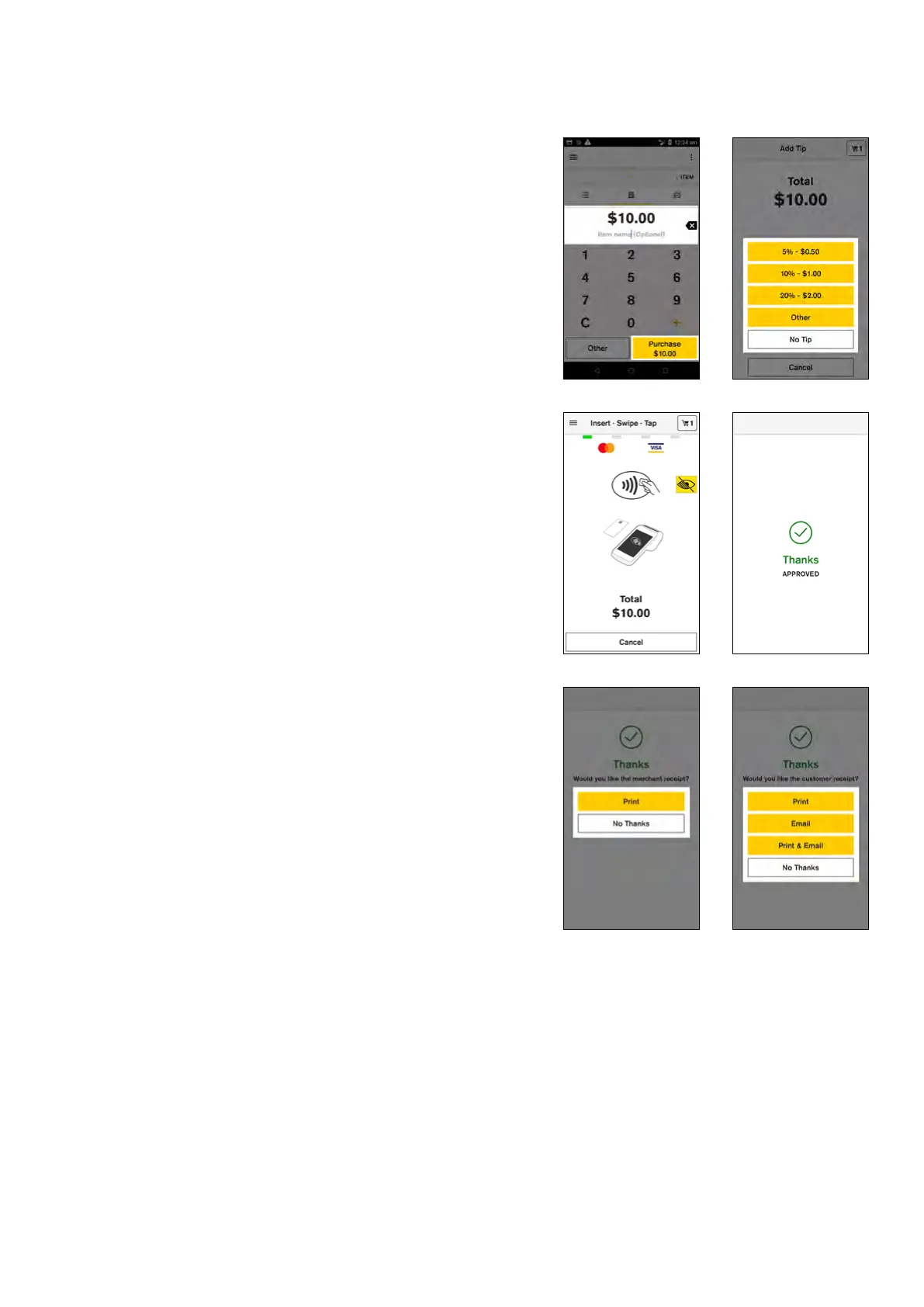
To process a transaction with a tip added:
1. Enter the transaction amount
2. Tap ‘Purchase’
3. The customer is asked to select a tip amount. The
customer can select a predefined amount, enter a
custom amount or opt not to add a tip
4. The total transaction amount is shown on screen. Your
customer presents their card or device and enters
their PIN (if required)
5. The graphic on screen shows customers how to
present their card
6. Your Smart terminal processes the transaction and
then displays ‘Approved’ or ‘Declined’
7. If a card is inserted, the terminal prompts to remove
the card from the chip card slot
8. Merchant receipt prints
9. Select ‘Print’ to print a customer receipt, or ‘No
Thanks’ to continue back to the Payment screen
14 Commonwealth Bank of Australia | Smart User Guide



 To Next Page