Basic troubleshooting
Checking Verifone terminal
management system (VHQ)
connectivity
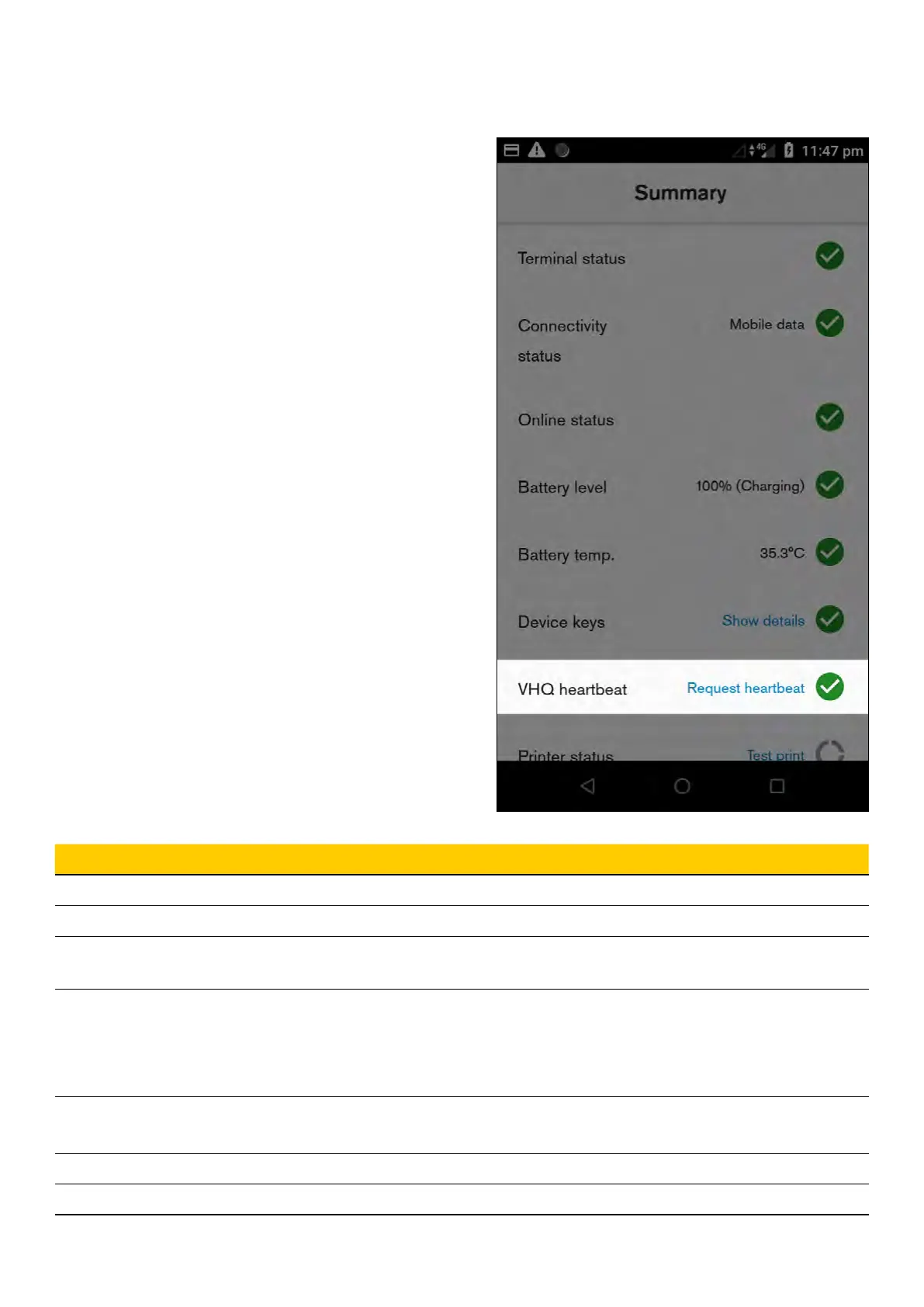
1. Launch the ‘Diagnostics’ application
2. Select ‘Summary’ menu - This will update the
status of each item. Summary screen shows
general status about the most important
device functions
3. Check status of VHQ heartbeat – a green tick
will present successful connection between
terminal and Verifone terminal management
system (VHQ)
Field Description
Terminal status Shows if payment terminal is connected or not
Connection status Shows if there is network connection such as Wi-Fi/ethernet/mobile
Online status Shows if device can reach external IP address to make sure selected
network has actual internet connectivity
Keys
• Shows if expected keys are installed
• Pop-up can be clicked to see details about each key status
• Clicking ‘Show details’ will display the installation status per key,
prompting the missing key(s) in a pop-up window
VHQ heartbeat • Shows VHQ heartbeat status
• Clicking ‘Request heartbeat’ will trigger manual VHQ heartbeat
Print status Allow to perform test receipt print to validate if printer detected and works
Trigger logs upload Schedules a manual log upload to a Verifone server
32 Commonwealth Bank of Australia | Smart User Guide



 To Next Page