ORIGINAL INSTRUCTIONS | QUALITY PROCESS REF. | V. 09|10|2020 | K07185
19
8. ADJUSTMENT
8.3. SETTING THE GRINDING
FINENESS
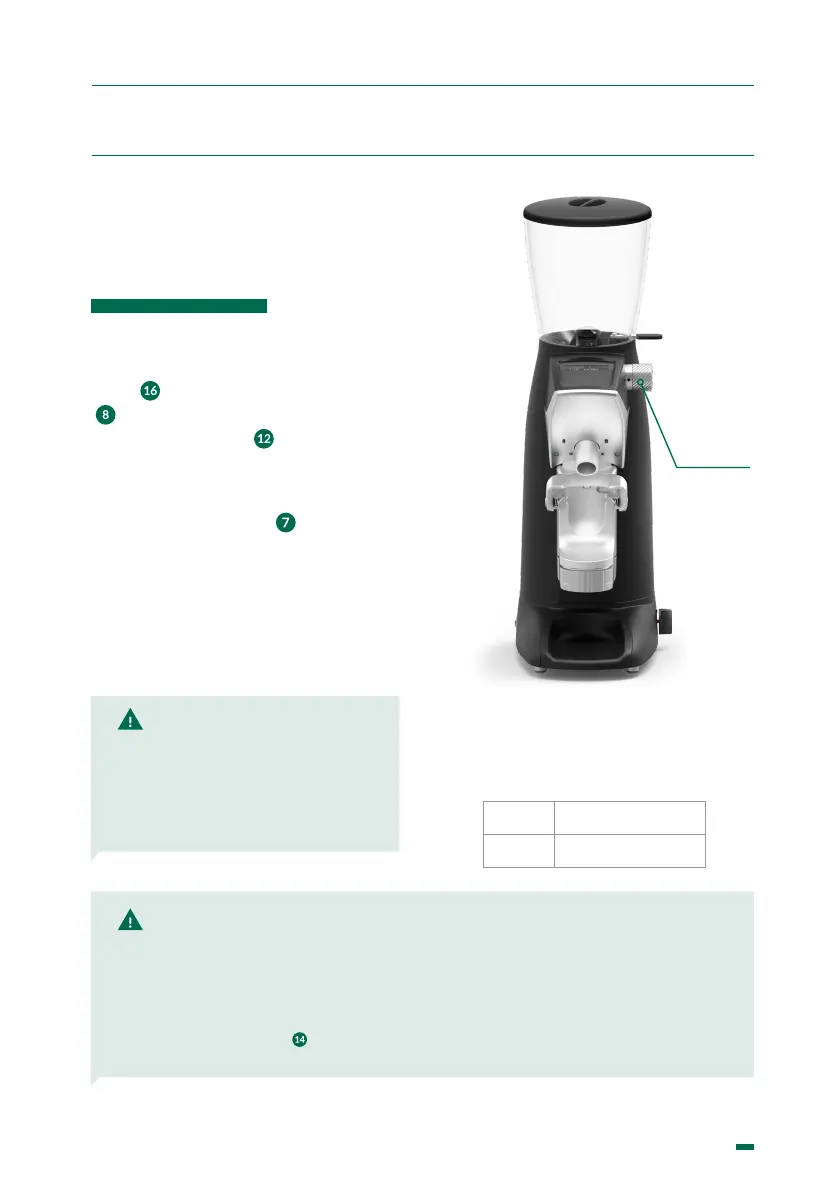
Place the portalter in the upper coffee
holder(
) and press the dose ll button
(
) causing ground coffee to come out
through the exit chute (
).
To change the grinding neness, turn
the grinding control knob ( ). Turning it
clockwise will give a ner grind than the
current setting and turned in the other
direction, a coarser grind than the current
setting.
NOTE: If the coffee throughput is very low, this is because the coffee is being ground very
ne. If the throughput is very high, this is because the coffee is being ground very coarse.
A perfect Espresso is produced when the grinding gives an infusion of 25 ml of coffee in
25 seconds using about 7 g of ground coffee.
In the machine’s automatic mode, a numeric graphical scale from 0 to 800 is shown on
the grinder’s display (
) which always shows the current neness setting, an option to
be borne in mind if there is a bad grinding neness setting.
NOTE: It is recommended that
this operation be performed,
when changing to a ner
grinding, with the motor running,
to prevent coffee from building
up between the burrs and
blocking the grinder.
TIP: Our grinders are delivered set to a grinding
neness suitable for Espresso coffee, which can
be changed according to the type of coffee, the
degree of roasting and the weight used.
PKF
50-120
F8
80-120
Fig. 4
Control
knob



 To Next Page