OWNERS MANUAL
5
POWERING ON & OFF
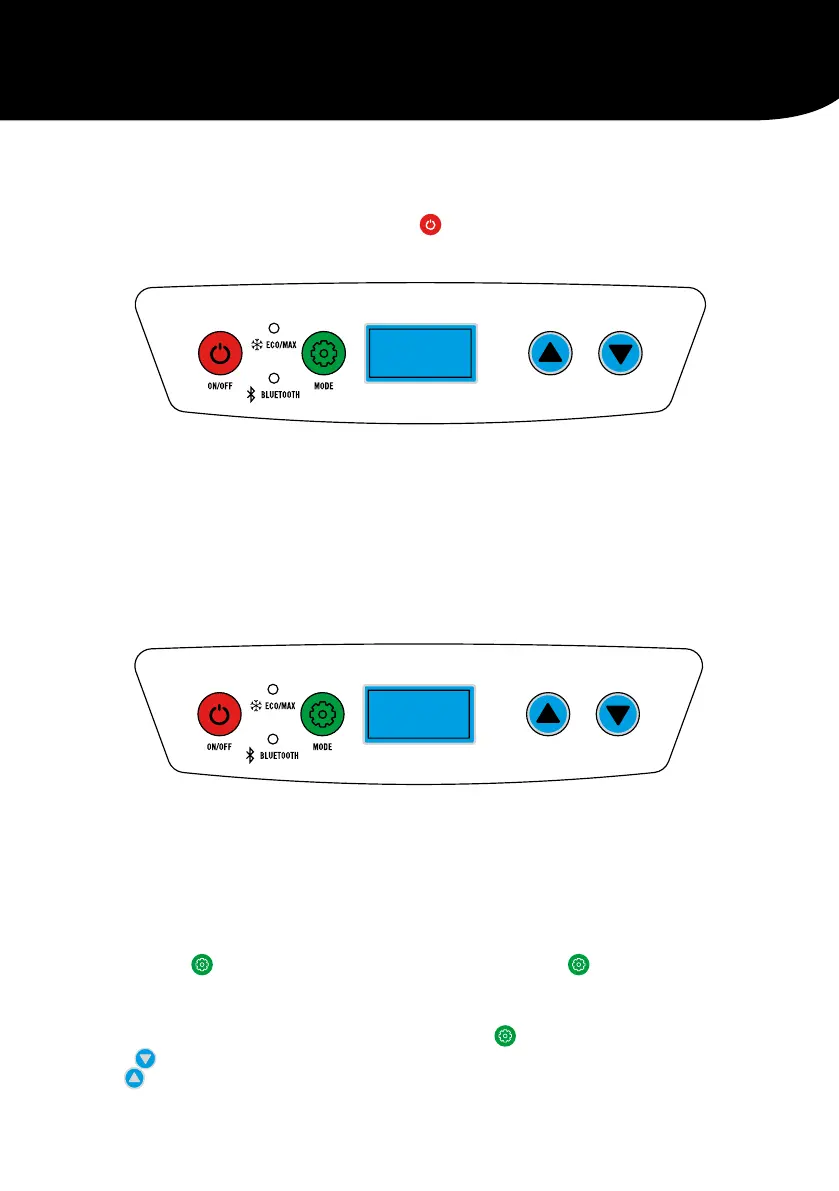
Connect to the desired input voltage and press the button to turn the unit ON, the display will
show the current cabinet temperature. Repeat the process to turn the unit OFF.
TEMPERATURE CONTROLLER
The Temperature Controller provides the ability to set the desired temperature level and displays
information on the cabinet and set temperature.
The electronic controller has been programmed to maintain an average of the set temperature. The
compressor will start up when the internal cabinet temperature increases 0.5 to 1.5 degrees above
that selected and will run until the temperature is 0.5 to 1.5 degrees below the set temperature.
SETTING THE TEMPERATURE
When your unit is first connected to the
AC or DC input and turned on the digital readout
will show the current cabinet temperature,
to adjust follow these steps.
Press and hold
for 3 seconds until
the display starts to flash, this will
show the current temperature setting.
Press
to decrease the cabinet temperature
and
to increase the cabinet temperature,
the new setting will flash for 3 seconds then
return to the actual cabinet temperature.
ECO/MAX FUNCTION
This function allows the compressor speed to be
slowed down to increase operating efficiencies
(ECO) or increase the compressor speed to
provide “quick” cool down times (MAX).
To operate, press the
button to commence
the “economy” operation mode, the green ECO
indicator will illuminate.
Press the
button again to select the
MAX operating mode. The red MAX indicator
will illuminate.


 To Next Page