. . . . . . . . . . . . . . . . . . . . . . . . .
Using the Compaq Mobile CD Expansion Unit
3-6
ttttt
Part Number: 235758-004 - Writer: Jim Williams - Saved by: Rebecca Wiggins
Saved date: 11/05/97 1:35 PM- File Name: Ch03.doc
Ejecting a CD Manually
In the unlikely event that you are unable to eject a CD from the CD-
ROM drive by pressing the release button or by using your CD
software, follow the instructions below to manually eject the CD.
NOTE:
Certain applications or operating system software may
disable the eject button to prevent accidental damage to the disc. If
the eject button is disabled by the application software, it will not
operate.
CAUTION
:
Before beginning this procedure, turn off the power to
your computer and remove all battteries.
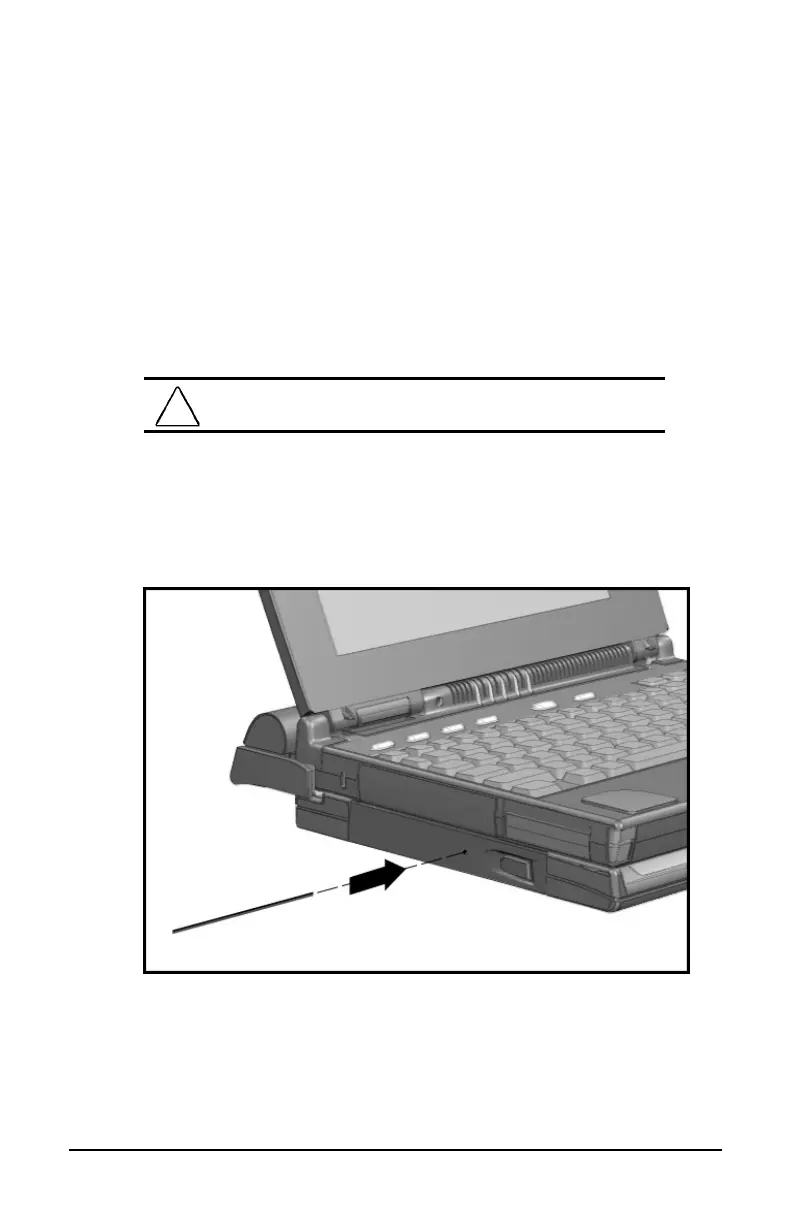
1. Insert a metal rod into the manual eject hole and push firmly.
NOTE:
You may use a straightened paper clip to open the CD-
ROM tray manually.
Ejecting a CD Manually
2. Slowly pull the loading tray out from the drive until it is fully
extended, then remove the CD.













 To Next Page