. . . . . . . . . . . . . . . . . . . . . . . . .
Attaching and Detaching Procedures
2-9
Part Number: 235758-004 - Writer: Johnnie Abercrombie - Saved by: Rebecca Wiggins
Saved date: 11/05/97 1:36 PM - File Name: Ch02.doc
Undocking the Computer and MCD
To remove the computer and MCD from the convenience base,
follow these steps:
CAUTION
: Before docking or undocking, turn off the computer or
initiate Suspend to prevent damage to the computer. To prevent
loss of information, ensure that the battery pack is inserted into
the computer before initiating Suspend and undocking the
computer.
1. Turn off the computer or initiate Suspend.
2. Close the computer display.
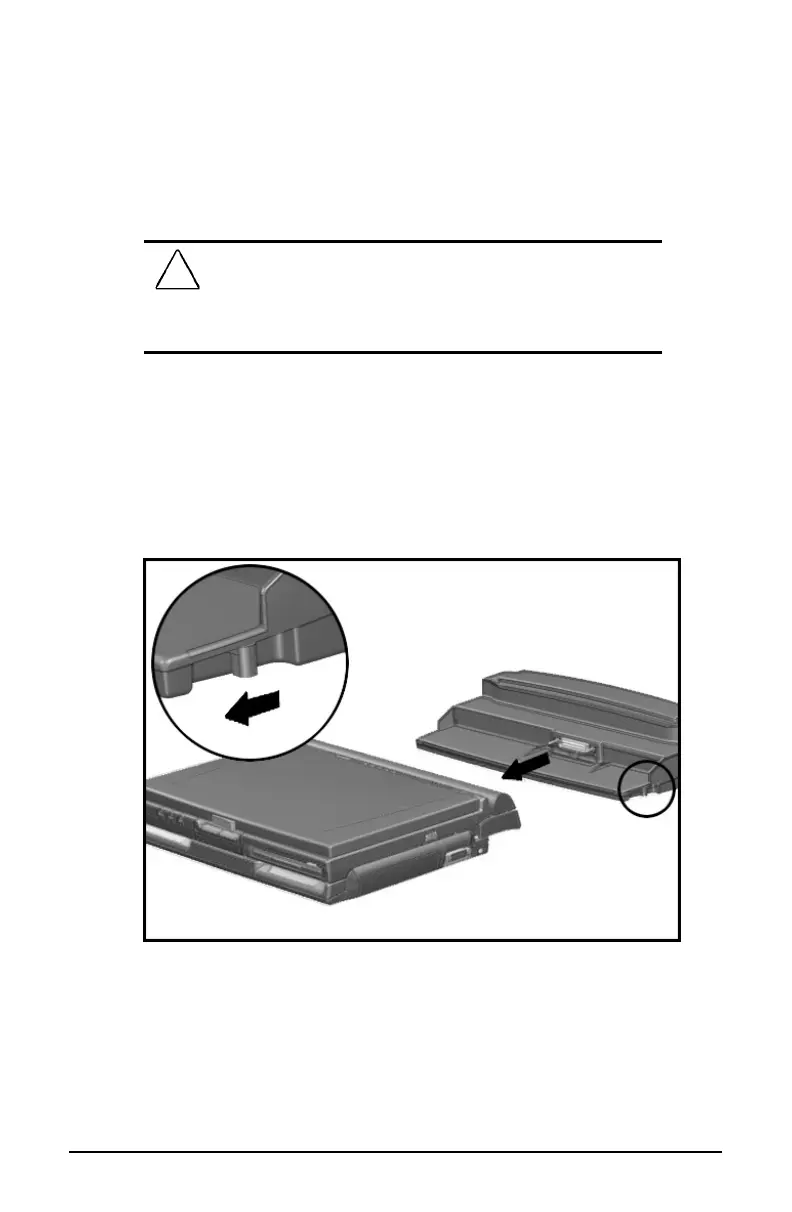
3. Pull the docking lever on the right side of the convenience base
toward the front of the base. This releases the computer and
MCD from the convenience base.
Undocking the Computer and MCD
4. Slide the computer and MCD forward until it clears the
convenience base.
5. Turn on the computer or exit Suspend to resume work.













 To Next Page