17
OPERATING INSTRUCTION
STEP 4 - Press the “ON/OFF” to turn on the power
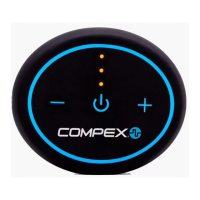
Press and release the ON/OFF button to turn on the device, indicated by the yellow LED
indicators on and beeping once (0.5 second).
STEP 5 - Select one of the stimulation modes
After the device is on, press and release the ON/OFF button to change the 6 programs: The
flashing/beeping times of LED indicator represent the corresponding programs (0.2s per
beeping). For example, 3 timers of flashing/beeping mean Program 3; 6 timers of flashing/
beeping mean Program 6.
STEP 6 - Adjust the stimulation intensity
Press and release the + or – button to increase or decrease the intensity by one level (up to
299 levels), indicated by the LED flashing once and beeping once (0.2s per beeping); holding
the + or – button for 1 second could increase or decrease the intensity by 10 levels, indicated
by the LED flashing twice and beeping twice (0.2s per beeping). After the above mode, time,
and intensity are set up, the stimulation provided by the device will last until the device until
the program is completed.
STEP 7 - Press the “ON/OFF” to turn off the power after done
Hold the ON/OFF button for 1 second to turn off the device, indicated by the three LED
indicators off and beeping twice (0.5s per beeping).
Note: When not in use, store the device and accessory in a cool place, out of direct sunlight.
Program change
Intensity change
ON / OFF
ON / OFF


 To Next Page