31COMPRAG Screw air compressor A-Series
21
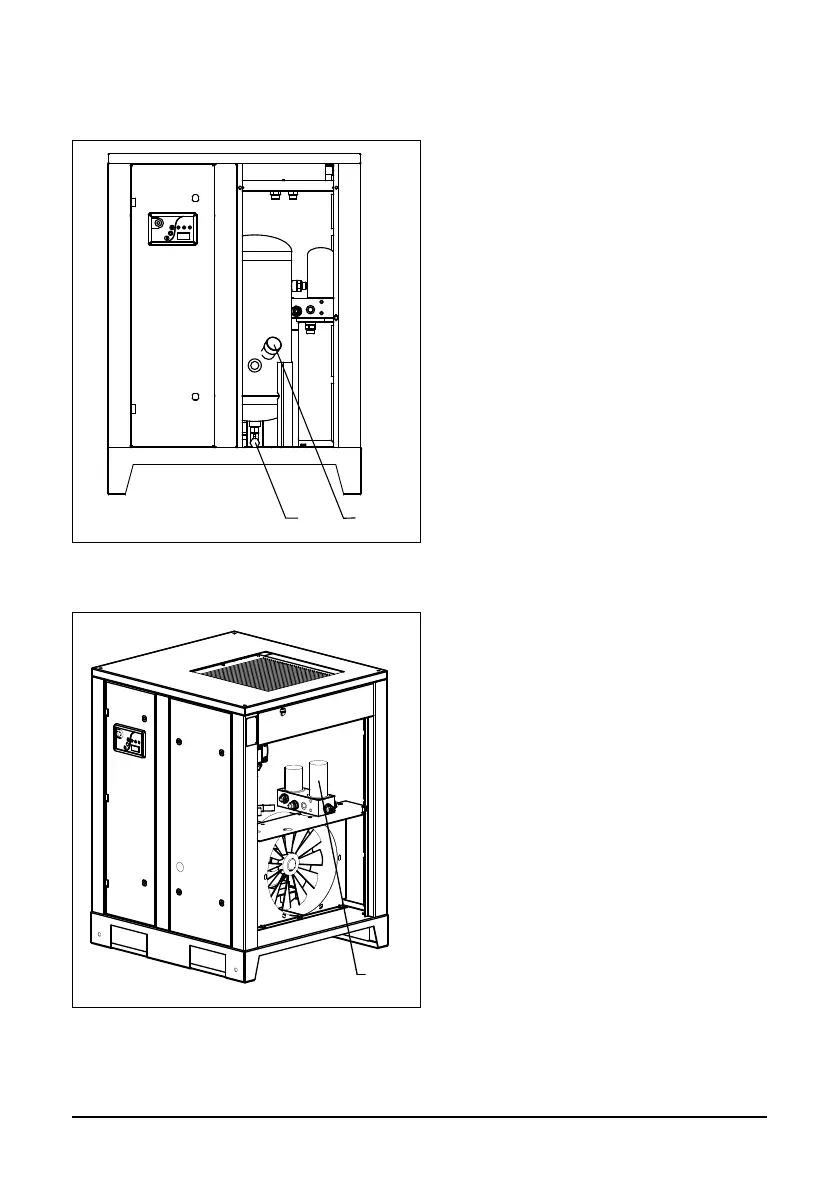
Fig. 5.3 Oil replacing
Open the front panel and turn the ll plug
(2) one revolution in order vent system
pressure.
Remove the ll plug.
Remove plug from the drain valve (1) at
the bottom of the Air-Oil separation tank.
Drain the oil into a dedicated vessel from
the separator tank after opening the
drain valve.
Fill the Air-Oil separation tank with oil until
it is level with the middle of the sight glass.
Ret and tighten the drain valve plug and
the ll plug.
Open the right side panel. Remove the oil
lter (1) using a special Oil Filter Wrench.
Drain the oil from the lter into a dedica-
ted vessel and clean the lter seat.
Oil the gasket of the new oil lter and screw
it into place. Only tighten oil lter by hand.
Start up the compressor.
Stop the compressor and let it run idly
for several minutes in order for the oil to
circulate and air to be extracted from the
oil system. Wait several minutes until the
oil settles and the inner pressure drops.
If necessary, unscrew the ll plug and add
oil until it is level with the middle of the
sight glass.
Place the ll plug into its initial position
and tighten it.
5.4 Replacing oil and oil lter
1
Fig. 5.4 Oil lter replacing



 To Next Page