32 Version 1.2
5.5 Replacing air lter
3
1
2
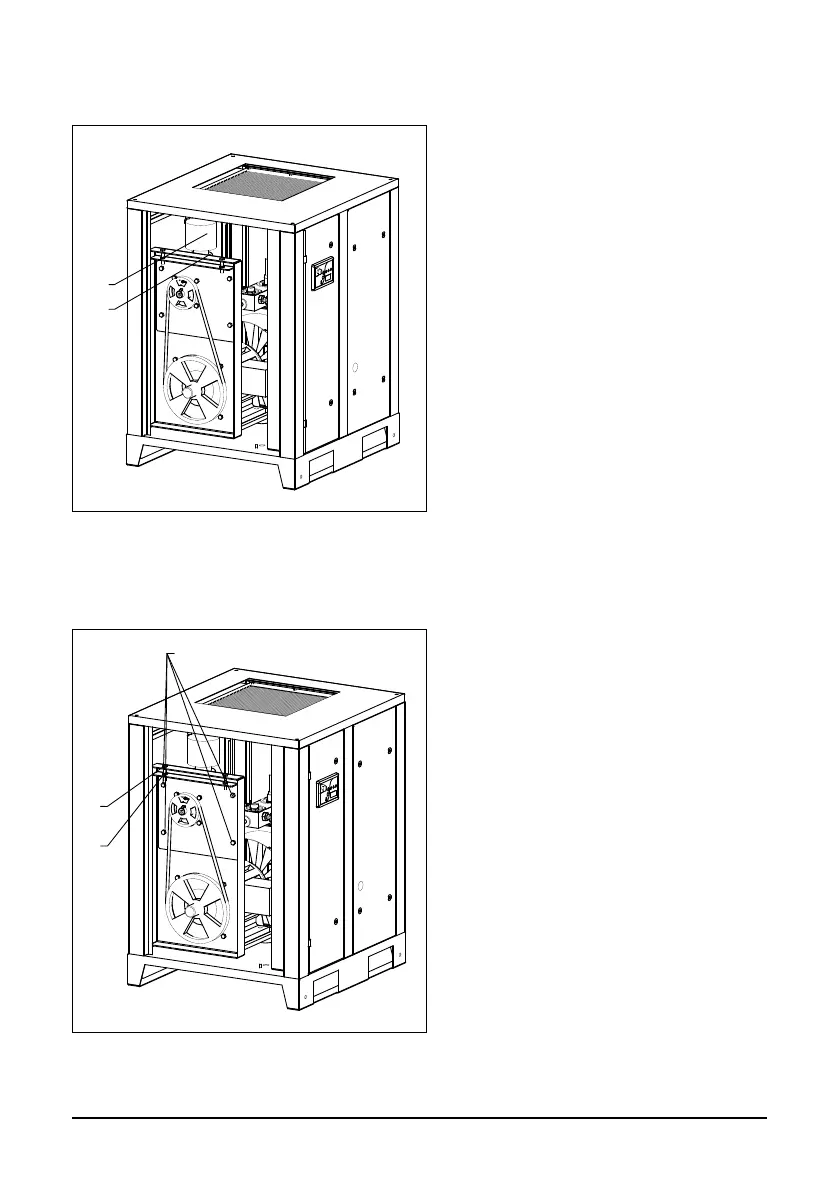
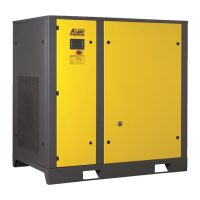
Fig. 5.6 Changing drive belt
The air lter (1) is attached to the
compressor’s intake valve.
In order to replace it, open the left side pa-
nel, loosen the clamp (2) securing the lter.
Remove the contaminated lter, and
detach the clamp from it.
Set the new lter in its place and t into
place with the clamp.
5.6 Changing drive belt
Open the left side panel, loosen the 4
screws (3) securing the bracket of the air
end by turning them 2 revolutions.
Loosen the 2 bolts of the motor (2) and
the 2 corresponding nuts (1) on the
tensioner using a wrench.
Remove the old belts from the pulleys
and install the new belts.
After installing the new belt, tighten the
belt with the appropriate tensile force
(see section 5.3 Checking Drive Belt).
Tighten the 2 bolts of the motor (2)
and the 2 corresponding nuts on the
tensioner.
Tighten the 4 screws of the bracket of
the air end.
Check the belt tension within four hours
of the compressor’s operation in accor-
dance with section 5.3.
2
1
Fig. 5.5 Air lter replacing



 To Next Page