EasyManua.ls Logo

CompuLab fitlet2 - Page 11

CompuLab fitlet2
17 pages
Print Icon
To Next Page IconTo Next Page
To Previous Page IconTo Previous Page
Loading...
Hayetsira St. 17, Yokneam, Israel
Tel: +972-48-290-168 | Fax: +972-48-325-251 | www.fit-iot.com
www.fit-iot.com
Page 11 of 17
fitlet2 owner’s manual
4
5
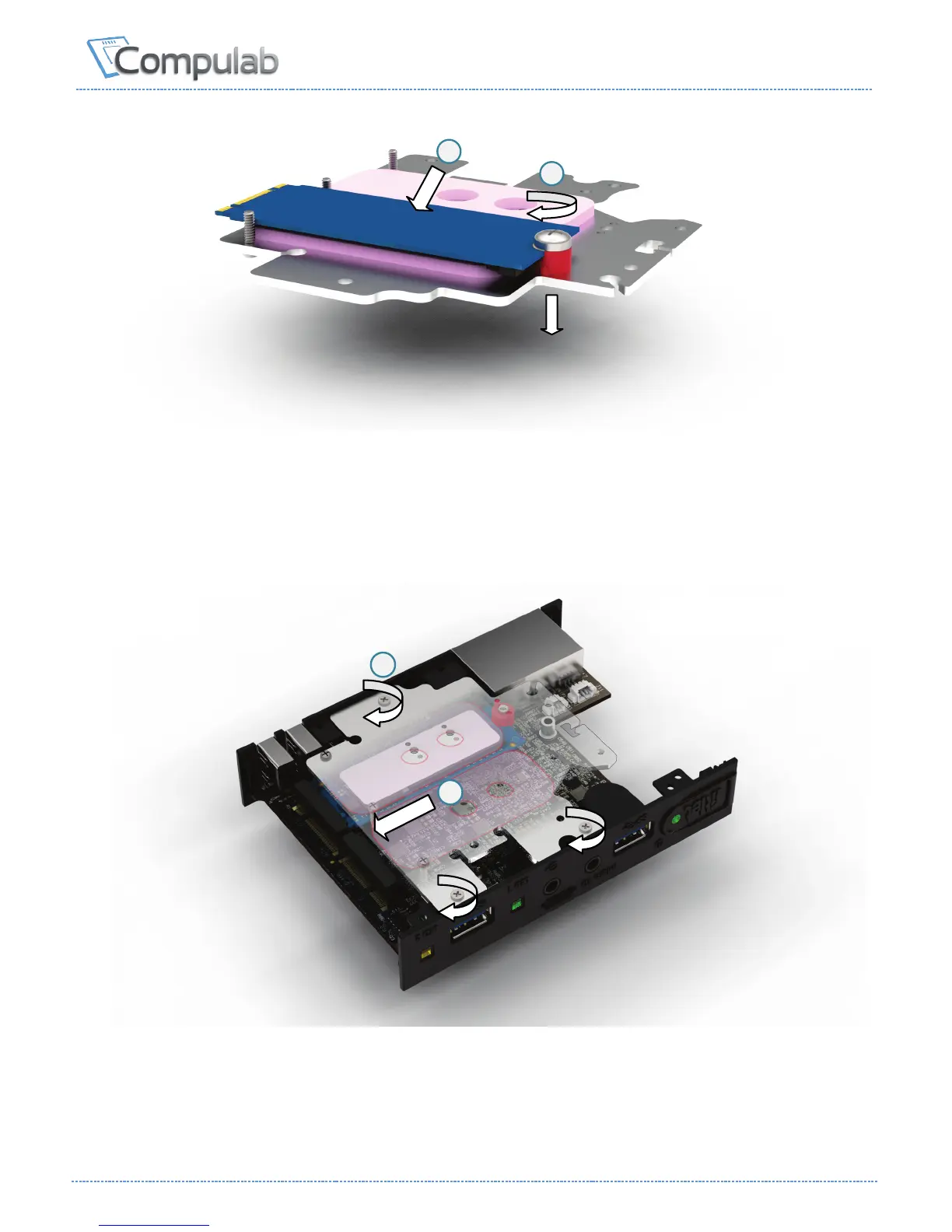
4. Place edge of M.2 SSD against the fastening screw and press the SSD firmly against the
thermal pad until its connector edge is seated between the alignment screws.
Once positioned correctly the connector edge should stick out above the edge of the M.2
cooling plate.
5. Tighten the fastening screw.
6
7
6. Turn over the M.2 cooling plate and push the M.2 SSD into its socket at the underside of the
motherboard.
7. Push down the M.2 cooling plate and tighten the 3 panel screws

Other manuals for CompuLab fitlet2

Related product manuals