Hayetsira St. 17, Yokneam, Israel
Tel: +972-48-290-168 | Fax: +972-48-325-251 | www.fit-iot.com
RTC battery
The RTC battery is used for keeping time and date while fitlet2 is disconnected from power.
BIOS settings and power-up policy is independent of battery. fitlet2 normally ships with the
battery unplugged to ensure that the battery is not discharged during warehousing.
The battery can keep charge for approx. 5 years when fitlet2 is disconnected and significantly
longer when fitlet2 is connected to power. Battery can be purchased separately to be replaced
by the user.
Installing RTC battery
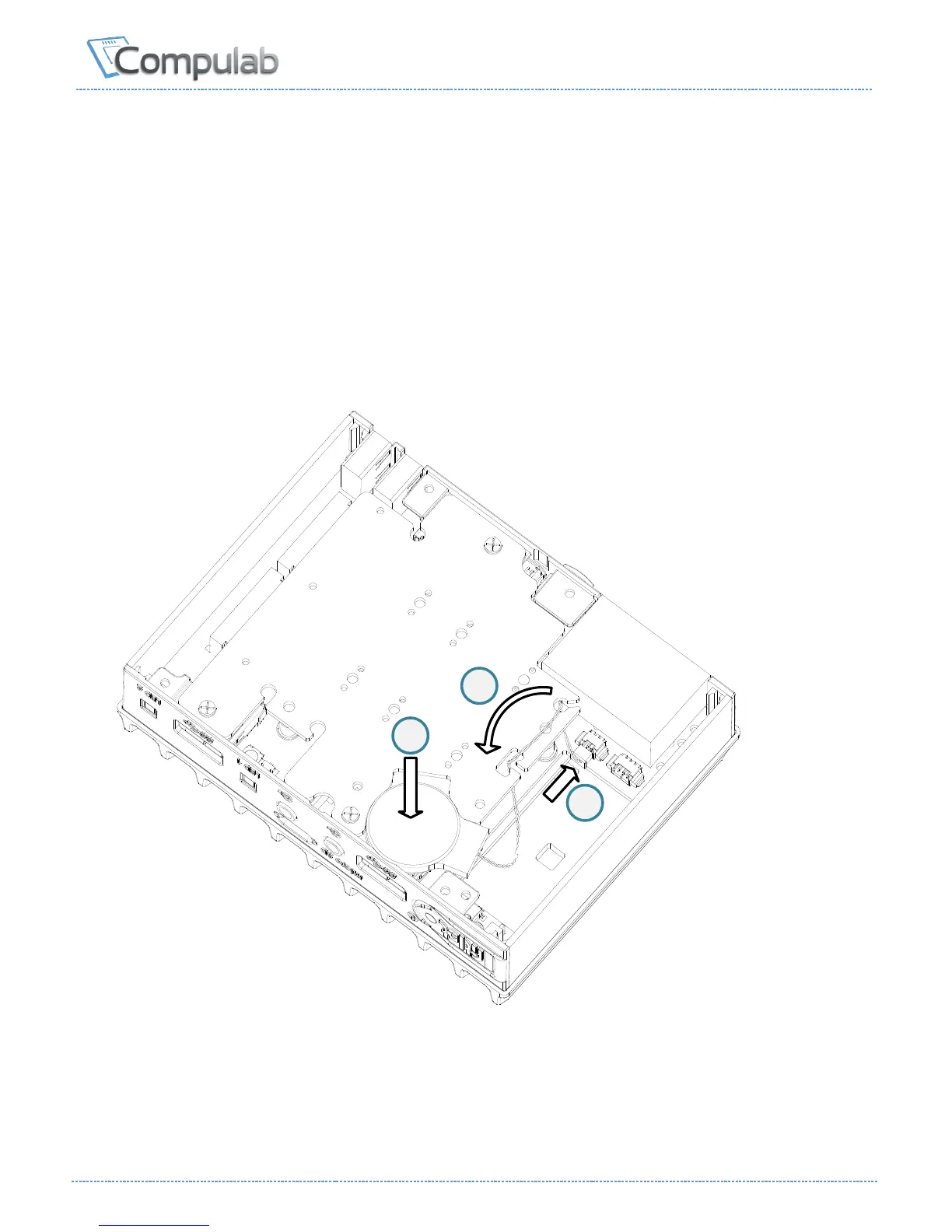
1. Connect the battery plug to the corresponding socket (see illustration).
2. Place the wire as shown inside the slots of the M.2 cooling plate to minimize clutter.
3. Place the battery in the marked pocket. Once fitlet2 bottom cover is assembled the
battery is secured in place.


 To Next Page