DeviceMaster Installation and Configuration Guide: 2000594 Rev. F Connecting Serial Devices - 97
Connecting Serial Devices
Eight Screw Terminals (DM-2402)
This subsection discusses the following topics for the DeviceMaster with 8 serial screw terminals.
• Screw Terminal (8) Connectors on Page 97
• Screw Terminal (8) Null-Modem Cables (RS-232) on Page 98
• Screw Terminal (8) Null-Modem Cables (RS-422) on Page 98
• Screw Terminal (8) Straight-Through Cables (RS-232/485) on Page 99
• Screw Terminal (8) Loopback Signals on Page 99
• Connecting Serial Devices on Page 99
Screw Terminal (8) Connectors
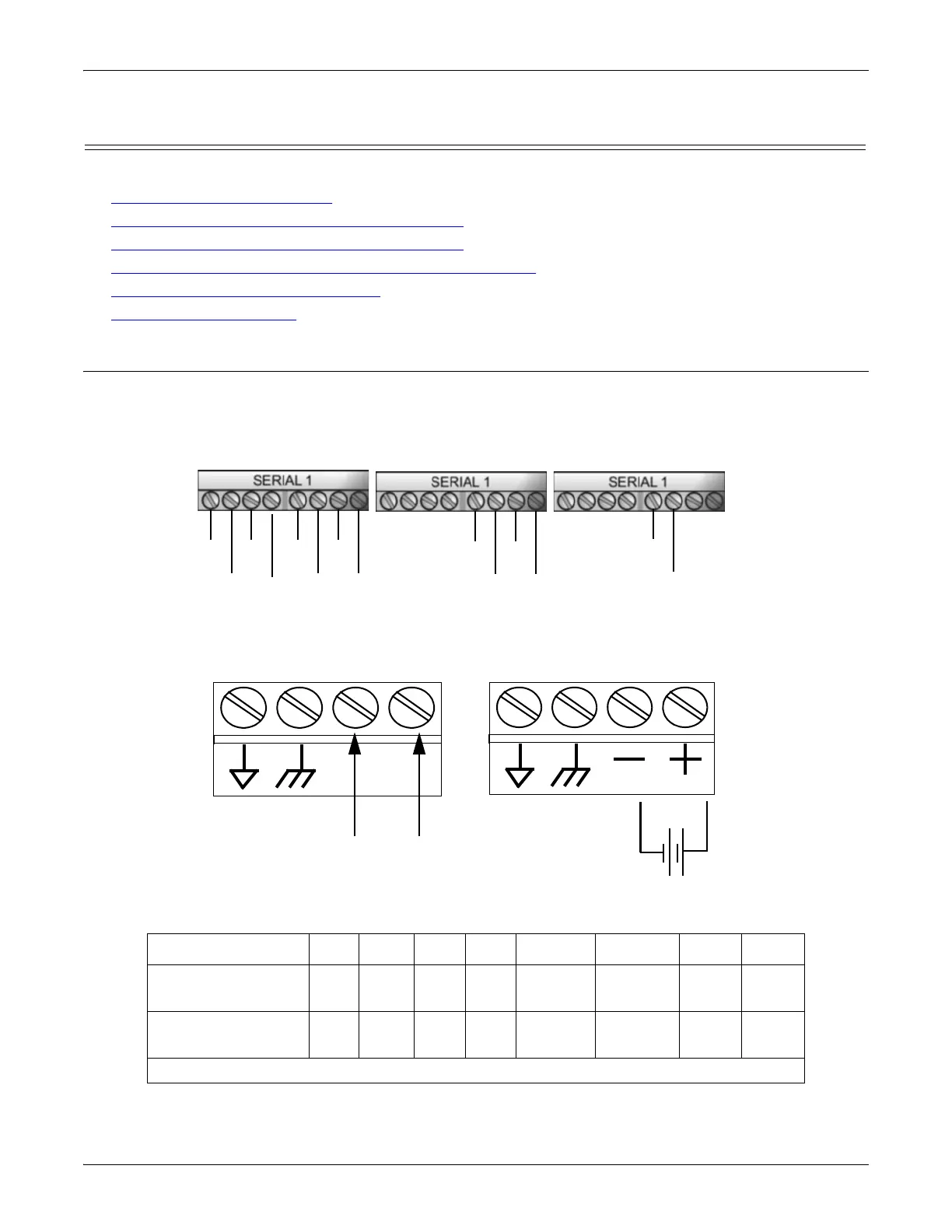
Use the following drawings or table for signal information. The signals for SERIAL2 are the same as
SERIAL1.
RS-232 CD DSR RI DTR TxD RTS RxD CTS
RS-422/RS-485
Full-Duplex
N/A N/A N/A N/A TxD- TxD+ RxD- RxD+
RS-485 Half-
Duplex
N/A N/A N/A N/A TRxD- TRxD+ N/A N/A
† Ground must be connected to the appropriate signal ground terminal.
RS-232
RS-422
RS-485 Full-Duplex
RS-485 Half-Duplex
CD
DSR
RI TxD
RTS
RxD
CTS
DTR
TxD-
TxD+
RxD-
RxD+
TRxD-
TRxD+
† Groundmustbeconnectedtothesignalgroundterminal.
† Wire gauge: AWG 12-22
Signal
Ground
Not connected
Positive†
Return†
6-30VDC
Signal
Ground†
Chassis
Ground†
RS-232: Connecting the Ground



 To Next Page