11
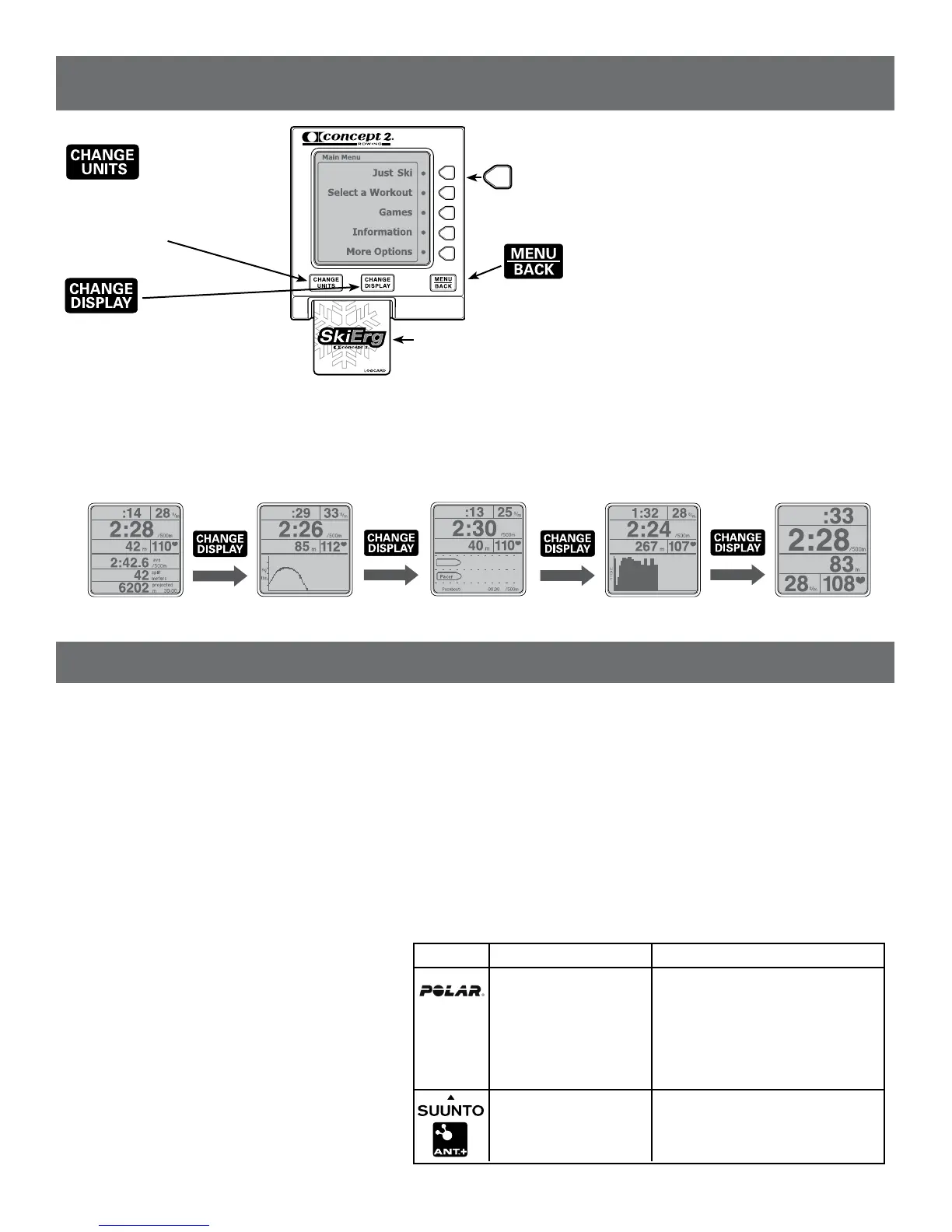
allows you to select
meters, pace, watts or calories.
Pushthisbuttonanytimewhile
setting up a workout, skiing or
viewing results.
allows you to
chooseanotherdisplay.Push
this button any time while skiing.
Each time you press [CHANGE
DISPLAY] a new display is
shown. See below.
LogCard – when a LogCard is present, workout data will be stored on the
LogCard. After your workout, return to the Main Menu before removing
theLogCardtoensureproperstorageofdata.(IfnoLogCardpresent,data
is stored in Memory.) Usethe“Concept2LogCardUtility”tobackupyour
LogCarddatatoyourPC.(USBcableprovided)
Note: ALogCardisprovidedwitheveryPerformanceMonitor(PM).Each
card can be shared by up to five users. Additional cards can be purchased
from Concept2.
These buttons allow you to:
• makemenuselections
• incrementnumbersforsettingworkoutsanddate/time
• viewalternatedisplayswhileskiing
turns on the monitor and displays Main Menu or
the previous menu. After a workout, press this button to end
the workout and return to the Main Menu.
Five Graphic Displays
Turning the PM On/Off:
ThePMwillturnonwhenyou:
• starttopull
• press[MENU/BACK]
• insertaLogCardorUSBcable
• insertbatteriesorbatterypack
ThePMturnsoffafterfourminutesofinactivity
on a workout screen, or after one minute on the
Main Menu screen.
Setting Date and Time:
ThersttimeyouturnonthePM,youare
prompted to set the date and time. This ensures
your results are associated with the proper date.
• Ifyoueverneedtore-setDate/Time,from
Main Menu press More Options > Utilities >
Set Date and Time.Usebuttonsasindicated
to increase or decrease time.
General Operation:
• ThePMautomaticallydisplaysyourworkoutdataassoonasyoustart
skiing. It is not necessary to press any buttons if you do not want to.
• Press[MENU/BACK] to go back to the previous display.
• Press[CHANGE UNITS] or [CHANGE DISPLAY] at any time during and
after your ski to view different units and a different presentation of your
workout data.
• Weencourageyoutoexplorethemenuandexperimentwiththebuttons!
Using a Heart Rate Monitor:
ThePMdisplaysyourheartrateifoneofthefollowingheartratesystems
is in use:
PM3
ThePM3willreceiveheart
rate transmission from a
Polar™chestbeltIFthe
optional Concept2 Heart
RateReceiver(available
from Concept2) is in use
andpluggedintothePM3.
Not available.
PM4
ThePM4willreceiveheartrate
transmissionfromaPolar™chestbelt
IF the optional Concept2 Heart Rate
Receiver(availablefromConcept2)isin
useandpluggedintothePM4.
ThePM4willreceiveheartrate
transmissiondirectlyfromaSuunto™,
Garmin™orANT+SPORT™chestbelt.
See More Options for set up.
Note:HeartRate(HR)willbedisplayedonlyifHRInterfaceisinuse.
GETTING STARTED
ALL DATA FORCE CURVE PACESKIER BAR CHART LARGE PRINT
OVERVIEW OF THE PERFORMANCE MONITOR(PM)
For more detailed information about using the Performance Monitor, please visit concept2.com/pm.


 To Next Page