18 - Using the keyboard
Hotkeys
To activate hotkeys, press and hold the Fn key before pressing the
other key in the hotkey combination.
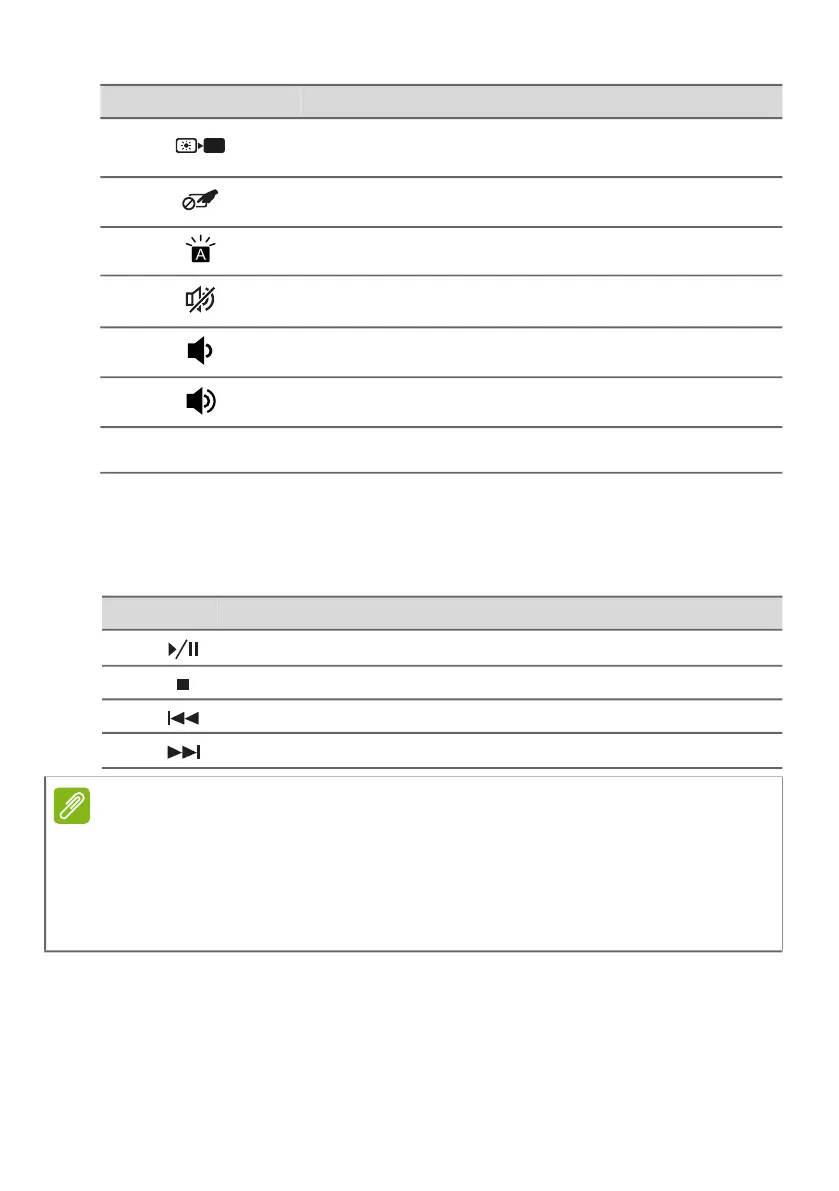
Turns the display screen backlight off to save
power. Press any key to return.
Turns the built-in touchpad on and off.
Turns the keyboard backlight on and off.
Turns the speakers on and off.
Decreases the sound volume.
Increases the sound volume.
NumLk Turns the Numeric Lock on or off.
Icon Description
Hotkey Icon Description
Fn +
Home Scrolls to the beginning of a document.
Fn +
Pg Up Scrolls the page up.
Fn +
Pg Dn Scrolls the page down.
Fn +
End Scrolls to the end of a document.
Note
To swap the hotkey and special function of the F1 to F12 keys, change the
function key setting in the BIOS (to open the BIOS press F2 when starting
your computer, then select the Main menu and change Function key
behavior to Function keys).
(Specifications vary depending on model.)



 To Next Page