Conceptronic C54BRS4A User Manual
32
Dynamic IP Address
A Dynamic IP Address connection configures the Router to automatically obtain its global IP address
from a DHCP server on the ISP’s network. The service provider assigns a global IP address from a
pool of addresses available to the service provider. Typically the IP address assigned has a long
lease time, so it will likely be the same address each time the Router requests an IP address.
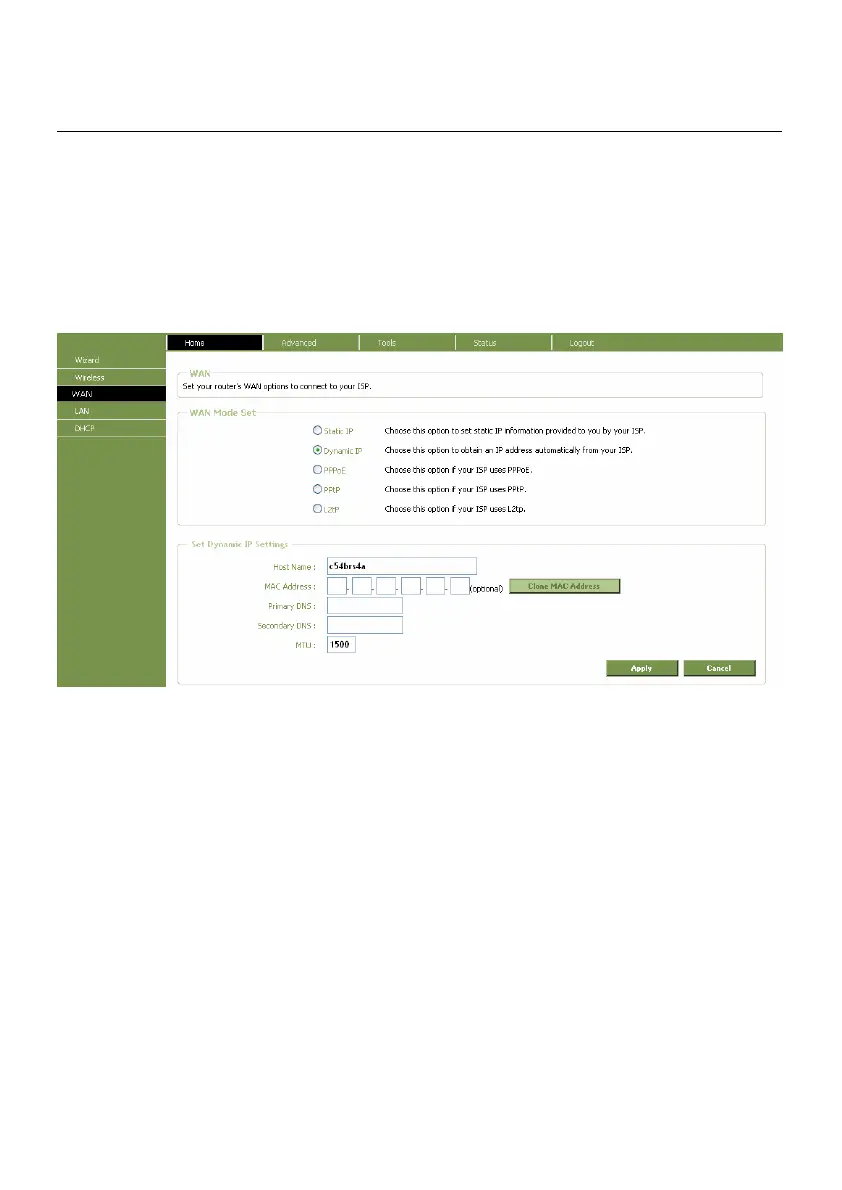
To configure a Dynamic IP Address connection, perform the steps listed below. Some of the settings
do not need to be changed the first time the device is set up, but can be changed later if you
choose. See the table below for a description of all the settings available in this window.
WAN Settings window for Dynamic IP Address
To configure a Dynamic IP Address connection for the WAN, follow these steps:
1. Click the Dynamic IP radio button at the top of the window.
2. Some ISPs record the unique MAC address of your computer’s Ethernet adapter when you first
access their network. This can prevent the Router (which has a different MAC address) from
being allowed access to the ISPs network (and the Internet). To clone the MAC address of your
computer’s Ethernet adapter, press the “Clone MAC Address” button or enter the MAC
Address manually.
3. Fill in the Primary DNS Address. This information should be available from your ISP.
4. Fill in the Secondary DNS Address (if available from your ISP).



 To Next Page