Conceptronic C54BRS4A User Manual
7
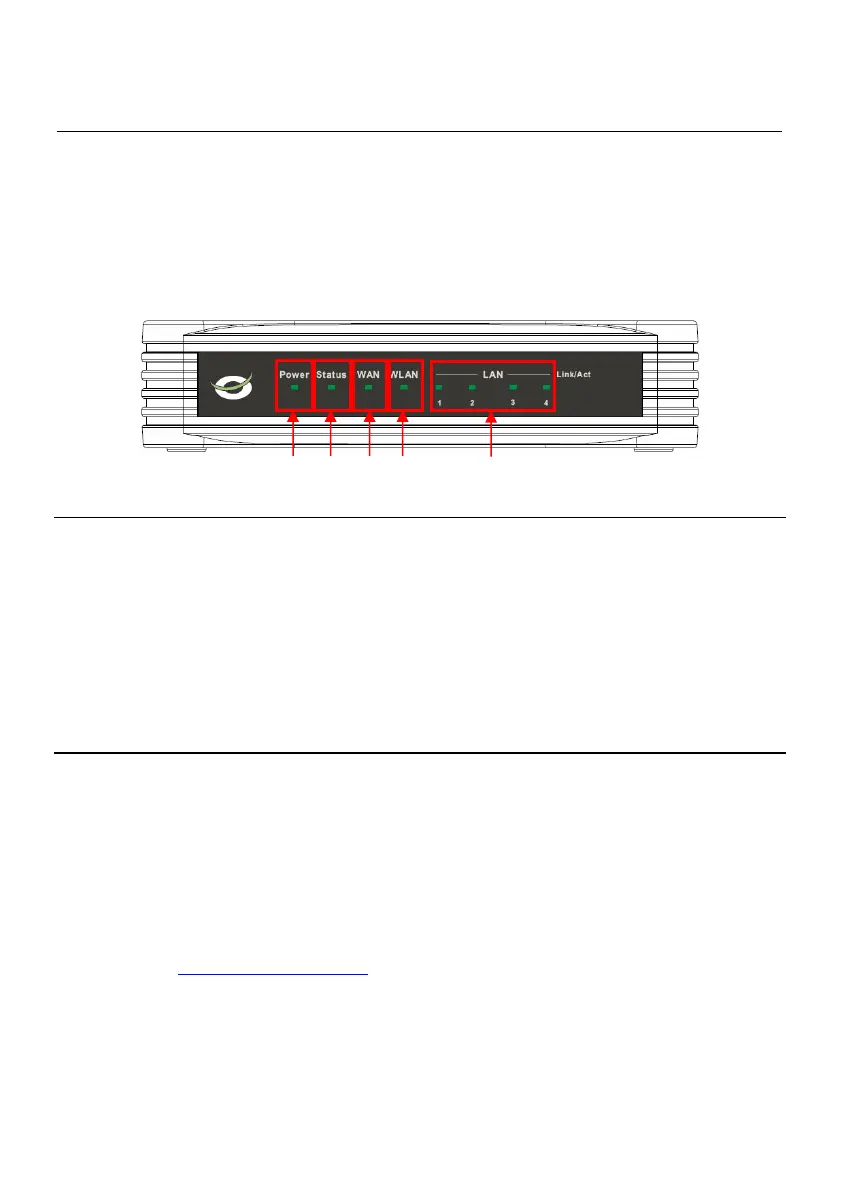
Front Panel LED Display
Place the Router in a location where the LED indicators on the front panel can be viewed.
The LED indicators on the front panel include the Power, Status, WAN, and WLAN indicators. Each
Ethernet LAN port displays an indicator for monitoring link status and activity (Link/Act).
Nr Description Status Status Explanation
1 Power LED OFF The device is turned off
ON The device is turned on
2 Status LED OFF The device is turned off / System Failure*
BLINK The device is turned on and ready for use
3 WAN LED OFF No WAN Connection is created
ON - STEADY A WAN Connection is created
ON - BLINK Data is send or received through the WAN Port
4 WLAN LED OFF Wireless interface is disabled
BLINK Wireless interface enabled and active
5 LAN LED’s OFF No Network Link is created to the LAN Port
(1, 2, 3, 4) ON - STEADY A Network Link is created on the LAN Port
ON - BLINK Data is send or received through the LAN Port
* In normal use, the Status LED will turn on and blink within 45 seconds after the device is
turned on or restarted. When a system failure happens with the device, the Status LED will not
turn on.
You can use the following options to solve the system failure:
a. Power down the device, wait 10 seconds and reconnect the power to the device.
b. Reset the device to factory defaults by pressing the reset button on the back of the
device for +/- 15 seconds.
If the Status LED does not turn on after you tried above options, please contact Conceptronic
Support at: support@conceptronic.net
1 2 3 4
5



 To Next Page