Conceptronic C54BRS4A User Manual
45
Note:
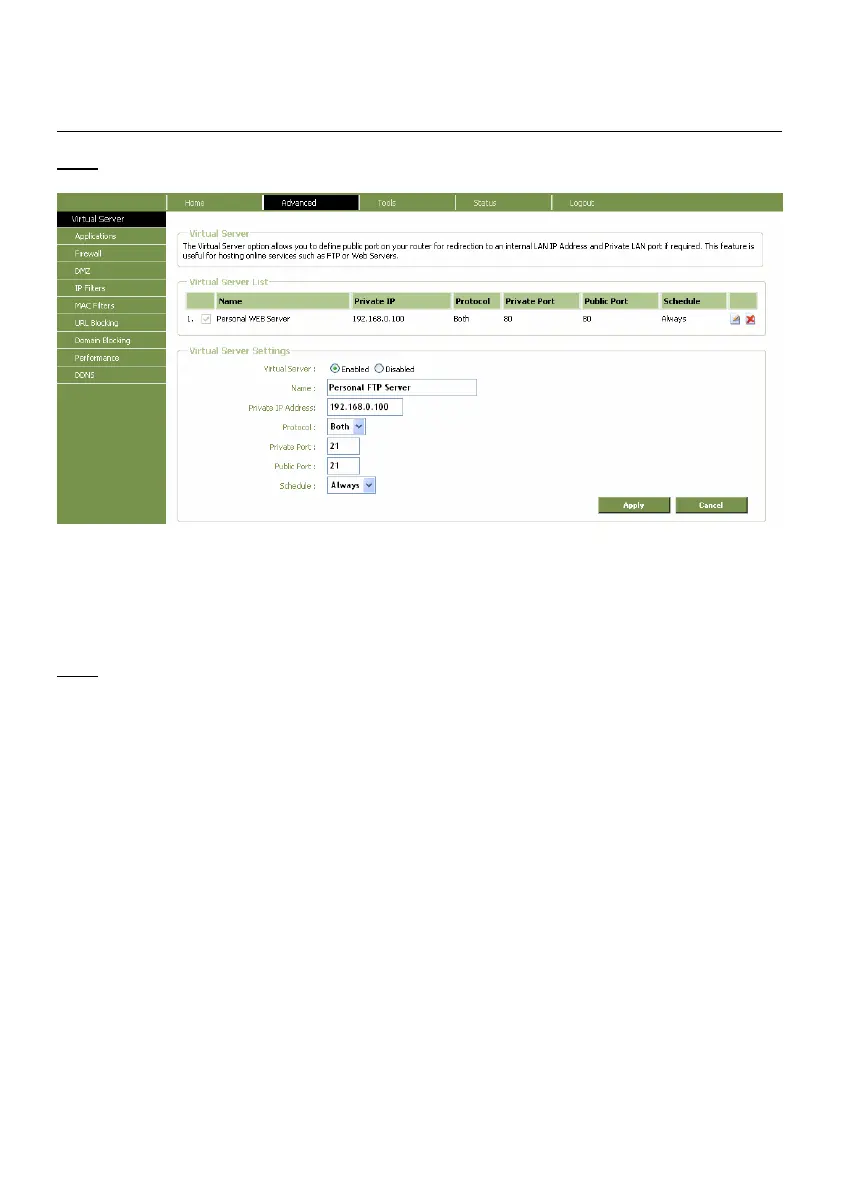
In the picture below you will see an example of a Virtual Server configuration.
Virtual Server window
1. Set the Virtual Server rule to “Enabled”.
2. Enter a name for your Virtual Server Rule in the “Name” field.
3. Enter the IP Address of your computer/server which needs the Virtual Server rule.
4. Select the Protocol for your Virtual Server rule: “TCP”, “UDP” or “Both”.
Note:
If you do not know which protocol you need for your Virtual Server Rule, select “Both”. This
option will pass both TCP and UDP traffic to the configured IP Address of your
computer/server.
5. Enter the desired Port of your computer/server which needs the Virtual Server rule.
6. Enter the port which must be visible on the outside of your internet connection.
7. Click “Apply” to apply the created Virtual Server rule.
When the Virtual Server rule is saved, it will be shown in the “Virtual Server List”.
To create more Virtual Server rules, repeat step 1 - 7.



 To Next Page