What to do if my Concox GT06F is unable to locate my vehicle?
- PpruittericAug 15, 2025
If your Concox GPS is unable to locate, it may be due to a shielded or poor signal. Try changing the installation place to improve signal reception.
What to do if my Concox GT06F is unable to locate my vehicle?
If your Concox GPS is unable to locate, it may be due to a shielded or poor signal. Try changing the installation place to improve signal reception.
Why does my Concox GT06F have a poor signal?
The Concox GPS tracker may experience poor signal in locations with obstructed signal reception, such as around tall buildings or in basements. To resolve this, use the GPS tracker in areas with good signal conditions.
What to do if my Concox GT06F GPS is unable to connect to the network?
If your Concox GPS is unable to connect to the network, it is likely due to a poor signal. Ensure the GPS tracker is used in an area with good signal reception.
Why is my Concox GT06F GPS unable to boot?
If your Concox GPS is unable to boot, the battery may be low. Charge the device's battery to resolve this issue.
What does it mean if my Concox GPS is offline and the indicators are off?
If your Concox GPS is offline or the indicators are off, this can be due to an abnormal power supply or because the indicators are in sleep mode. Check the power supply. You can also try pressing the side key to activate the indicators.
Why is my Concox GPS not updating my vehicle's location?
If your Concox GPS is not updating the vehicle's location, it may be due to the lack of GPS positioning. Try testing the device again or change the installation place.
What to do if my car fails to start with Concox GPS installed?
If the car fails to start, it might be due to a power cutoff or an ACC abnormality. Restore power or check the ACC to resolve this issue with your Concox GPS.
Why does my car stop driving when using Concox GT06F GPS?
If the car stops driving, it may be due to an abnormal power supply. Connect the negative electrode of the Concox GPS device to a constant power source.
How to fix no power off alarm on Concox GPS?
If there is no power off alarm, the built-in battery may be off. Turn it on.

Lists all included accessories with the GPS vehicle tracker device.
Outlines the primary capabilities and features of the GPS vehicle tracker.
Details technical specifications such as frequency, voltage, accuracy, and dimensions.
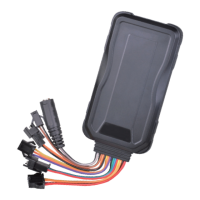
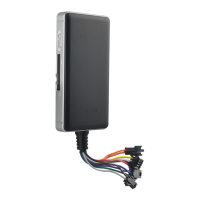
Illustrates the physical layout of the device and identifies its key components and ports.
Explains the meaning of different LED indicator lights for GPS, GSM, and power status.
Provides instructions and notice for correctly inserting the SIM card into the device.
Details the specific pinout and function of each wire connector for device installation.
Illustrates various wiring diagrams for connecting the device to vehicle systems and accessories.
Provides detailed textual explanations for device wiring, relay connections, and accessory hookups.
Guides on selecting optimal locations for device installation within the vehicle for signal reception.
Explains the procedures for powering the device on and off, including LED status indications.
Details how to activate the SOS alarm and its associated alert mechanisms.
Describes the alarm triggered when the device's electricity supply is interrupted.
Explains the alarm activated when the device's battery level becomes critically low.
Covers the vibration alarm feature, its triggering conditions, and notification process.
Explains how to use the MIC and speaker for voice monitoring inside the vehicle.
Details how to enable and use the two-way communication feature with the device.
Describes the alarm triggered when the vehicle moves beyond a predefined distance.
Explains how to remotely cut off the vehicle's oil or electricity supply via commands.
Details the procedure to restore the vehicle's oil or electricity supply after a cut-off command.
Provides instructions on how to restart the device remotely using an SMS command.
Explains the device's capability to detect and report car door status changes.
Describes how the device measures and uploads analog signals like battery voltage.
Explains how to use light and buzzer signals to locate a parked vehicle.
Guides on configuring APN and server details for network connectivity and platform access.
Instructions for logging into the designated service platform to manage the device.
Information on where to download and install the companion mobile application.
Lists the SMS command to check the current status of the device.
Provides the SMS command to retrieve the device's current location coordinates.
Lists the SMS command to obtain the URL for viewing the device's location.
Provides the SMS command to query the device's firmware version.
Lists the SMS command to configure network settings for the device.
Details SMS commands for setting the APN, including username and password.
Provides SMS commands for configuring the server address, domain name, or IP address.
Explains SMS commands for adding, deleting, and querying SOS numbers.
Details SMS commands to set upload intervals for GPS data based on ACC status.
Provides SMS commands to set the distance interval for GPS data uploads.
Details SMS commands to configure delayed defense settings, including duration.
Provides SMS commands to enable or disable the vibration alarm function.
Details SMS commands to configure displacement alarm settings, including radius.
Explains SMS commands for setting and deleting the center number for specific functions.
Details SMS commands to remotely control the vehicle's power or oil supply.
Provides the SMS command for restarting the device.
Details SMS commands for configuring door detection triggering modes.
Provides SMS commands to enable/disable analog data uploads and set intervals.
Lists the SMS command used to trigger vehicle lights and buzzers for locating.
Addresses poor signal issues, their causes, and recommended solutions for the GPS tracker.
Provides solutions for the device failing to boot, primarily related to battery status.
Offers troubleshooting steps for network connectivity problems, such as poor signal.
Addresses issues with the device failing to locate its position, suggesting signal checks.
Explains potential causes and solutions for the absence of a power-off alarm notification.
Provides troubleshooting steps for issues related to the device interfering with car starting.
Addresses problems related to abnormal power supply or indicators when the car is stopped.
Offers solutions for the device being offline or its indicators being off.
Provides troubleshooting for the device not updating the vehicle's location, often due to GPS issues.
Details the conditions required for warranty validity and limitations.
Outlines obligations for repairs and replacements at authorized service centers.
Provides a section for recording maintenance dates, descriptions, and service details.
| Device Type | GPS Tracker |
|---|---|
| Standby Time | Up to 120 hours |
| GPS Sensitivity | -159dBm |
| Network | GSM/GPRS |
| GSM Frequency | 850/900/1800/1900MHz |
| Storage Temperature | -40°C to +85°C |
| LBS Accuracy | 100-1000m |
| Waterproof | IP65 |
| Battery | Built-in rechargeable battery |
| GPS Accuracy | 5m |
| Operating Temperature | -20°C to +55°C |
| Features | Geo-fence |
| Standby Consumption | <5mA |
| Data Transmission | GPRS |
| I/O Ports | 1 Digital Output |
| Power Supply | DC 9V-36V |