8
The Setup Wizard
time you turned on the TV. It will assist you to
IMPORTANT: Make sure the antenna or cable TV
system connection is made.
1. Press POWER button on the TV control
panel or
button on the remote control to
switch on the TV. The power indicator will
change to Green. The Setup Wizard window
appears on the screen.
NOTE: It may take a few seconds before
the Setup Wizard window appears on the
screen.
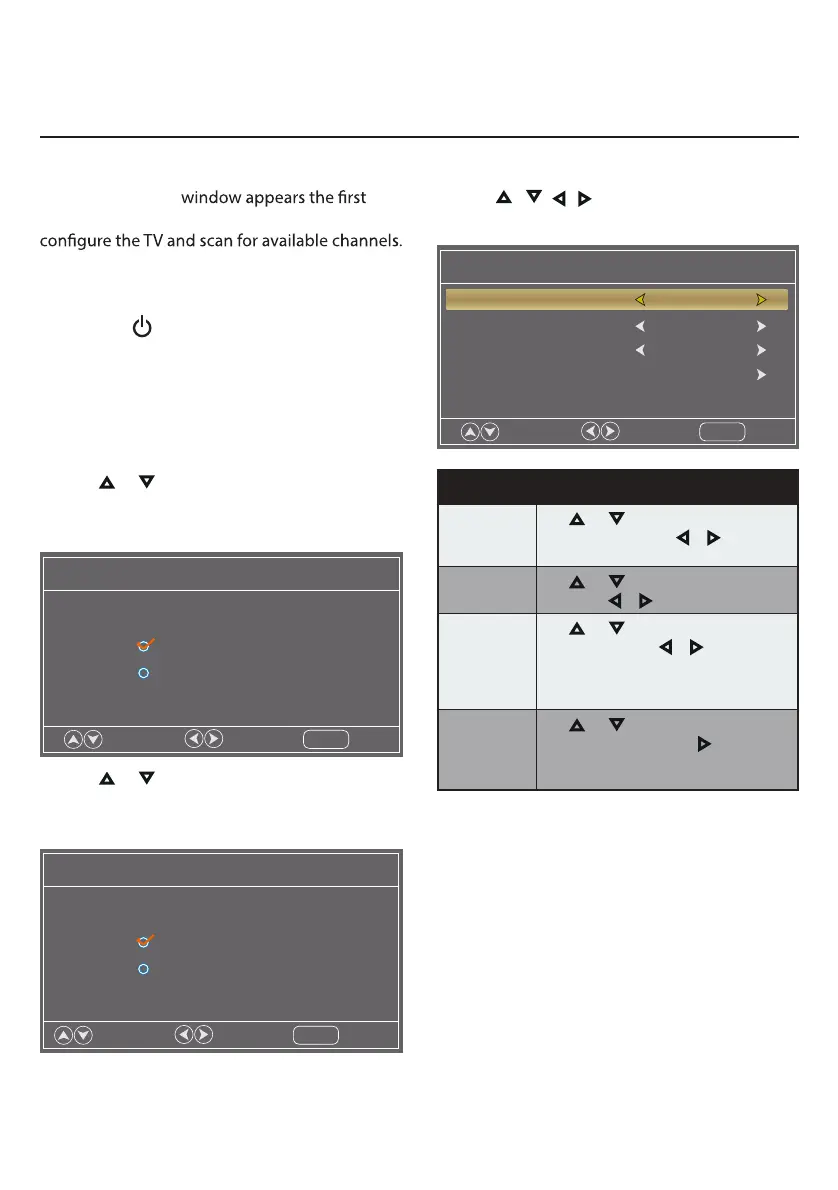
2. Use or keys to check Home Mode
(Energy Saving) or Retail Mode. Press Enter
to enter the next menu.
Setup Wizard
Choose your Picture Mode
Home Mode (Energy Saving)
Move
Select
Exit
MENU
Retail Mode
3. Use or keys to check Yes or No. Press
Enter to enter the next menu or press MENU
to return to the previous menu.
Setup Wizard
Are you sure you want Home mode?
In this mode ENERGY STAR saving are realized.
Yes
Move
Select
Return
MENU
No
4. Use / / / keys to navigate and select
your desired settings.
Setup Wizard
Air/Cable Air
Cable System Auto
Auto Scan
Menu Language English
Move
Select
Exit
MENU
Setup Wizard
Menu
Language
Use
or
keys to highlight Menu
Language, then press or to select
English, French or Spanish.
Air/Cable
Use
or keys to highlight Air/Cable,
then press or to select Air or Cable.
Cable System
Use
or
keys to highlight Cable
System, then press or to select
Auto, STD, IRC or HRC.
NOTE: Only adjustable after set “Air/
Cable” as “Cable” mode.
Auto Scan
Use
or
keys to highlight Auto
Scan, then press Enter or to start
memorizing all the channels available in
your area.
NOTE: You may press EXIT at any time to exit
the menu.
Setup Wizard
Main Menu Operation


 To Next Page