EasyManua.ls Logo

Connex CX22A19DC - Setup Menu Guide

Connex CX22A19DC
20 pages
Print Icon
To Next Page IconTo Next Page
To Previous Page IconTo Previous Page
Loading...
9
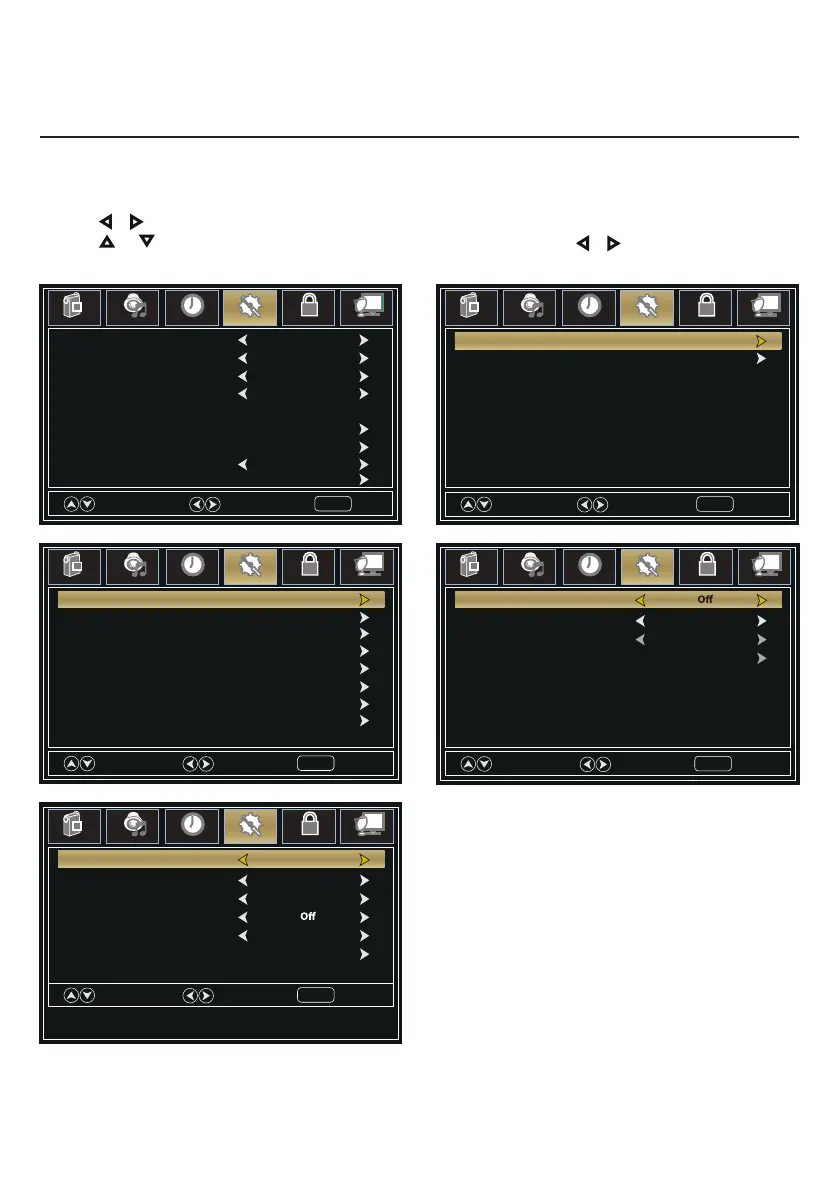
1. Press MENU button, the setup window will appear on the screen.
2. Use or keys to highlight Setup mode.
3. Use or to highlight the item you would like to reset, then press or to select the settings.
4. Press MENU to return to the previous menu or press EXIT at any time to exit the setting.
Menu Language English
Advanced
Zoom Mode Wide
Closed Caption
Noise Reduction Middle
DLC On
Setup Wizard
Transparency 25%
Source Label
Select
Move
Exit
MENU
Picture
Sound
Time
Setup
Lock
Channel
Restore Default
Move
Next
Return
MENU
Picture
Sound
Time
Setup
Lock
Channel
HDMI CEC
HDMI3 Default
HDMI1 Default
HDMI2 Default
PC Default
Media Default
AV Default
Component Default
Move
Select
Return
MENU
Picture
Sound
Time
Setup
Lock
Channel
TV
Default
Move
Select
Return
MENU
Picture
Sound
Time
Setup
Lock
Channel
CC Mode
Basic Selection CC 1
Advanced Service 1
Option
Move
Select
Return
MENU
Picture
Sound
Time
Setup
Lock
Channel
HDMI CEC On
Auto Standby On
Auto TV on On
HDMI ARC
Device control On
Device List
Setup Menu

Related product manuals