Mounting the TV on a wall
Install Steps
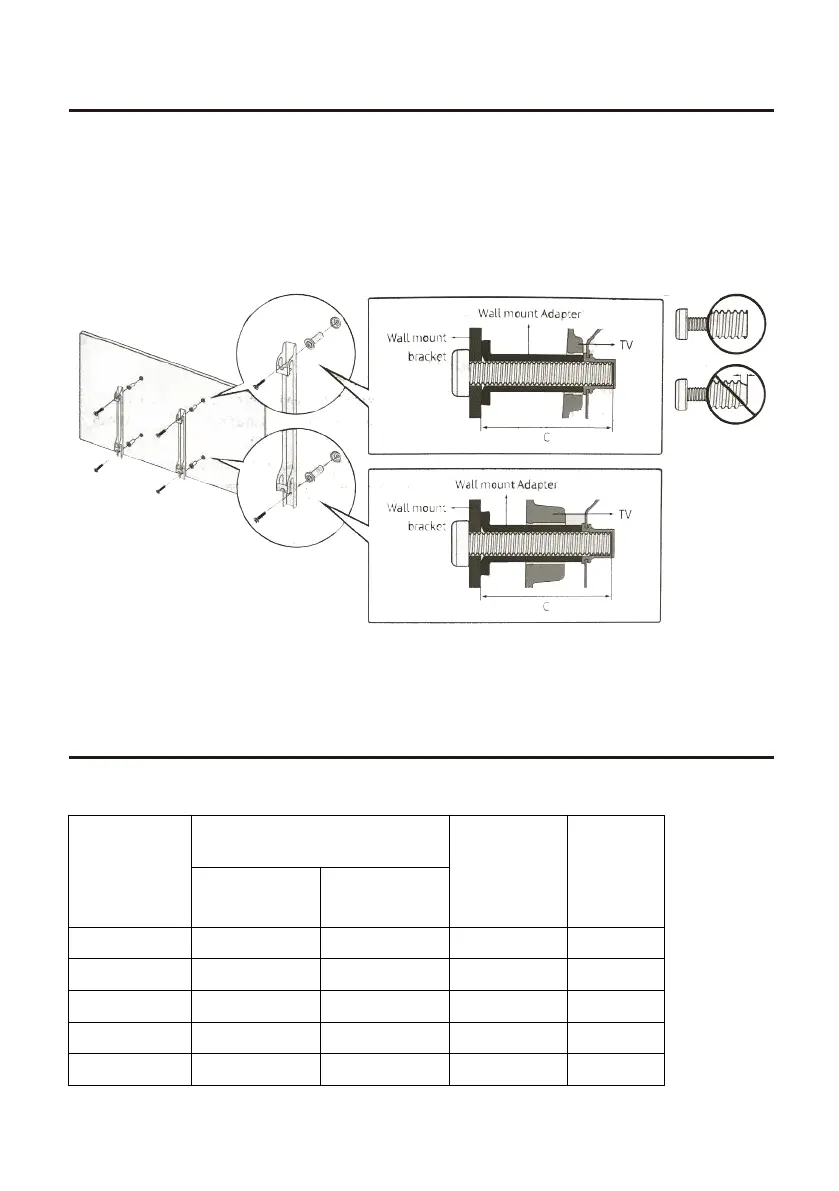
If you mount this TV on the wall, follow the instructions exactly as set out by the manufacturer.
Incomplete or improper installation may cause injury to you, and/or damage to the LED TV.
When you have appropriate wall mount brackets, please install them by using the VESA screws
included in TV PE bag.
1.Assemble the wall mount adapter.
2.Install the wall mount adapter on a wall with screws.
3.Install the wall mount brackets onto rear cabinet with the VESA screws.
4.Buckle the brackets with TV into the wall mount adapter.
Please refer to the table below to ensure the correct size VESA mount is used with the TV.
4
TV size in
inches
VESA screw hole specs
Screw Size Quantity
Width
mm
Height
mm
19-28 100 100 M4 4
3
50-55
65
2 200 100 M6 4
39-43 200 200 M6 4
400 200 M6 4
400 400 M6 4


 To Next Page