EasyManua.ls Logo

Connex CX22A19DC - Sound Menu Settings

Connex CX22A19DC
20 pages
Print Icon
To Next Page IconTo Next Page
To Previous Page IconTo Previous Page
Loading...
11
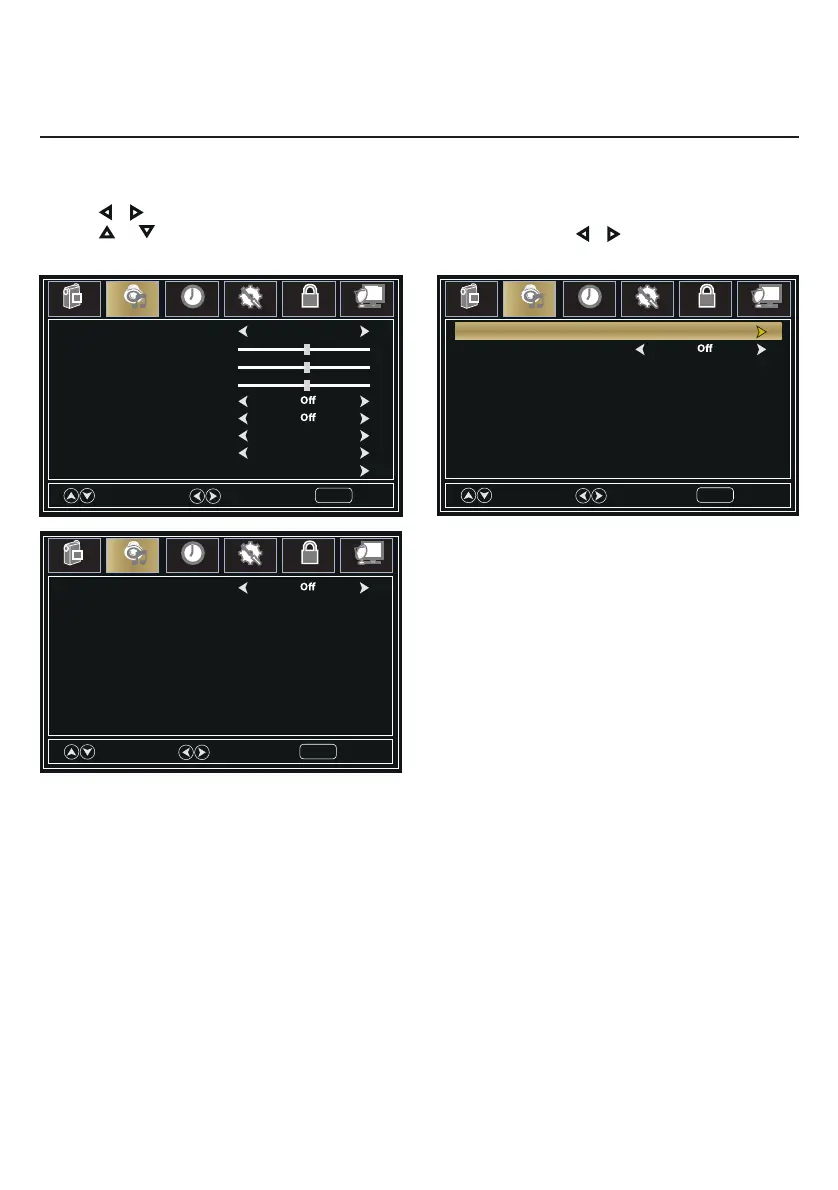
1. Press MENU button, the setup window will appear on the screen.
2. Use or keys to highlight Sound mode.
3. Use or to highlight the item you would like to reset, then press or to select the settings.
4. Press MENU to return to the previous menu or press EXIT at any time to exit the setting.
Voice Guide
Volume Middle
Speed Middle
Pitch Middle
Move
Select
Return
MENU
Picture
Sound
Time
Setup
Lock
Channel
Sound Mode Standard
Treble
Balance
Audio Languages English
SPDIF Type RAW
Auto Volume
Surround Sound
Bass
Select
Move
Exit
MENU
Picture
Sound
Time
Setup
Lock
Channel
50
50
0
Accessibility
Video Description
Move
Next
Return
MENU
Picture
Sound
Time
Setup
Lock
Channel
Voice Guide
Sound Menu

Related product manuals