7 8
Installing or removing the battery
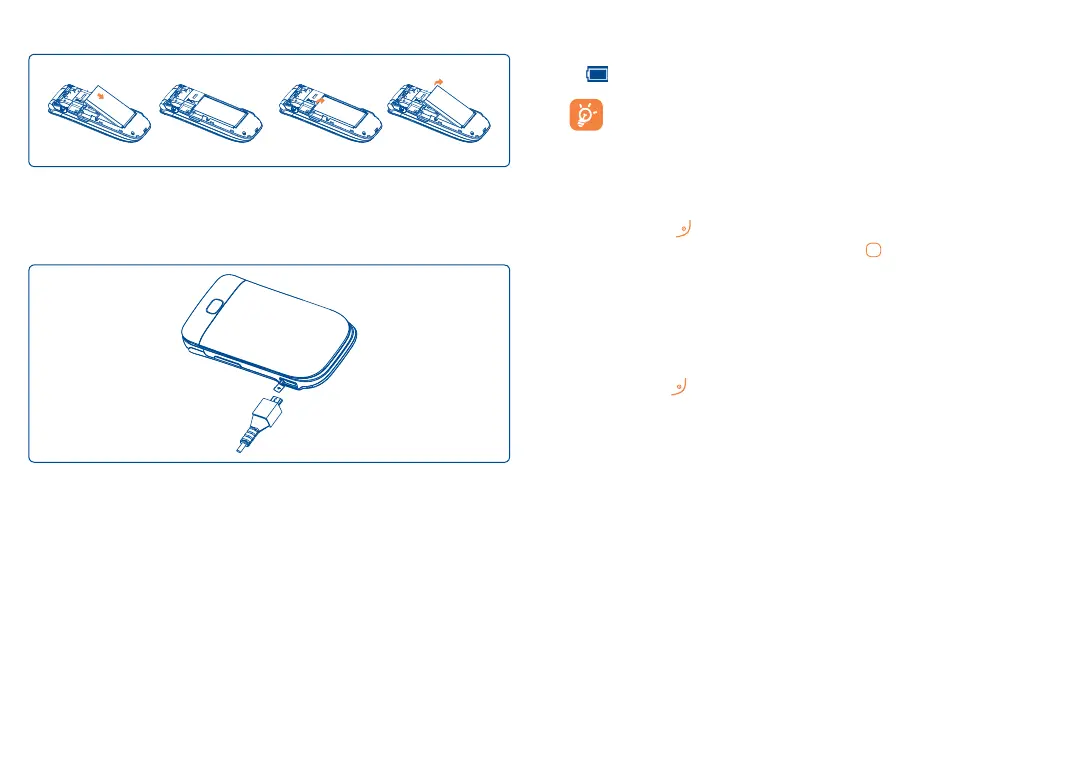
Insert and click the battery into place, then close the telephone cover.
Unclip the cover, then remove the battery.
Charging the battery
Connect the battery charger to your phone and outlet respectively.
•LEDlightwillilluminatewhenitischarging,andturnoffwhenbattery
isfullycharged.
•Chargingmaytakeabout20minutestostartifthebatteryislow.
•Becarefulnottoforcetheplugintothesocket.
• Makesurethebatteryiscorrectlyinsertedbeforeconnectingthecharger.
•Theoutletmustbenearthephoneandeasilyaccessible(avoidelectric
extensioncables).
•When using yourtelephone for the first time, charge the batteryfully
(approximately 3 hours).You are advised to fully charge the battery
(
)eachtime.
In order to reduce power consumption, you can do the following:
disconnect the charger from the phone when the battery is fully
charged, switch off Bluetooth
®
, exit out of any background running
applications when not in use, reduce the back light time-out, etc.
1.2 Power on your cellphone
Hold down the key until the cellphone powers on, type in your PIN
code if necessary and then confirm with the key. The Home Screen is
displayed.
While the phone is searching for a network, "Searching/Emergency"
will be displayed.
1.3 Power off your cellphone
Hold down the key from the Home Screen.



 To Next Page