96 97
YT MUSIC
Swipe up on the home screen and tap YT Music to play audio files stored
on your phone. You can tap SIGN IN to log in to your YouTube Music account
and stream music from the account. You can also tap DEVICE FILES ONLY to
browse and play music files stored on your phone.
VIEWING YOUR MUSIC LIBRARY
Open YT Music, and your music library is displayed. You can tap Songs to
view all your audio files or tap Albums or Artists to browse collections of
specific artists or albums. You can also tap Playlists to view all your playlists.
NOTE: If an audio file is being played, its name and player controls are
displayed at the bottom of the screen. Tap the area to open the playback
screen.
PLAYING MUSIC
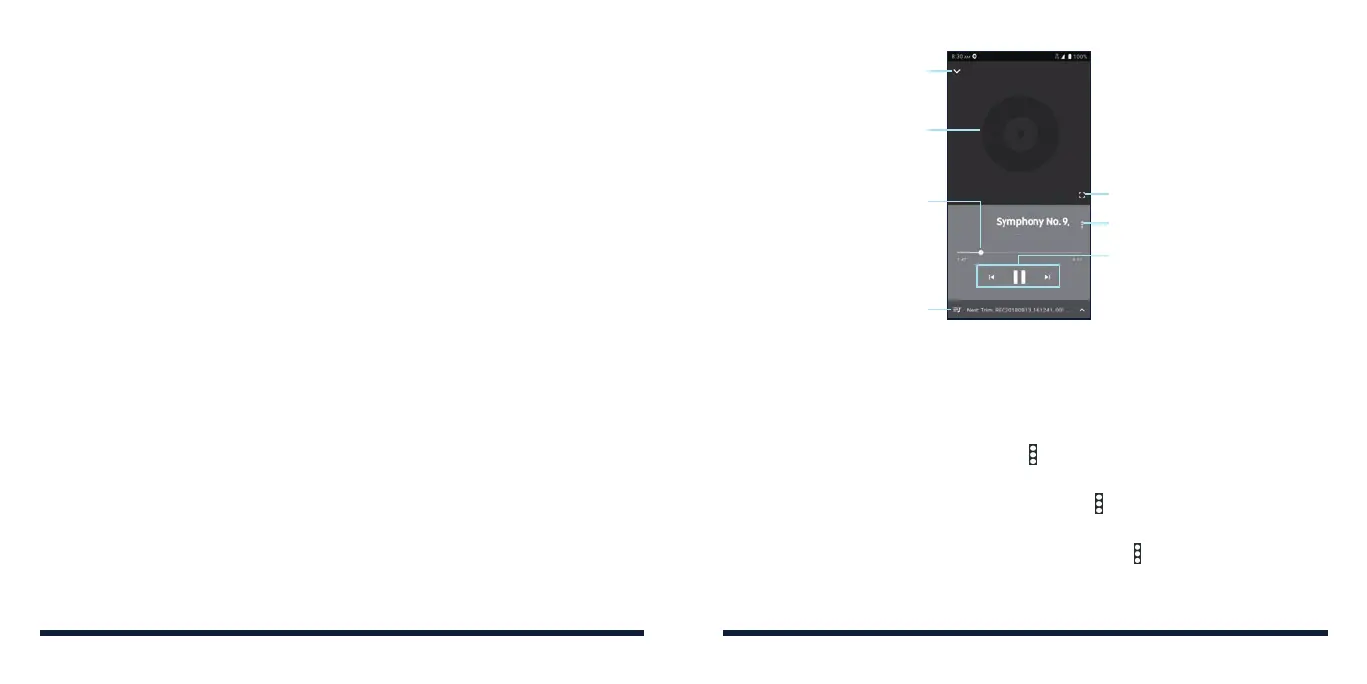
Tap a song in the music library to listen to it. The following playback screen
will appear.
Playback controls: Skip songs or
pause and resume playback
Drag the slider to jump to
any part of the song
Check the current playlist and
toggle shue and repeat
Album artwork (if available)
Return to the library
Access additional options
Switch to landscape display
MANAGING PLAYLISTS
Create playlists to organize your music files into sets of songs, so that you can
play the songs you like in the order you prefer.
• From any music library category, tap > Add to playlist next to a song to
add it to a playlist or create a new playlist.
• In the Playlist section of the music library, tap next to the playlist name to
play the list, add the songs to other playlists, edit the playlist, or delete it.
• Tap a playlist to view its content. You can then tap next to a song and
select Remove from playlist to take the song off the playlist.
YT MUSIC



 To Next Page