39
USING THE
MAINMENU
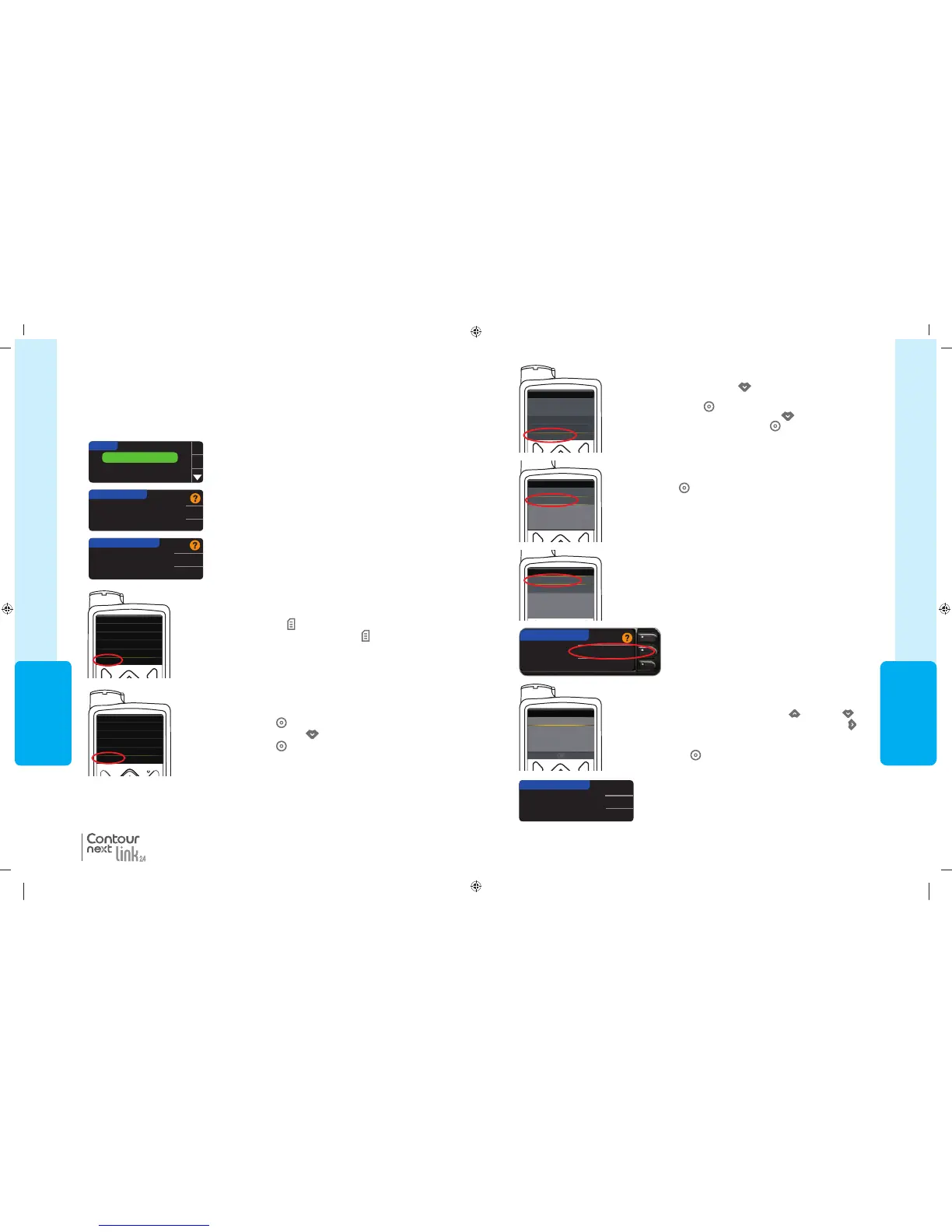
7. Press the Down arrow button
to scroll to Utilities.
Press Select button
.
In the Utilities menu, use the down arrow
to scroll to
Device Options
. Press Select button .
8. In the Device Options menu, scroll to
Connect Device
. Press
Select button .
Manual Connect
Auto Connect
CONNECT TO PUMP
9. Place the meter and pump next to each other. Select
Manual
Connect
on your pump. Select Manual Connect on your meter.
10. Pick up the pump. Enter the meter serial number (SN) shown on
the meter into the pump screen. Use the up
and down
buttons to select the characters, then press the right button
to move to the next character. Keep pressing up to get to the
alphabet. Press down to go in reverse (starting with “Z”). Press
the Select button
after entering the last SN character. Select
OK on your pump.
Use Pump to enter
this Device SN:
BG1234567B.
OK
Go Back
CONNECT TO PUMP
Enter Device SN
Press OK on the meter afterentering the complete meter
SN into thepump.
Connecting to the Pump Using Manual Connect
Device Options
Manage Devices
Connect Device
Connect Device
Manual Connect
Auto Connect
Utilities
Self Test
Carb Unit
Manage Settings
Sensor Demo
Device Options
85587269_CntrNextLINK_2_4_UG_EN_FpBp_v4.indd 39 11/18/16 9:03 AM
USING THE
MAINMENU
38
MiniMed
®
630G
MiniMed
®
670G
Connecting to the Pump Using Manual Connect
NOTE: Place your meter and your pump side by side before you begin. You need to
alternate between both devices to complete the connection.
3. Press the button to highlight Pump Options. Press OK
to select.
Pump Options
Reminder
Date
OK
SETUP
4. The Pump Options screen appears and asks if you
would like to Connect now. Press Yes.
No MiniMed Pump
connected. Connect now?
PUMP OPTIONS
Yes
No
5. Press OK.
Put the meter down and pick up your pump.
Select "Connect
Device" on your Pump.
OK
Go Back
CONNECT TO PUMP
6a. Press any button to turn the screen on.
Press the Menu button
.
If your pump does not have a Menu button
go to step 6b.
NOTE: If your pump screen turns off, press any button to
turn it back on.
See page 33 for the Auto Connect steps.
1. Press and hold the top Menu button to turn the meter on.
2. Press the button to highlight Setup. Press OK to select.
6b. Press Select button
.
Use the Down arrow button
to scroll to
Options
.
Press Select button
.
Enter BG
Basal
Audio Options
Status
Suspend Delivery
Options
®
Connecting to the Pump Using Manual Connect
Menu
Insulin Settings
Sensor Settings
Event Markers
Reminders
Utilities
OR
For the MiniMed 670G
For the MiniMed 630G
85587269_CntrNextLINK_2_4_UG_EN_FpBp_v4.indd 38 11/18/16 9:03 AM
39
USING THE
MAINMENU
7. Press the Down arrow button
to scroll to Utilities.
Press Select button
.
In the Utilities menu, use the down arrow
to scroll to
Device Options
. Press Select button .
8. In the Device Options menu, scroll to
Connect Device
. Press
Select button .
Manual Connect
Auto Connect
CONNECT TO PUMP
9. Place the meter and pump next to each other. Select
Manual
Connect
on your pump. Select Manual Connect on your meter.
10. Pick up the pump. Enter the meter serial number (SN) shown on
the meter into the pump screen. Use the up
and down
buttons to select the characters, then press the right button
to move to the next character. Keep pressing up to get to the
alphabet. Press down to go in reverse (starting with “Z”). Press
the Select button
after entering the last SN character. Select
OK on your pump.
Use Pump to enter
this Device SN:
BG1234567B.
OK
Go Back
CONNECT TO PUMP
Enter Device SN
Press OK on the meter afterentering the complete meter
SN into thepump.
Connecting to the Pump Using Manual Connect
Device Options
Manage Devices
Connect Device
Connect Device
Manual Connect
Auto Connect
Utilities
Self Test
Carb Unit
Manage Settings
Sensor Demo
Device Options
85587269_CntrNextLINK_2_4_UG_EN_FpBp_v4.indd 39 11/18/16 9:03 AM
USING THE
MAINMENU
38
MiniMed
®
630G
MiniMed
®
670G
Connecting to the Pump Using Manual Connect
NOTE: Place your meter and your pump side by side before you begin. You need to
alternate between both devices to complete the connection.
3. Press the button to highlight Pump Options. Press OK
to select.
Pump Options
Reminder
Date
OK
SETUP
4. The Pump Options screen appears and asks if you
would like to Connect now. Press Yes.
No MiniMed Pump
connected. Connect now?
PUMP OPTIONS
Yes
No
5. Press OK.
Put the meter down and pick up your pump.
Select "Connect
Device" on your Pump.
OK
Go Back
CONNECT TO PUMP
6a. Press any button to turn the screen on.
Press the Menu button
.
If your pump does not have a Menu button
go to step 6b.
NOTE: If your pump screen turns off, press any button to
turn it back on.
See page 33 for the Auto Connect steps.
1. Press and hold the top Menu button to turn the meter on.
2. Press the button to highlight Setup. Press OK to select.
6b. Press Select button
.
Use the Down arrow button
to scroll to
Options
.
Press Select button
.
Enter BG
Basal
Audio Options
Status
Suspend Delivery
Options
®
Connecting to the Pump Using Manual Connect
Menu
Insulin Settings
Sensor Settings
Event Markers
Reminders
Utilities
OR
For the MiniMed 670G
For the MiniMed 630G
85587269_CntrNextLINK_2_4_UG_EN_FpBp_v4.indd 38 11/18/16 9:03 AM
85587269_CntrNextLINK_2_4_UG_EN_FpBp_v5_UnMaskedPlaced.pdf:42


 To Next Page
 Loading...


