5
GETTING
STARTED
OK
MENU
Bolus
Logbook
Trends
Setup
OK
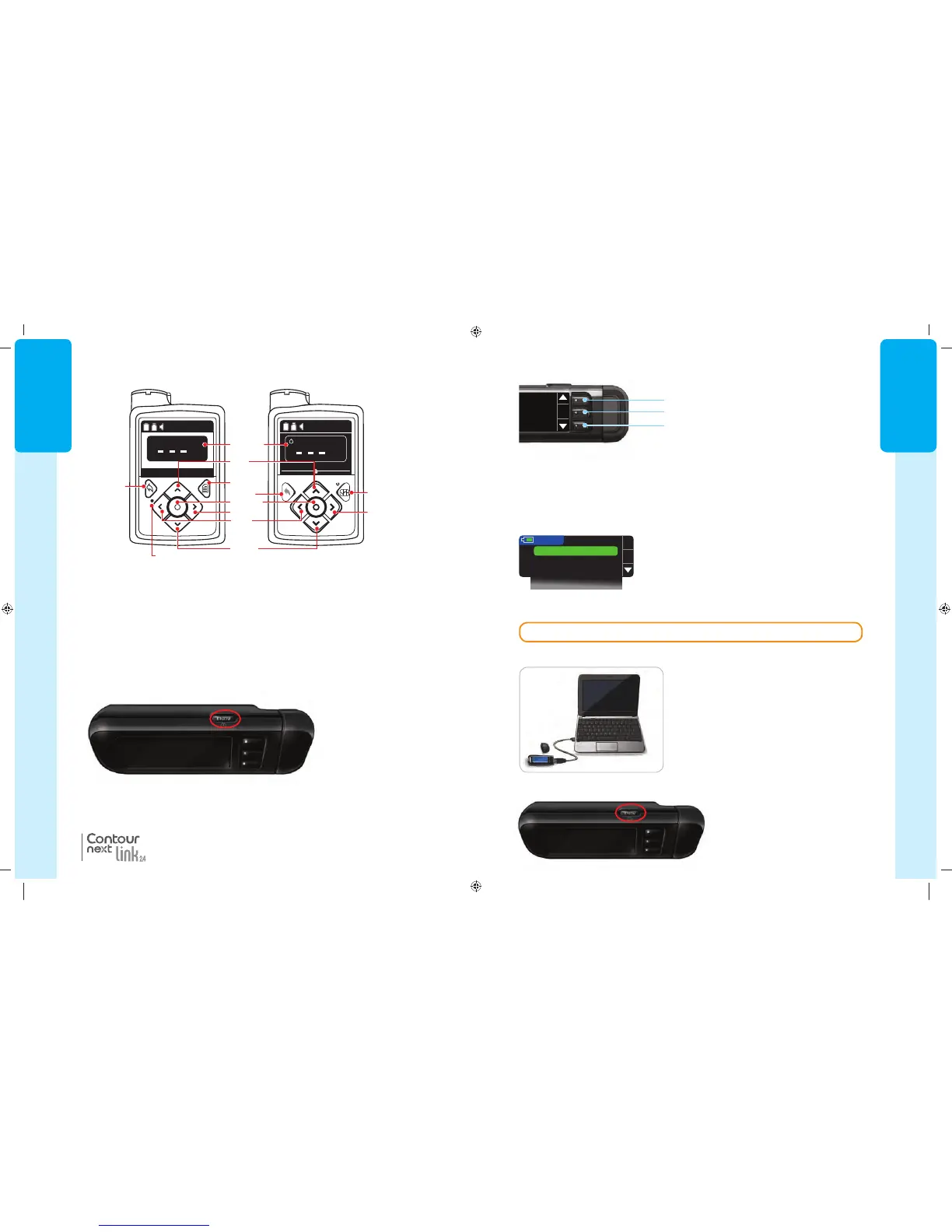
The Main Menu has four choices: Bolus, Logbook, Trends and Setup. Press the or
button to scroll to your desired selection. When your choice is highlighted, press
OK
.
Turn On
Initial Setup
• The three buttons next to the screen allow you to make your selection by pressing the
button next to your choice.
• Scroll up or down for additional choices when the or arrows appear on the meter
screen.
• When your choice is highlighted, make a selection by pressing OK.
NOTE: Press and hold the or button to scroll through the list faster.
Button
OK Button
Button
CAUTION: Unplug meter from charging source before beginning Setup.
Using the Main Menu
Initial Setup
1. Before use, fully charge your meter. See
page iv.
Using the Selection/Scrolling Buttons
2. Press and hold the top Menu
button until the meter turns on.
After a welcome screen, you see
the Language choicescreen.
85587269_CntrNextLINK_2_4_UG_EN_FpBp_v4.indd 5 11/18/16 9:03 AM
GETTING
STARTED
4
®
Meter Overview
Turning the Meter On or Off
• Press and hold the top Menu button to turn the meter on or off.
• Insert a test strip to turn the meter on.
• Meter turns off after 3 minutes of inactivity.
The top Menu button has three functions:
• To turn the meter on/off, press and hold the top Menubutton.
• To go back one screen from most screens, press the top Menu button once.
• To turn on/off the test strip port light, quickly press the top Menu button two times.
Meter Overview
Using the Top Menu Button
“Talks” to Your MiniMed Insulin Pump
Your CONTOUR
®
NEXT LINK 2.4 meter can automatically send your blood glucose
result or a bolus directly to your MiniMed 630G or MiniMed 670G insulin pump. Up
to 6 CONTOUR NEXT LINK 2.4 meters can be connected to your MiniMed insulin
pump. Your C
ONTOUR NEXT LINK 2.4 meter and MiniMed insulin pump must be
within 6 feet of each other.
MiniMed
®
630G MiniMed
®
670G
BG
Active Insulin
Bolus Basal
1.5 u
mg/dL
12: 2 4
PM
BG
Active Insulin 0.0 u
mg/dL
12: 0 7
AM
Graph
Display
Screen
Menu
Select
Right Right
Up
Back
Back
Left
Down
Notification Light
85587269_CntrNextLINK_2_4_UG_EN_FpBp_v4.indd 4 11/18/16 9:03 AM
5
GETTING
STARTED
OK
MENU
Bolus
Logbook
Trends
Setup
OK
The Main Menu has four choices: Bolus, Logbook, Trends and Setup. Press the or
button to scroll to your desired selection. When your choice is highlighted, press
OK
.
Turn On
Initial Setup
• The three buttons next to the screen allow you to make your selection by pressing the
button next to your choice.
• Scroll up or down for additional choices when the or arrows appear on the meter
screen.
• When your choice is highlighted, make a selection by pressing OK.
NOTE: Press and hold the or button to scroll through the list faster.
Button
OK Button
Button
CAUTION: Unplug meter from charging source before beginning Setup.
Using the Main Menu
Initial Setup
1. Before use, fully charge your meter. See
page iv.
Using the Selection/Scrolling Buttons
2. Press and hold the top Menu
button until the meter turns on.
After a welcome screen, you see
the Language choicescreen.
85587269_CntrNextLINK_2_4_UG_EN_FpBp_v4.indd 5 11/18/16 9:03 AM
GETTING
STARTED
4
®
Meter Overview
Turning the Meter On or Off
• Press and hold the top Menu button to turn the meter on or off.
• Insert a test strip to turn the meter on.
• Meter turns off after 3 minutes of inactivity.
The top Menu button has three functions:
• To turn the meter on/off, press and hold the top Menubutton.
• To go back one screen from most screens, press the top Menu button once.
• To turn on/off the test strip port light, quickly press the top Menu button two times.
Meter Overview
Using the Top Menu Button
“Talks” to Your MiniMed Insulin Pump
Your CONTOUR
®
NEXT LINK 2.4 meter can automatically send your blood glucose
result or a bolus directly to your MiniMed 630G or MiniMed 670G insulin pump. Up
to 6 CONTOUR NEXT LINK 2.4 meters can be connected to your MiniMed insulin
pump. Your C
ONTOUR NEXT LINK 2.4 meter and MiniMed insulin pump must be
within 6 feet of each other.
MiniMed
®
630G MiniMed
®
670G
BG
Active Insulin
Bolus Basal
1.5 u
mg/dL
12: 2 4
PM
BG
Active Insulin 0.0 u
mg/dL
12: 0 7
AM
Graph
Display
Screen
Menu
Select
Right Right
Up
Back
Back
Left
Down
Notification Light
85587269_CntrNextLINK_2_4_UG_EN_FpBp_v4.indd 4 11/18/16 9:03 AM
85587269_CntrNextLINK_2_4_UG_EN_FpBp_v5_UnMaskedPlaced.pdf:8



 To Next Page