7
GETTING
STARTED
Connect Device
Manual Connect
Auto Connect
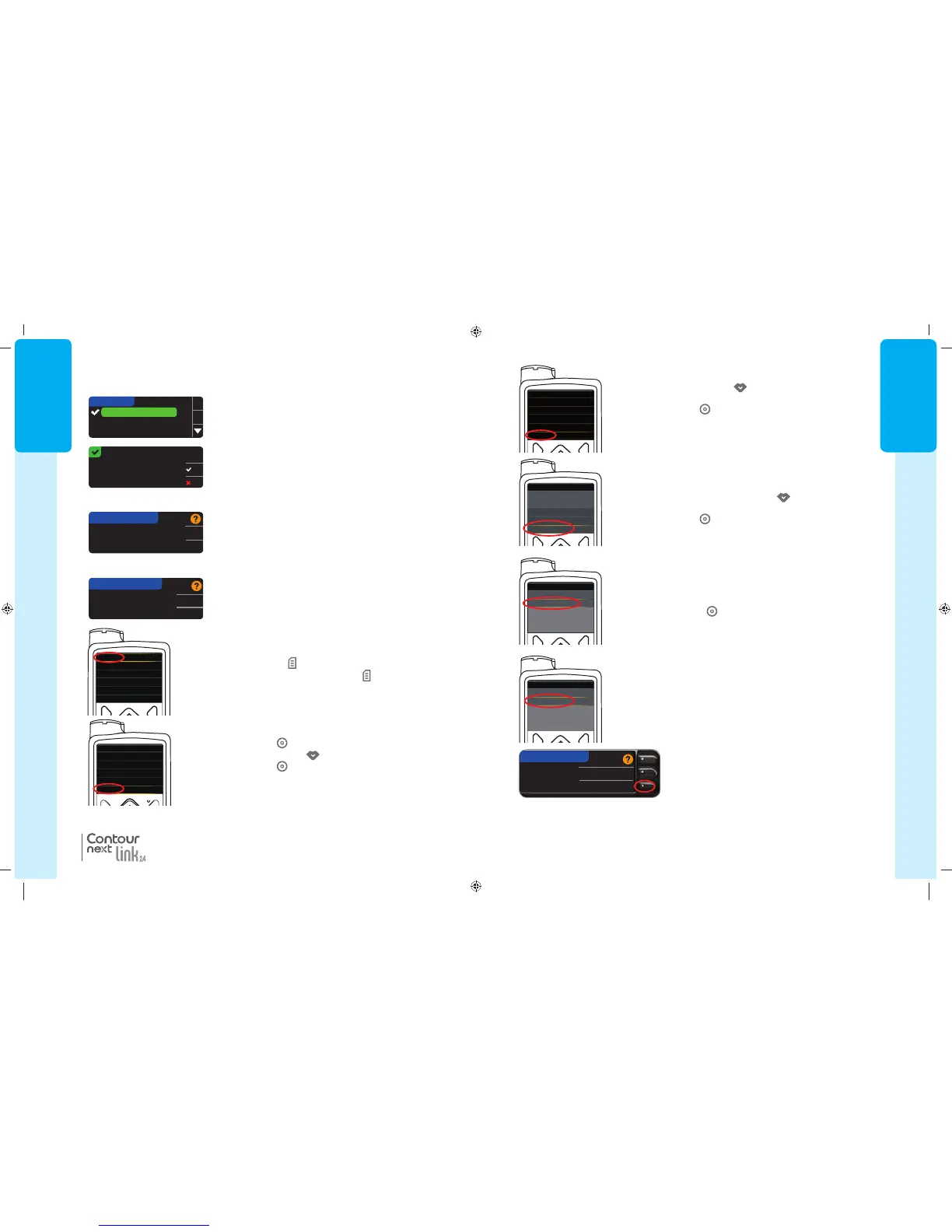
9. In the Utilities menu, use the down arrow to scroll to
DeviceOptions
.
Press Select button
.
10. In the Device Options menu, scroll to
Connect Device
.
Press Select button
.
11. Place the meter and pump next to each other.
Select
Auto Connect
on your pump.
Select Auto Connect on your meter.
If you select
Manual Connect
, see page 38.
Device Options
Manage Devices
Connect Device
Connect to Pump
Manual Connect
Auto Connect
CONNECT TO PUMP
NOTE: If your meter is lost or stolen, delete the meter from your pump. See your
MiniMed insulin pump user guide.
8. Press the Down arrow button
to scroll to Utilities.
Press Select button
.
Utilities
Self Test
Carb Unit
Manage Settings
Sensor Demo
Device Options
Menu
Insulin Settings
Sensor Settings
Event Markers
Reminders
Utilities
85587269_CntrNextLINK_2_4_UG_EN_FpBp_v4.indd 7 11/18/16 9:03 AM
GETTING
STARTED
6
MiniMed
®
630G
MiniMed
®
670G
3. Press the button to see more language choices.
When your language is highlighted, press OK.
4. Press
OK
to confirm.
If the correct language is not displayed, press
No
.
LANGUAGE
English
Deutsch
Español
OK
Connect to a
MiniMed Pump?
OK
Skip
CONNECT TO PUMP
Select "Connect
Device" on your Pump.
OK
Go Back
CONNECT TO PUMP
NOTE: If your pump screen turns off, press any button toturn backon.
5. Press OK to connect to a MiniMed insulin pump now.
If you press Skip, you will be asked to accept or
change the date and time.
To change, follow instructions starting on page 45,
step5. Return to Initial Setup, page 10, step 22,
whenset.
Connect to Pump
Language:
English
OK
No
Set Language
6. Press OK.
Put the meter down and pick up your pump.
These meter screen images are for illustration purposes only.
®
7a. Press any button to turn the screen on.
Press the Menu button
.
If your pump does not have a Menu button
go to step 7b.
7b. Press Select button
.
Use the Down arrow button
to scroll to
Options
.
Press Select button
.
Set Language
Menu
Insulin Settings
Sensor Settings
Event Markers
Reminders
Utilities
Enter BG
Basal
Audio Options
Status
Suspend Delivery
Options
OR
For the MiniMed 670G
For the MiniMed 630G
85587269_CntrNextLINK_2_4_UG_EN_FpBp_v5.indd 6 11/21/16 2:37 PM
7
GETTING
STARTED
Connect Device
Manual Connect
Auto Connect
9. In the Utilities menu, use the down arrow to scroll to
DeviceOptions
.
Press Select button
.
10. In the Device Options menu, scroll to
Connect Device
.
Press Select button
.
11. Place the meter and pump next to each other.
Select
Auto Connect
on your pump.
Select Auto Connect on your meter.
If you select
Manual Connect
, see page 38.
Device Options
Manage Devices
Connect Device
Connect to Pump
Manual Connect
Auto Connect
CONNECT TO PUMP
NOTE: If your meter is lost or stolen, delete the meter from your pump. See your
MiniMed insulin pump user guide.
8. Press the Down arrow button
to scroll to Utilities.
Press Select button
.
Utilities
Self Test
Carb Unit
Manage Settings
Sensor Demo
Device Options
Menu
Insulin Settings
Sensor Settings
Event Markers
Reminders
Utilities
85587269_CntrNextLINK_2_4_UG_EN_FpBp_v4.indd 7 11/18/16 9:03 AM
GETTING
STARTED
6
MiniMed
®
630G
MiniMed
®
670G
3. Press the button to see more language choices.
When your language is highlighted, press OK.
4. Press
OK
to confirm.
If the correct language is not displayed, press
No
.
LANGUAGE
English
Deutsch
Español
OK
Connect to a
MiniMed Pump?
OK
Skip
CONNECT TO PUMP
Select "Connect
Device" on your Pump.
OK
Go Back
CONNECT TO PUMP
NOTE: If your pump screen turns off, press any button toturn backon.
5. Press OK to connect to a MiniMed insulin pump now.
If you press Skip, you will be asked to accept or
change the date and time.
To change, follow instructions starting on page 45,
step5. Return to Initial Setup, page 10, step 22,
whenset.
Connect to Pump
Language:
English
OK
No
Set Language
6. Press OK.
Put the meter down and pick up your pump.
These meter screen images are for illustration purposes only.
®
7a. Press any button to turn the screen on.
Press the Menu button
.
If your pump does not have a Menu button
go to step 7b.
7b. Press Select button
.
Use the Down arrow button
to scroll to
Options
.
Press Select button
.
Set Language
Menu
Insulin Settings
Sensor Settings
Event Markers
Reminders
Utilities
Enter BG
Basal
Audio Options
Status
Suspend Delivery
Options
OR
For the MiniMed 670G
For the MiniMed 630G
85587269_CntrNextLINK_2_4_UG_EN_FpBp_v5.indd 6 11/21/16 2:37 PM
85587269_CntrNextLINK_2_4_UG_EN_FpBp_v5_UnMaskedPlaced.pdf:10



 To Next Page