10. Battery Guidance
Important Note:
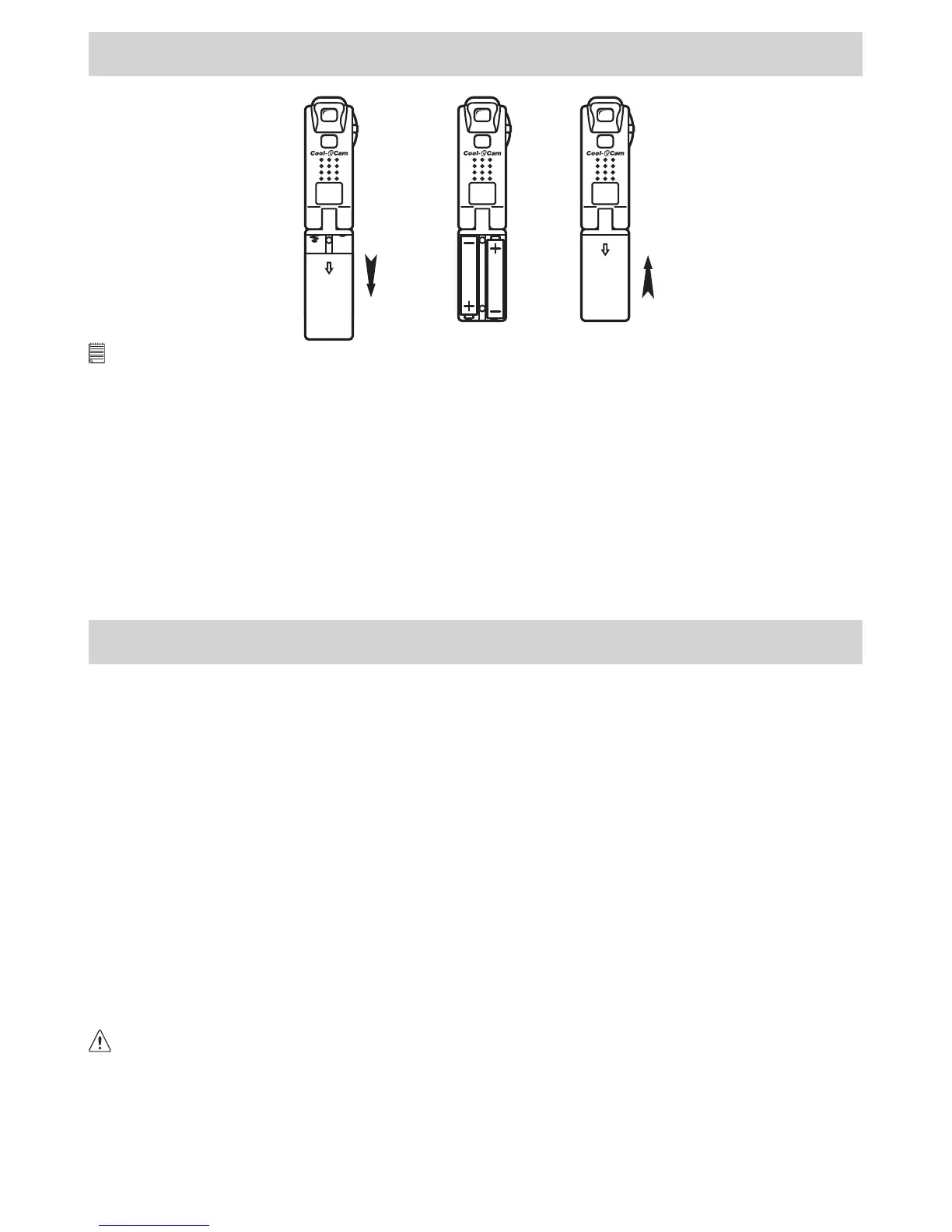
We strongly recommend that you do not use rechargeable batteries as this will affect the performance of your Pocket C@m.
WARNINGS!
• Batteries should be replaced by an adult.
• Non-rechargeable batteries are not to be recharged.
• Rechargeable batteries are to be removed from the camera before being charged (if •removable).
• Rechargeable batteries are only to be charged under adult supervision (if removable).
• Different types of batteries or new and used batteries are not to be mixed.
• Only batteries of the same or equivalent type as recommended are to be used.
• Batteries are to be inserted with the correct polarity.
• Exhausted batteries are to be removed from the camera.
• The supply terminals are not to be short-circuited.
• Do not mix alkaline, standard (carbon-zinc), or rechargeable (nickel-cadmium) batteries.
• Do not dispose the batteries in re.
• Batteries are to be removed from the camera when not in use.
• Do not use rechargeable batteries.
These instructions should be retained for future reference.
11. Technical Specications
Memory 2MB SDRAM
Storable Frames High Resolution: 20 images / Low Resolution: 80 images
Image Sensor Progressive 1/3” CMOS with 640x480pixels, Color Filter Array: RGB Bayer matrix
Recording Image 352 x 288 pixels (High Resolution), 176 x 144 pixels (Low Resolution)
Exposure Automatic
Optical Viewnder Built-in
Lens Focal length 5mm (equivalent to 52mm on 135 camera)
Working Range Normal: 0.5m - innity
File Format Typical image les supported by bundled software program
Data Transfer True RGB data
Self-timer Electronic self-timer with 9 second delay
B/W LCD Indicator 2x7 segment LCD for mode & low battery warning
Control Panel Mode and Shutter
Video Frame Rate 8 fps (frame per second) in CIF mode, 25 fps in QVGA mode
Connectors USB
Power Control Standby Mode (after 60 seconds inactivity)
Power 2 x AAA Alkaline Batteries
Dimensions 146mm(H) x 17mm(D) x 33mm(W)
Weight 45g (not including batteries)
This Pocket C@m should only be operated within the following environmental conditions:
• 41-104º Fahrenheit; 5-40º Celsius
• 20% - 85% relative humidity, non-condensing
Camera Cautions
• Never immerse any part of the Pocket C@m or its components into any uid or liquid.
• Disconnect the Pocket C@m from your PC or Mac before cleaning it.
• Remove dust or stains with a soft cloth dampened with water or neutral detergent.
• Do not place hot items on the surface of the Pocket C@m.
• Do not attempt to open or disassemble the Pocket C@m. This will affect any warranty claim.
19



 To Next Page