3
3. System Requirements
For Windows® Users
PC
For Macintosh® Users
MAC
• PowerPC® Processor
• Mac™ OS version 8.6 ~ 9.2
• USB port
• 32MB RAM
• 150MB Free disk space
• Color Monitor with High Color (16-bit) graphic
capability or higher
• CD-ROM Drive
• Standard mouse and keyboard
• Compatible with Microsoft® Windows® 98SE, Me, 2000 or XP
• Pentium
®
II 333Mhz or Pentium® compatible processor
• 128MB RAM or higher
• USB Port
• 200MB free disk space
• CD-ROM Drive
• Color Monitor with High Color (16-bit) graphic
capability or higher
• Standard mouse and keyboard
4. Package Contents
TM
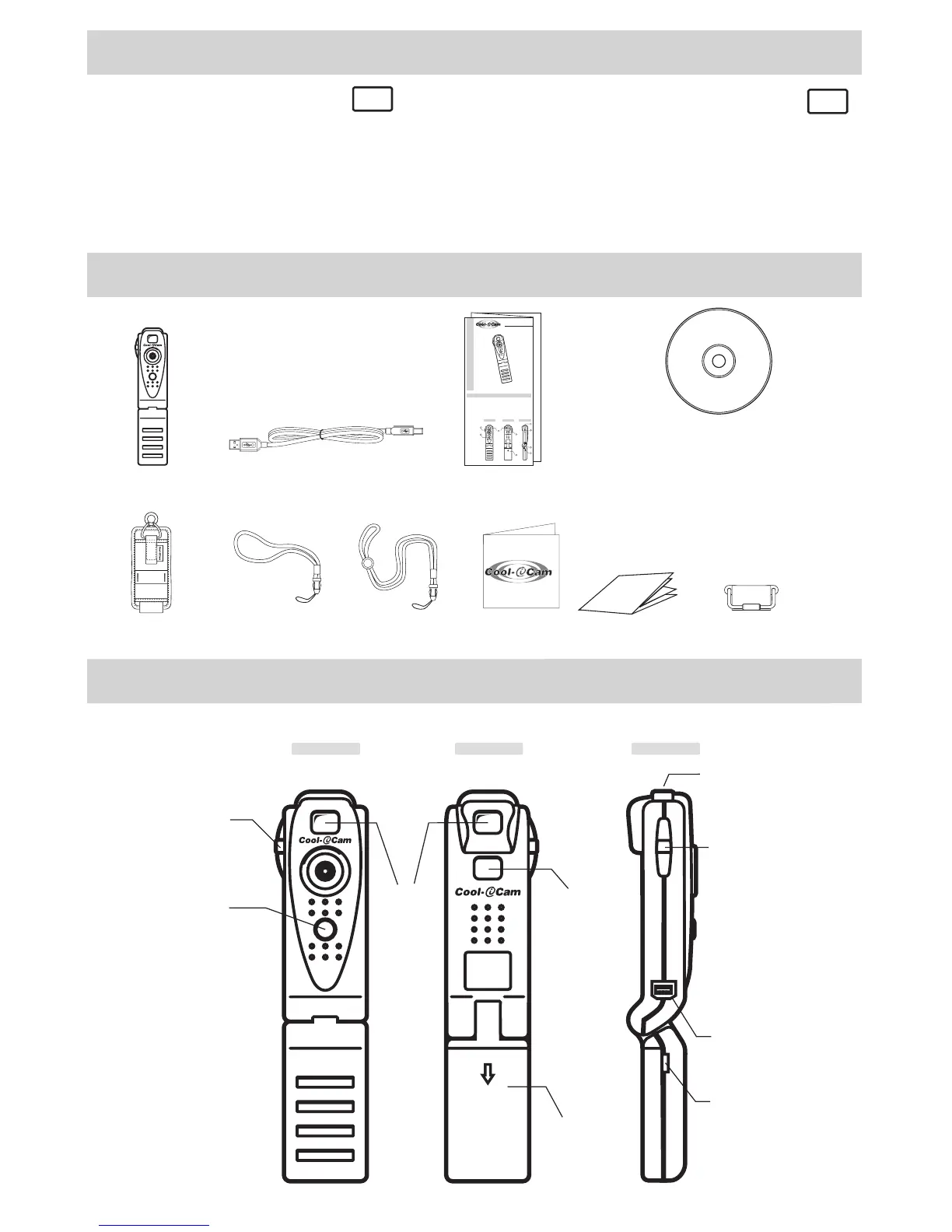
Pocket C@m
Quick Start Guide
1. Product Overview
1. Mode Button
2. Shutter Button
3. Viewnder
4. LCD Display
5. Battery Compartment
6. Holder for Wrist/Pendant Strap
7. USB Cable Port
8. Notebook Clip Hinge
r
Back View
1
Front View
Side View
2
3
4
5
6
1
7
8
Pendant Strap
Pocket C@m Software CD-ROM
(includes Digital Camera Manager (PC),
Digital Camera Installer (Mac),
PhotoStudio
®
2000 (PC & Mac)
ArcSoft PhotoPrinter
®
2000 (PC & Mac),
ArcSoft VideoImpression™ 1.6 (PC) & 1.5 (Mac),
ArcSoft Fantasy 2000 (PC & Mac)
Microsoft
®
NetMeeting™ (PC), Cu-SeeMe™ (Mac),
Adobe
®
Acrobat
®
Reader (PC & Mac))
Quick User GuidePocket Cam
Pocket C@m
Notebook clip
Pocket C@m
Rugged Case
Wrist Strap
USB Cable
Registration Card
Manual
P
l
e
a
s
e
t
a
k
e
a
m
o
m
e
n
t
t
o
f
i
l
l
o
u
t
a
n
d
r
e
t
u
r
n
t
h
i
s
R
e
g
i
s
t
r
a
t
i
o
n
C
a
r
d
.
Y
o
u
r
v
a
l
u
a
b
l
e
i
n
p
u
t
w
i
ll
h
e
l
p
u
s
t
o
s
e
r
v
e
y
o
u
b
e
t
t
e
r
.
P
r
o
d
u
c
t
R
e
g
is
t
r
a
t
io
n
C
a
r
d
™
5. Getting to Know Your Pocket C@m
Refer to the picture below for a quick overview for your Pocket C@m.
Len Cover
Front View
Viewnder
(3.2)
Battery
Compartment
(3.5)
Mode Button
(3.4)
LCD Display
(3.3)
Shutter
button
(3.1)
Back View
Side View
Notebook Cilp
Hinge (3.7)
USB Cable
Port (3.6)
Hole for
Wrist/Pendant
strap
Mode Button
(3.4)



 To Next Page