
 Need help?
Do you have a question about the Cooler Master Cosmos and is the answer not in the manual?
Details the physical and technical specifications of the computer chassis, including dimensions, materials, and supported components.
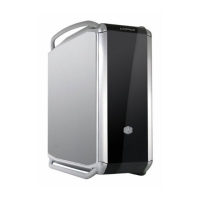
Illustrations showing the front, back, and top views of the computer case with labeled components.
Lists all included components and their quantities for system assembly, with item numbers and names.
Details the contents and purpose of the accessory carrying case provided with the computer.
Steps for removing the side panel and installing the power supply unit into the chassis.
Procedure for mounting the motherboard onto the chassis tray using stand-offs.
Guidance on installing expansion cards into the motherboard slots and securing them.
Instructions for fitting 3.5-inch and 5.25-inch drives into the bays.
Steps for installing new or replacing existing cooling fans in the case.
Procedure for cleaning dust filters to maintain optimal airflow and system performance.
Guide to altering the hinge direction for the front panel door to swing the other way.
Tips and techniques for organizing internal cables for better airflow and aesthetics.
Final steps and checks to ensure the system is fully assembled and functional.
 General
| Case Type | Full Tower |
|---|---|
| Motherboard Compatibility | E-ATX, ATX, Micro-ATX, Mini-ITX |
| Material | Aluminum, Steel, Plastic |
| Front Panel Ports | 2 x USB 3.0, 2 x USB 2.0, Audio In/Out |
| Power Supply Support | Standard ATX |
| Color | Black |
| Cooling Support | Multiple fan mounts (120mm/140mm) |


 To Next Page