WaveLinx Networked Relay Panel Quick Start (Version 15)
www.cooperlighting.com 6
Configure the WaveLinx Area Controller
Important
The initial configuration of the WaveLinx Area Controller requires the use of a device that has Wi-Fi, an Ethernet port, and a current web
browser. These steps assume that the Area Controller is still in a factory default condition.
Before performing the WaveLinx Area Controller configuration make certain that the Area Controller is connected to PoE port on the
network switch.
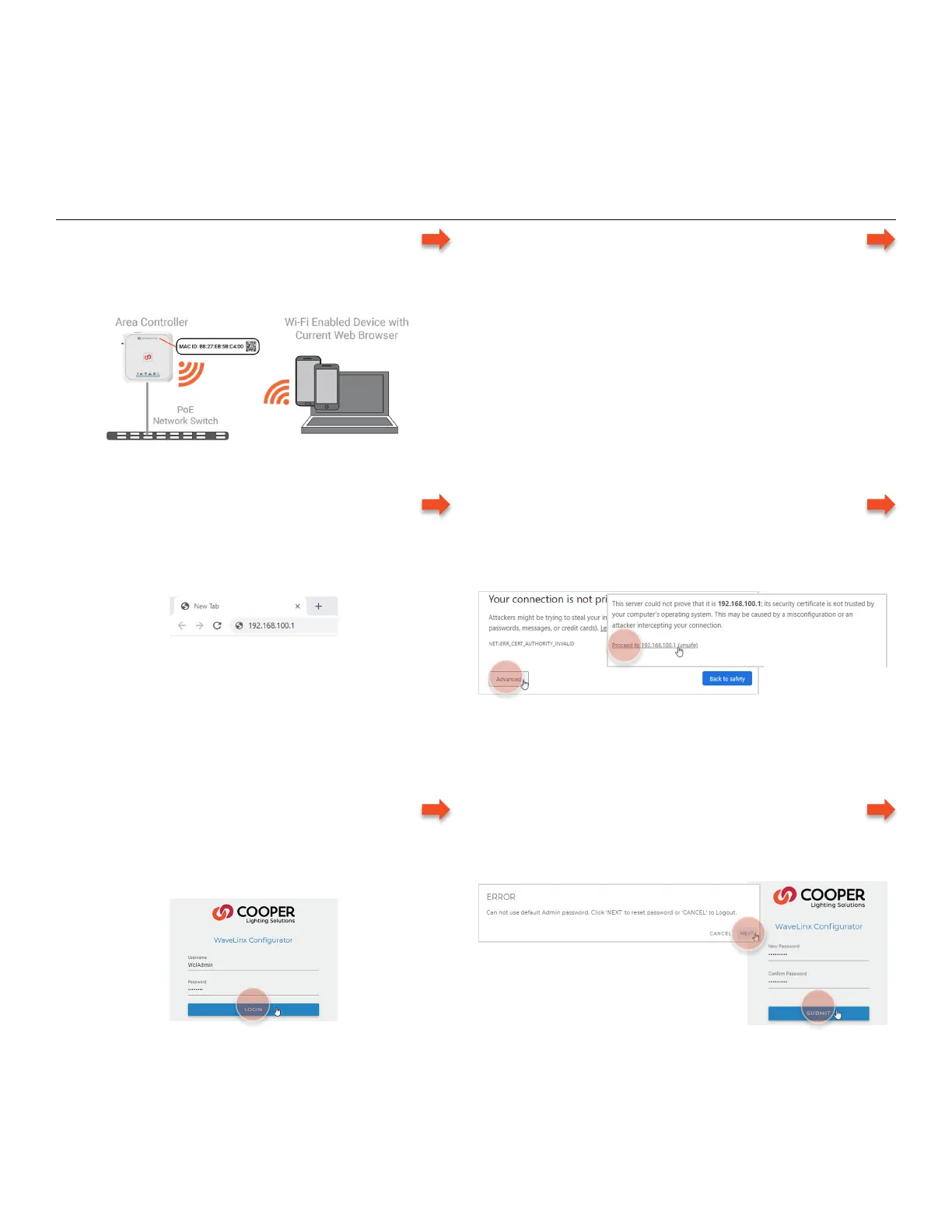
Step 1: Initial Login Configuration - WaveLinx Area Controller
– Prepare for Wi-Fi Connection
• Turn on the device’s Wi-Fi and bring it within the Area
Controller’s range (150 feet). Make note of the Area
Controller’s MAC address.
– Connect to the Area Controller’s Wi-Fi Access Point
• Display the available Wi-Fi networks. Select the network,
Cooper-XXXXXXXXXXXX, where X is the MAC address on
the controller’s label. Enter the password and select next.
• initial login password: wclAdmin
• after initial login: assigned password
– Open a Web Browser and Access the WaveLinx Area
Controller IP Address
• Open a current web browser and enter the Area
Controller’s default IP address 192.168.100.1 in the
address bar.
– Bypass Warnings and Proceed to the Site
Needed only for Initial login or if browser cache is cleared.
• Bypass any warning messages. Select to proceed to the
site.
(continued
– Login to the WaveLinx Configurator Webpage
Needed for initial login only.
• Enter the admin username, WclAdmin, the default
password, wclAdmin, and then select Login.
– Update the Password
Needed for initial login only.
• Follow the prompts to set a new password.
Continued on next page
different in other
browsers. Locate option
to proceed to the site.
Any future login activity will require the use of the
assigned password.



 To Next Page