WaveLinx Networked Relay Panel Quick Start (Version 15)
www.cooperlighting.com 7
(continued)
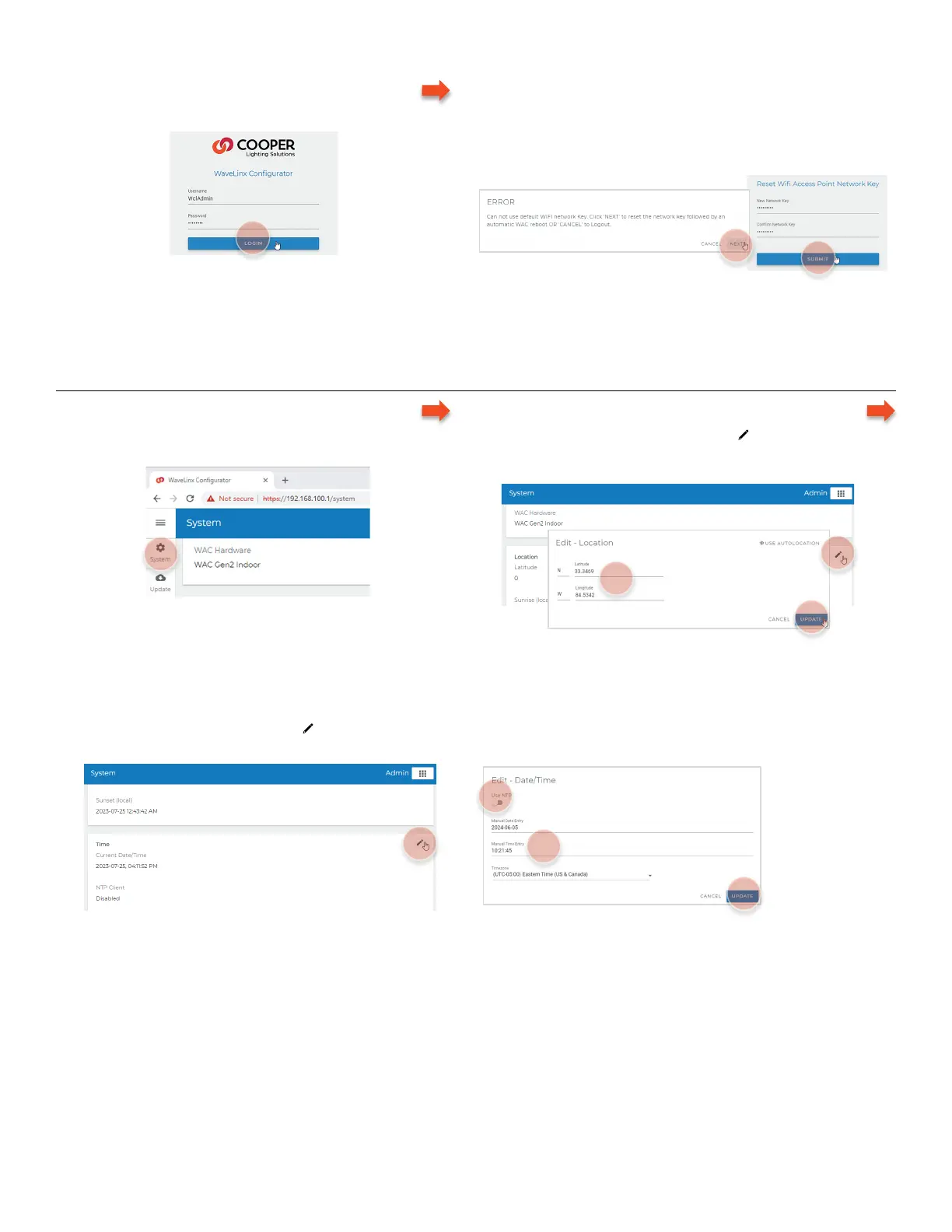
7 – Login to the WaveLinx Configurator Webpage
• Login as WclAdmin using the assigned password.
8 – Update the Wi-Fi Access Point Network Key
Needed for initial login only.
• Follow the prompts to set the Wi-Fi network key
(password).
The WaveLinx Area Controller will reboot. Wait about one minute. Reconnect to the Wi-Fi Access Point using the new password.
Step 2: Set the WaveLinx Area Controller Clock
– Login
• Login to the WaveLinx Configurator webpage and
select system.
– Set the Latitude and Longitude
• In the location section, select edit and enter the latitude
and longitude for the location and select update to save
changes.
– Set the Time and Time Zone
• In the time section, select edit , deselect use NTP and enter the current date, time, and time zone where the facility is
located. Select update to save changes.
Any future Wi-Fi Access Point connections will require
the use of the assigned network key (password).



 To Next Page