WaveLinx Networked Relay Panel Quick Start (Version 15)
www.cooperlighting.com 8
Step 3: Set the WaveLinx Area Controller IP Address
The WaveLinx Area Controller is set to use DHCP by default. If using a DHCP server, IP configuration is not necessary unless requested
to assign a static IP address. If DHCP is not being used, assign a static IP address using the following steps:
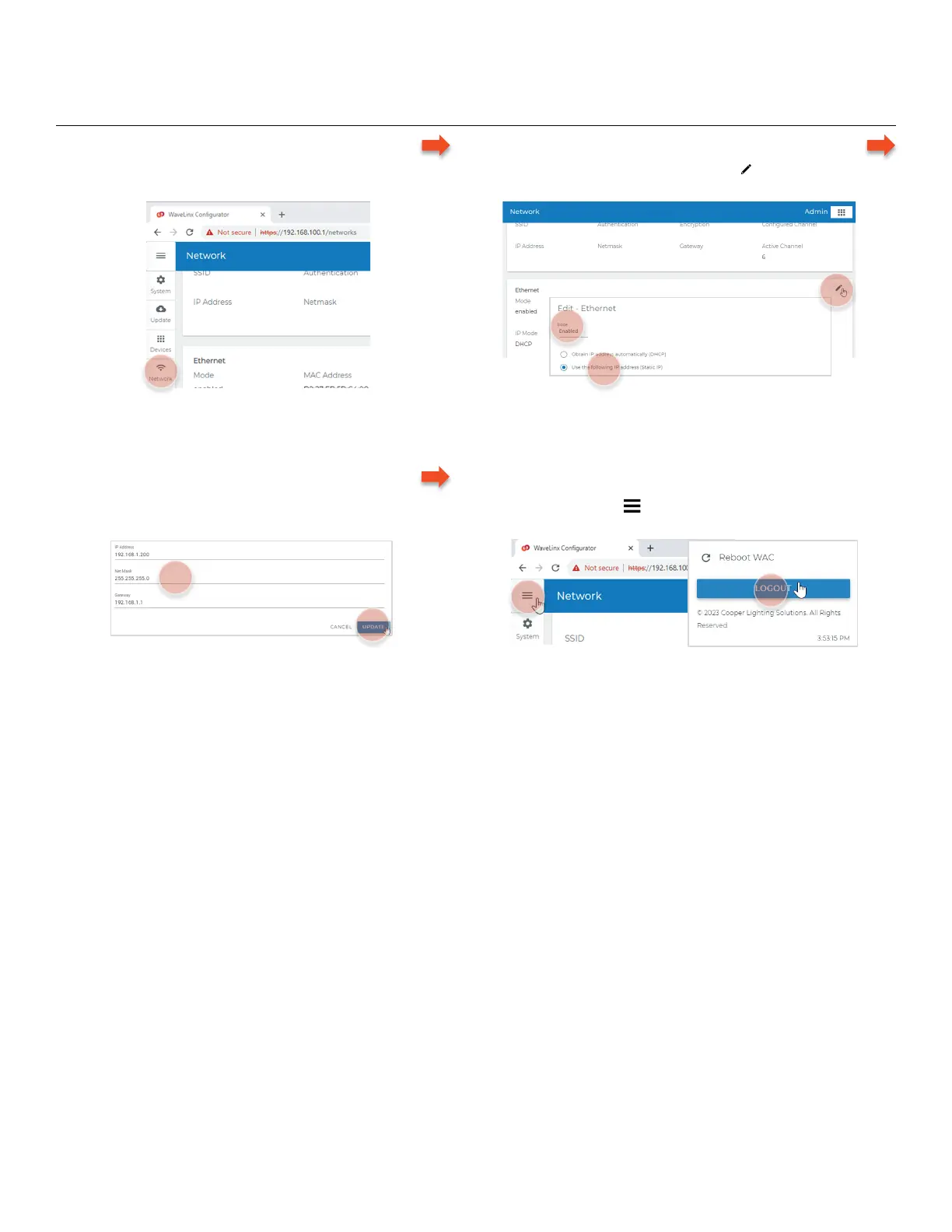
– Login
• If needed, l
ogin to the WaveLinx Configurator webpage
and select network.
– Enable and Select IP Address Method
• In the Ethernet section, select edit , set mode to enabled,
and then select Use the following IP address (Static IP).
– Enter IP Address Information
• Enter the desired IP address, net mask, and gateway
and then select update to save changes.
– Logout of the WaveLinx Configurator
• From the menu , select logout and then close the web
browser.



 To Next Page