2FT
1-3-38
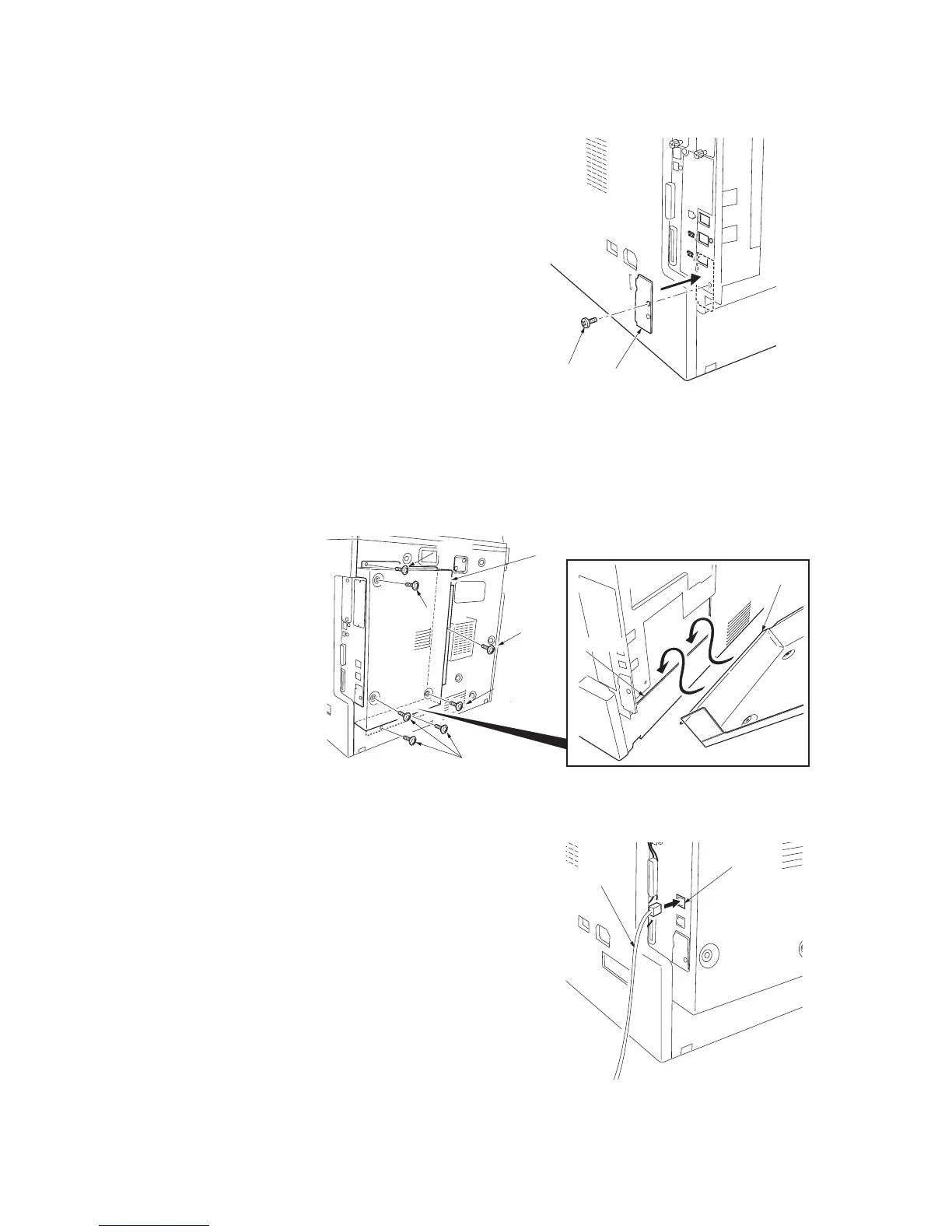
Attach the modular cover.
16. Attach the modular cover that has been
removed by Procedure 8 with the screw to
the position shown in the illustration.
Figure 1-3-73
Install the shield cover.
17. Insert the lower part of the shield cover that
has been removed by Procedure 7 into the
shield box and then attach it with the six
screws and TP tap tight screw M4 x 6 to its
original position.
Figure 1-3-74
Connect the telephone line to the line terminal.
18. Insert the modular connector cable to the
line terminal to connect it to the telephone
line.
For 120 V specifications, use supplied mod-
ular cord B.
Figure 1-3-75
Screw
Modular cover
Screw
Screws
Shield cover
TP tap tight
screw M4 x 6
Screw
Screw
Lower part
Shield box
Line terminal
Modular connector cable



 To Next Page