- 4 -
Chapter 2: Getting to know your system
System Overview
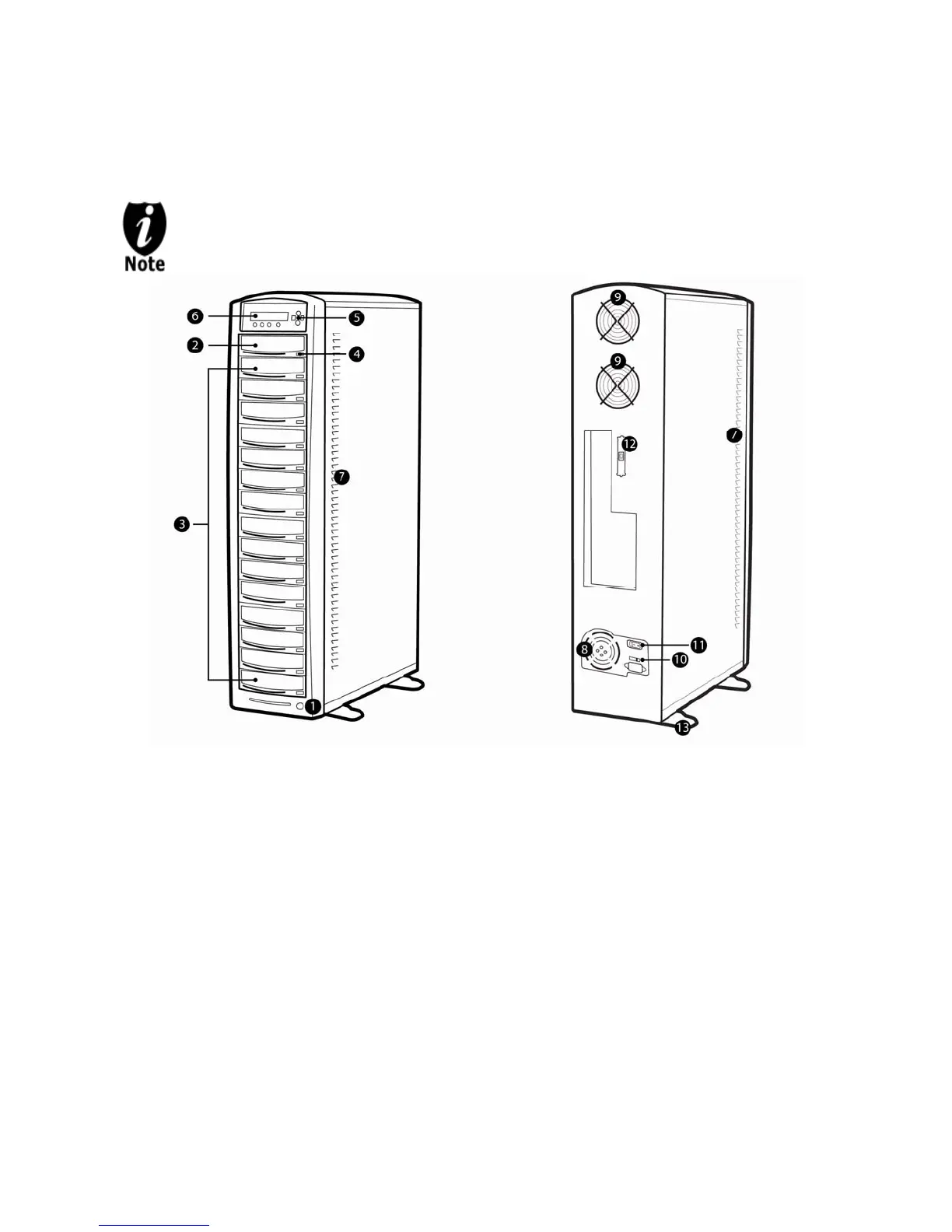
The below image is one representation of the duplicator casing. Your case’s outlook
may vary but will have similar principles.
Figure 1-1 System Controls and Display
The components shown in Figure 1-1 are:
1. System Power On/Off Button
2. Optical Disc Reader
(Referred to as “Reader” throughout this manual)
3. Optical Disc / LightScribe Label Writers
(Referred to as “Writer” throughout this manual)
4. Eject Button
5. Keypad
6. LCD Screen
7. System Ventilation Vents
8. Power Supply Fan
9. Ventilation Fans
10. Power Voltage Switch (110v/220v) (not available on all models)
11. Power Supply On/Off Switch (not available on all models)
12. USB/Firewire Connection (not available on all models)
13. Stability Feet (not available on all models)



 To Next Page