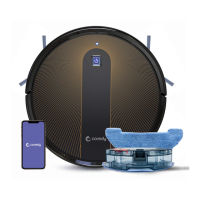
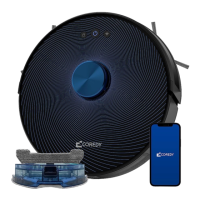
The Coredy R600 is a robotic vacuum cleaner designed for indoor use, offering automated cleaning and programmable scheduling. It is suitable for various floor types and features multiple cleaning modes to adapt to different needs.
Function Description
The Coredy R600 is an autonomous cleaning device that navigates and cleans floors without direct human intervention. It can perform automatic cleaning in a random pattern, ensuring thorough coverage of an entire level of a home. The robot is equipped with sensors to detect obstacles and avoid drops, making it suitable for homes with balconies (provided a physical barrier is in place). When its battery runs low, the robot automatically returns to its Charging Dock to recharge. Users can also manually direct the robot using a remote control.
Key functions include:
- Automatic Cleaning: Cleans in a random pattern, touching up around room edges, chair legs, and other furniture. It returns to the Charging Dock to recharge when the battery is low and after completing a cleaning cycle.
- Spot Cleaning: Intensely cleans a localized area by spiraling outward about 3 feet (1 meter) in diameter and then spiraling inward. This mode boosts vacuum power for concentrated cleaning of debris.
- Edge Cleaning: After cleaning open areas, the robot cleans along walls and around furniture legs. A quicker edge cleaning can be initiated via the remote control.
- Single Room Cleaning: Cleans a single room intensively for 30 minutes. This mode requires confining the robot to the specific room by closing the door.
- Manual Cleaning: Allows users to direct the robot to a particular area using directional buttons on the remote control.
- Scheduling: Users can customize cleaning schedules through the remote control, allowing the robot to clean at predetermined times.
- Automatic Re-charging: The robot automatically returns to its Charging Dock when the battery is low.
Important Technical Specifications
- Product Model: R600
- Input: 19 V ⎓ 0.6 A
- Battery Voltage: DC 14.4 V
- Power Consumption: 28 W
- Battery Type: Li-ion 2600 mAh
- Dust Collector Capacity: 0.55 L
- Cleaning Time: Max. 120 minutes
- Charging Time: 300-360 minutes
- Vacuuming Cleaning Suction: 600Pa (default), can be increased to 1600Pa via remote control.
- Boost Intellect Technology: Increases suction to 1000Pa when a carpet is detected, returning to normal suction off the carpet.
- Charging Dock Output: 19 V ⎓ 0.6 A
- Remote Control Batteries: 2 x AAA battery (included).
- Charging Dock Placement: Requires at least 2 meters (6 feet) in front and 1 meter (3 feet) on both sides of the dock for optimal operation.
- Remote Control Range: Limited workable range distance is 5m/16.5ft.
Usage Features
The Coredy R600 is designed for user-friendly operation with several features enhancing its usability:
- Indicator Light: Provides visual feedback on the robot's status:
- Blue: Cleaning, standby, or full charging.
- Orange: Self-charging and standby under low power.
- Blinks Orange: Charging.
- Off: Sleep mode.
- Red (or blinks red with sound alarm): Troubleshooting.
- Power On/Cleaning Button: Press and hold to power on/off; press to start cleaning.
- Remote Control: A comprehensive remote control allows users to:
- View mode and time on a display screen.
- Initiate automatic cleaning or automatic re-charging.
- Control direction.
- Set the clock and cleaning schedule.
- Select spot cleaning, edge cleaning, or single room cleaning.
- Adjust cleaning suction power (600Pa to 1600Pa).
- Start/pause cleaning.
- Pre-cleaning Preparation: Users are advised to pick up objects like clothing, loose papers, cords, and fragile items to prevent the robot from getting stuck or pulling objects off surfaces.
- Balcony Safety: A physical barrier is recommended for rooms with balconies to ensure safe operation.
- Charging Dock Setup: The Charging Dock should be placed on a hard, level surface against a wall, in an open and uncluttered area. Excess wire should be tucked into the trunking at the bottom of the dock to prevent the robot from getting stuck.
- Side Brush Installation: Side brushes attach to the bottom of the robot by pressing them into slots until they click.
- Activation: The robot is activated by placing it on the Charging Dock, ensuring metal charging contacts align. An initial use requires switching on the power button on the bottom of the robot.
- Pause Function: Cleaning can be paused by pressing the power button on the robot or the pause button on the remote control. Resuming cleaning is done by pressing the button again.
- Power Off: To end a cleaning cycle and put the robot in standby mode, press and hold the power button until the indicators turn off.
Maintenance Features
Regular maintenance is crucial for the Coredy R600 to ensure peak performance and longevity. The manual provides clear instructions for various care procedures:
- Emptying Robot's Bin:
- Press the dust bin release button to remove the bin.
- Open the dust bin door to empty it.
- Recommended after each use.
- Cleaning Robot's Filter:
- Remove the filter by grasping the white tab.
- Shake off debris by tapping the filter against a trash container.
- Recommended once per week (twice per week in homes with pets).
- Replacement Frequency: Every 2 months.
- Cleaning Robot's Side Brush:
- Remove the brush.
- Clean the brush and the brush stand.
- Reinstall the brush.
- Recommended once per month.
- Cleaning Robot's Cliff Sensors and Charging Contacts:
- Wipe the robot's cliff sensors with a clean, dry cloth.
- Wipe the charging contacts on both the robot and the Charging Base with a clean, dry cloth.
- Recommended once per month.
- Cleaning Robot's Floor Tracking Sensor:
- Use a clean, dry microfiber or soft cotton cloth to wipe any debris from the round sensor opening on the right side of the bottom surface.
- Do not spray cleaning solution directly into the sensor entrance.
- Recommended once per month.
- Cleaning Robot's Rolling Brush:
- Pull on the release tabs to unlock the brush guard.
- Lift the rolling brush to remove it.
- Clean the rolling brush with the provided cleaning tool or a vacuum cleaner.
- Reinstall the rolling brush by inserting the fixed protruding end first and then clicking into place.
- Press down to snap the brush guard into place.
- Recommended once every 4 months (once every 3 months in homes with pets).
- Replacement Frequency: Every 6-12 months.
- Battery Care:
- Always keep the robot charged on the Home Base when not in use to extend battery life.
- For long-term storage, remove the battery and store the robot and battery in a cool, dry place.
- Battery Removal/Reinstallation: Unscrew the battery door and two screws, remove the battery, place tape over metal charging contacts if shipping, and reinstall with the battery label and tabs facing up. Take care not to pinch the side brush when reinstalling the battery door.
- Battery Disposal: Contact local waste management for recycling.
- Battery Replacement: Purchase replacement batteries from Coredy's website.
- Troubleshooting: The manual includes a troubleshooting guide for common issues, with indicator light signals (red blinks/lit) and corresponding solutions. It also provides instructions for rebooting the robot.
- Customer Service: Contact information for US and UK customer support (phone and email) and the company website are provided for assistance with replacement parts or unresolved issues.

 Need help?
 General

 To Next Page