7
3. Installing Computer Software
You can install OTSView on a computer for data post-processing. Use the
CD-ROM that came with your OV-1000 and follow the instructions.
To install OTSView on a computer:
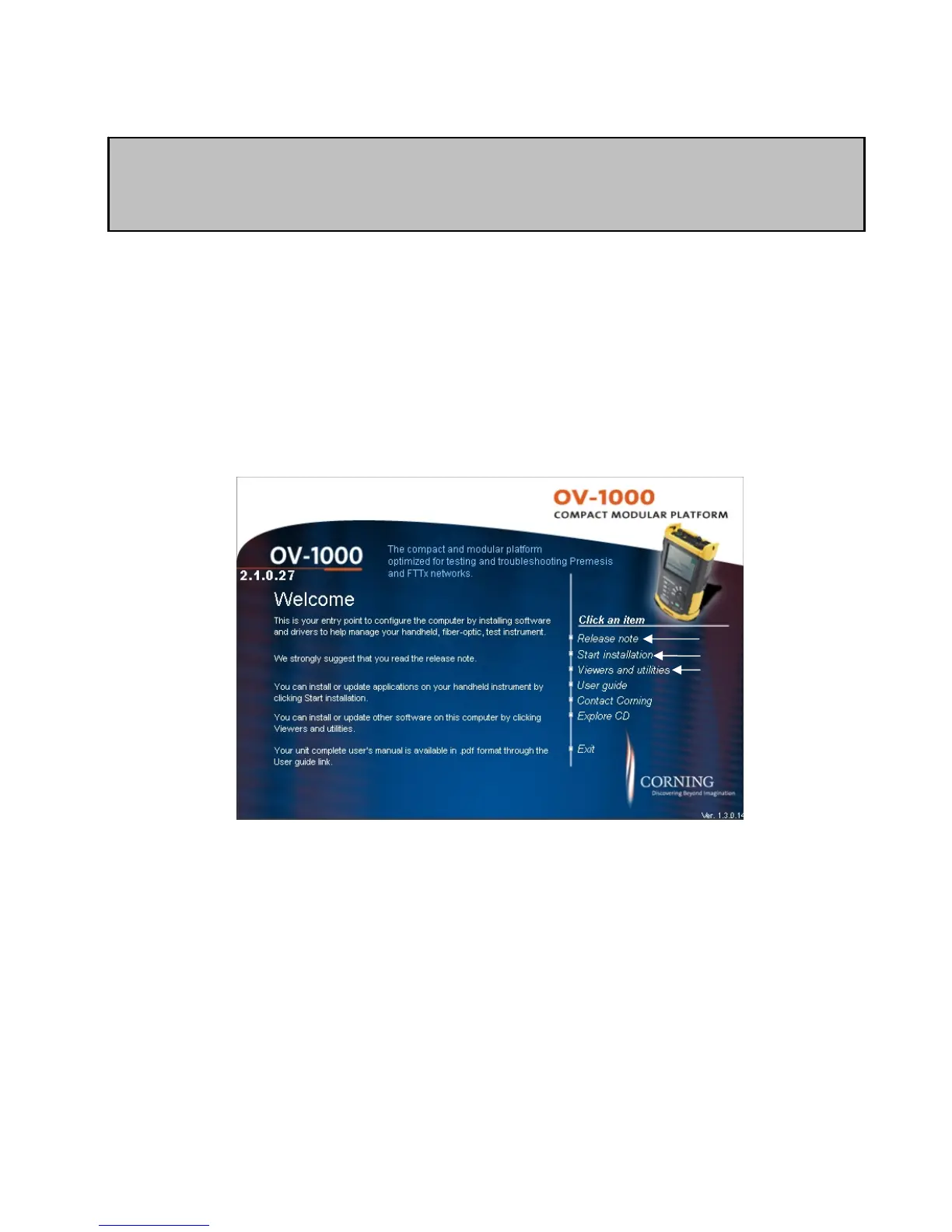
Insert the installation CD in the CD-ROM drive. The CD should autoload to a menu
screen, if not load the CD by clicking on my computer and selecting the CD-ROM/DVD
drive. At the menu screen select the link to the RELEASE NOTE. Once the RELEASE
NOTE has launched please print the instructions and follow each step. Failure to
follow these instructions will result in lack of communication between the
device and computer.
Figure 4. Auto Mode – OTDR tab
1. Release note link. Click on the link to open the release notes. Again please print
the release note and follow the directions to avoid any communication issues.
2. Start Installation link. Clicking on this link will start the process of installing the
required software on your computer. Please note that it will not install the trace
viewing software. That software is in the Viewers and Utilities links.
3. Viewers and Utilities link. Click on this link to install the trace viewing software
and other programs such as Adobe Acrobat.
IMPORTANT
• Plugging the unit into the computer without installing the software first
will result in driver errors.
1.
2.
3.


 To Next Page