6
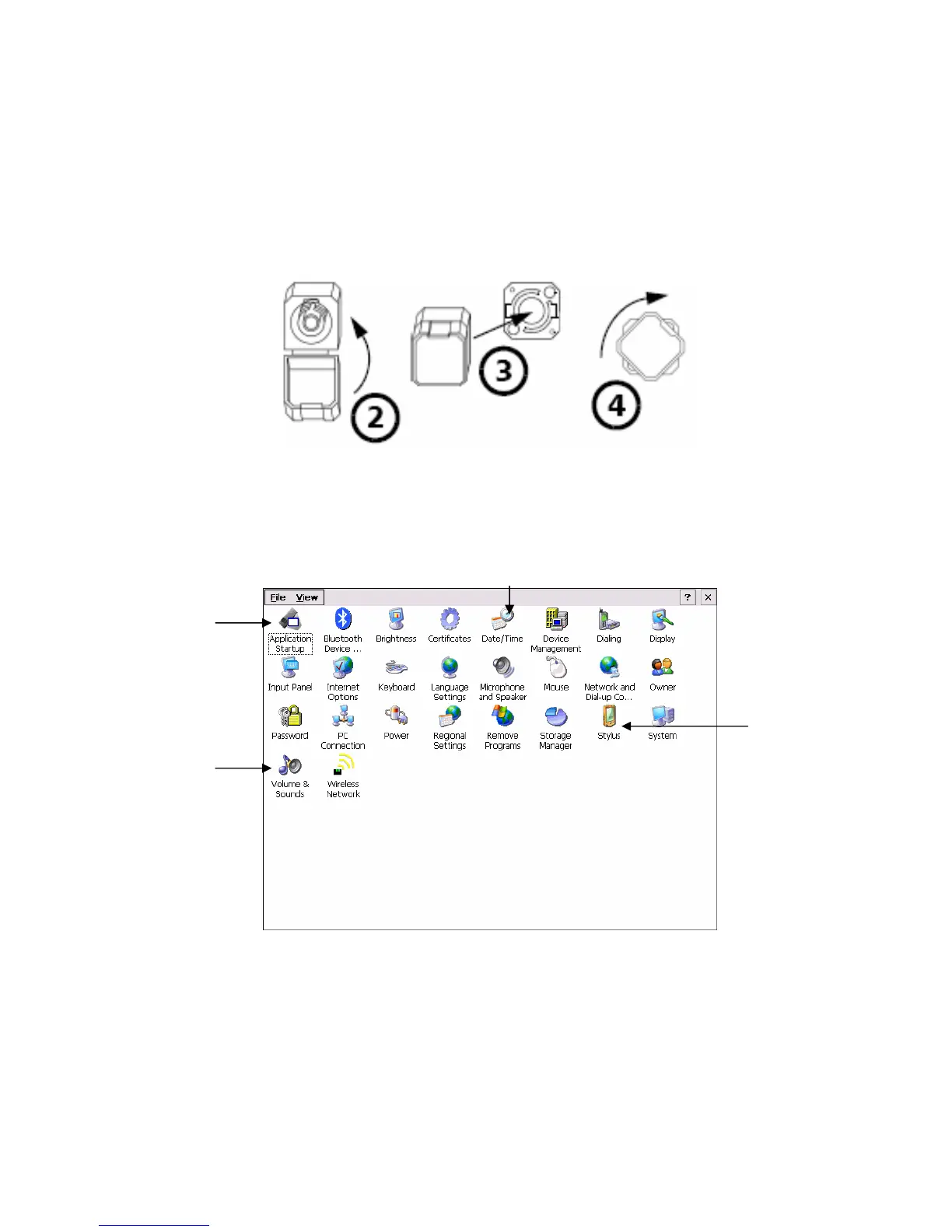
2d. Installing the Universal Interface (UI) adapter
1. To install a UI connector adapter onto the UI baseplate begin by holding the UI
connector adapter by the base and not the cap. The cap will break off if you
twist the adapter by the cap.
2. Close the dust cap in order to hold the connector adapter more firmly.
3. Align keys and insert the connector adapter into the base plate.
4. While pushing firmly, turn the connector adapter clockwise on the base plate to
lock it in place. To remove turn counterclockwise.
2e. Environmental Settings for the OV-1000
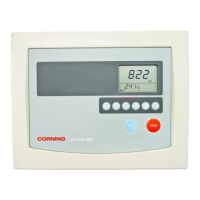
To setup your OV-1000 press the Setup button in the main menu on the start-up
screen. There are several things you can setup, but we are only going to point out a
few important things in the screenshot below.
Figure 3. Auto Mode – OTDR tab
1. Date/Time icon. Select icon to set date and time for unit.
2. Application startup icon. Select icon to setup modules to load on startup.
3. Volume & Sounds icon. Select icon to set volume and sound types.
4. Stylus icon. Select icon to calibrate stylus.
3.
2.
1.
4.


 To Next Page