23
9.0 Using the probe to inspect a connector
The OV-1000 has an optional video inspection probe which can be used to visually
examine a connector endface. The probe allows you to look for connector damage or
dirt. The probe can also view through a bulkhead adapter to see the endface of a
connector in the backbone/rear of a patch panel. All you have to do is plug in the
probe in the probe port on the right side of the OV-1000 and launch the probe
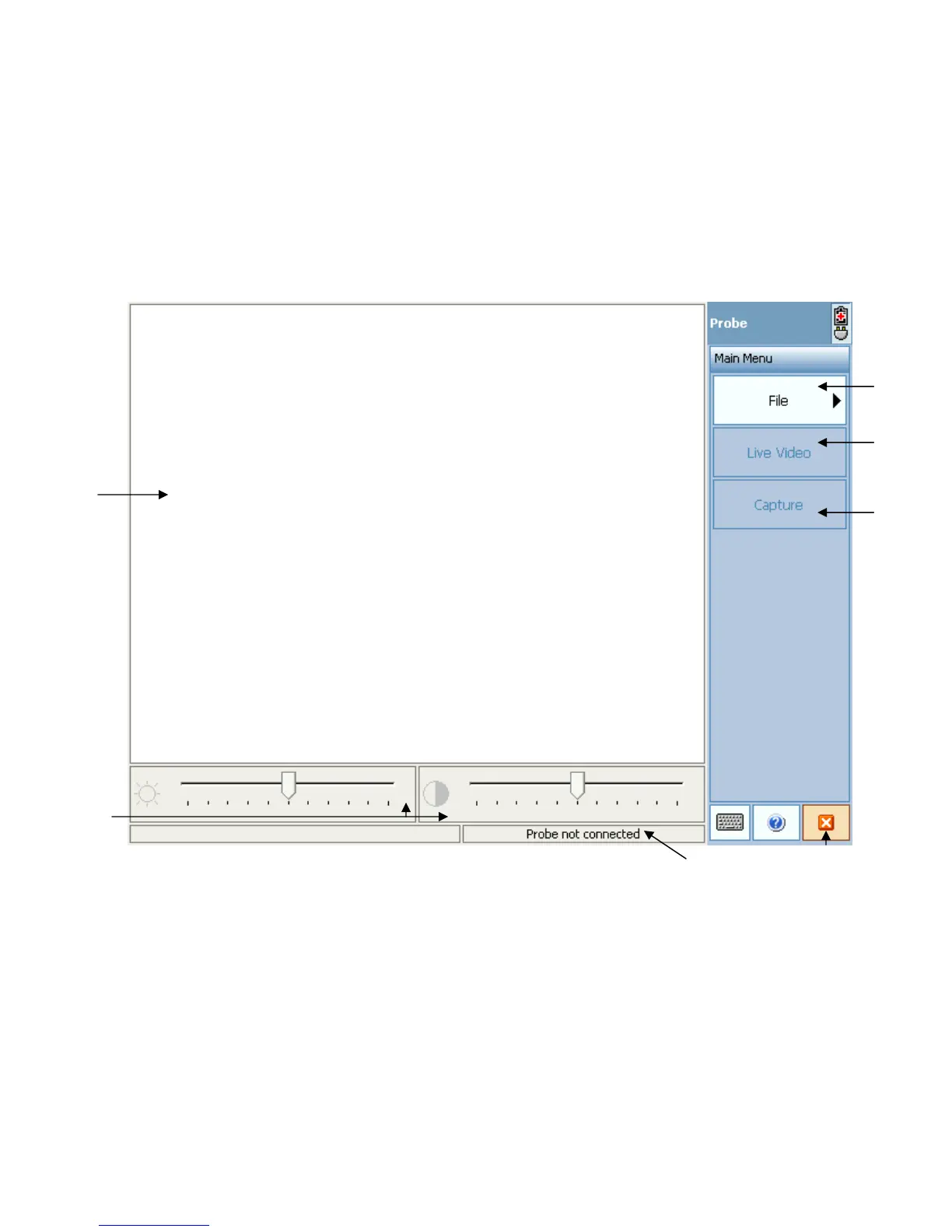
module from the main menu. At this point the following screenshot appears. There
are two options when inspecting: real time/live video and capturing a snapshot of the
endface.
Figure 20. Probe inspection screen
1. Endface viewing window. The image of the endface appears in this window.
2. File button. Press this button to save and manage your endface screenshots.
3. Live video button. Press this button for live video feed of the endface.
4. Capture screenshot button. Press this button to capture a photo/screenshot of
the endface.
5. Brightness and contrast bars. Adjust the brightness and contrast with these bars.
6. Probe status window. This window says whether a probe is connected or not.
7. Exit probe application button.
Note: Probe must be connected before launching the module.
3.
4.


 To Next Page