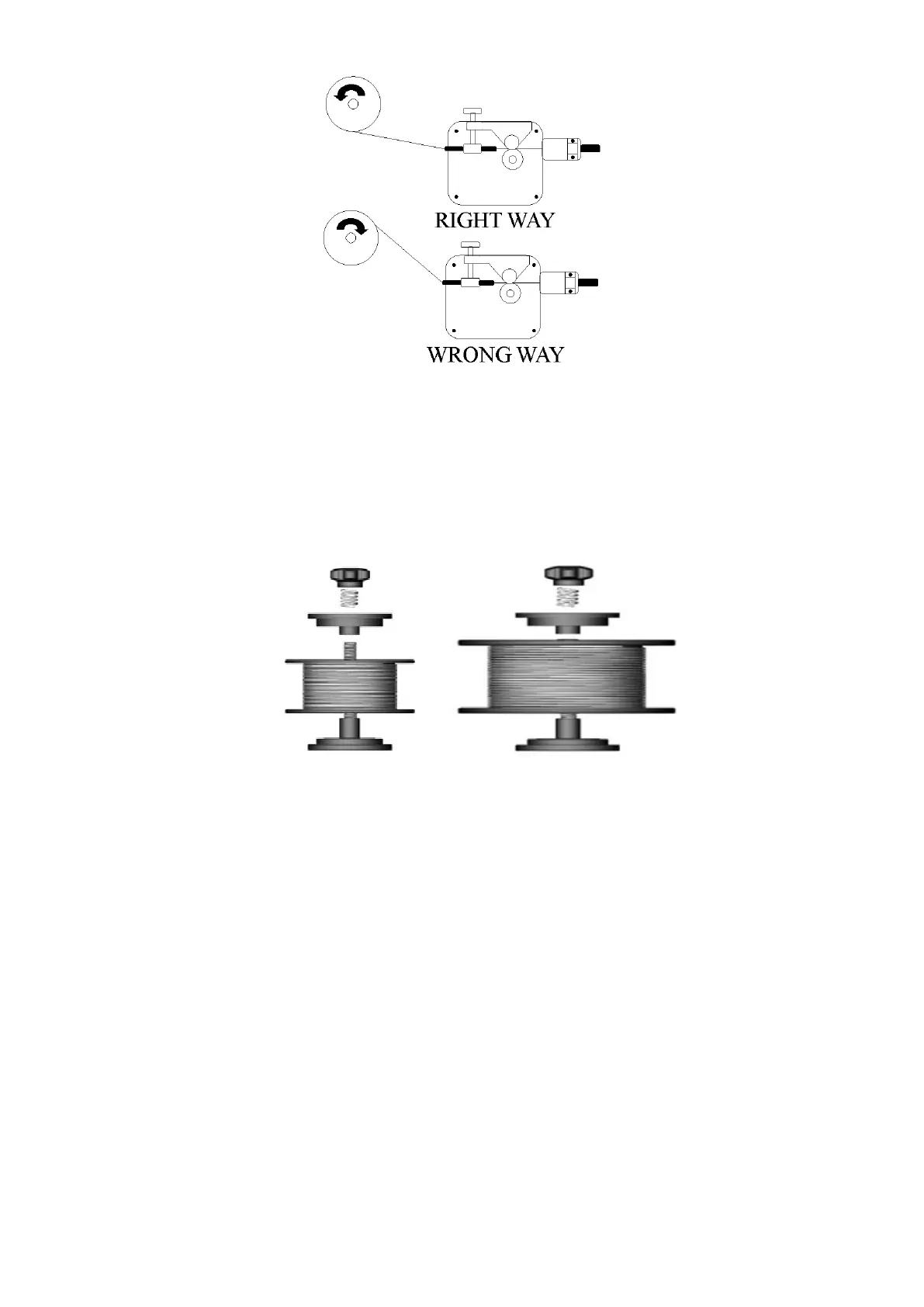
Figure 4
5.2.5 The welder can use either 4 inch or 8 inch spools. See Figure 5 for
additional reference. The wing nut controls the tension on the spool.
Figure 5
5.2.6 Setting the wire spool tension. a) Turn the spool of wire with one hand.
b) Increase the spool tension by tightening (turn clockwise) the wing
nut while turning the spool. Turn the spool while tightening the wing nut
until the spool slows down and you feel a slight drag. Stop tightening
the wing nut; you may need to repeat these steps until proper spool
tension is achieved.
5.2.7 If TOO MUCH tension is applied to the wire spool, the wire will slip on
the drive roller or will not be able to feed at all. If TOO LITTLE tension
is applied, the spool of wire will want to unspool itself when the trigger
is released. Readjust the spool tension using the wing nut as
necessary to correct for either problem.
5.2.8 With the welder disconnected from the power source, remove the
leading end of the wire from the spool. Hold on to it securely, so as
not to allow unspooling or tangling of the wire as it will result in tangled
wire and feeding problems.


 To Next Page