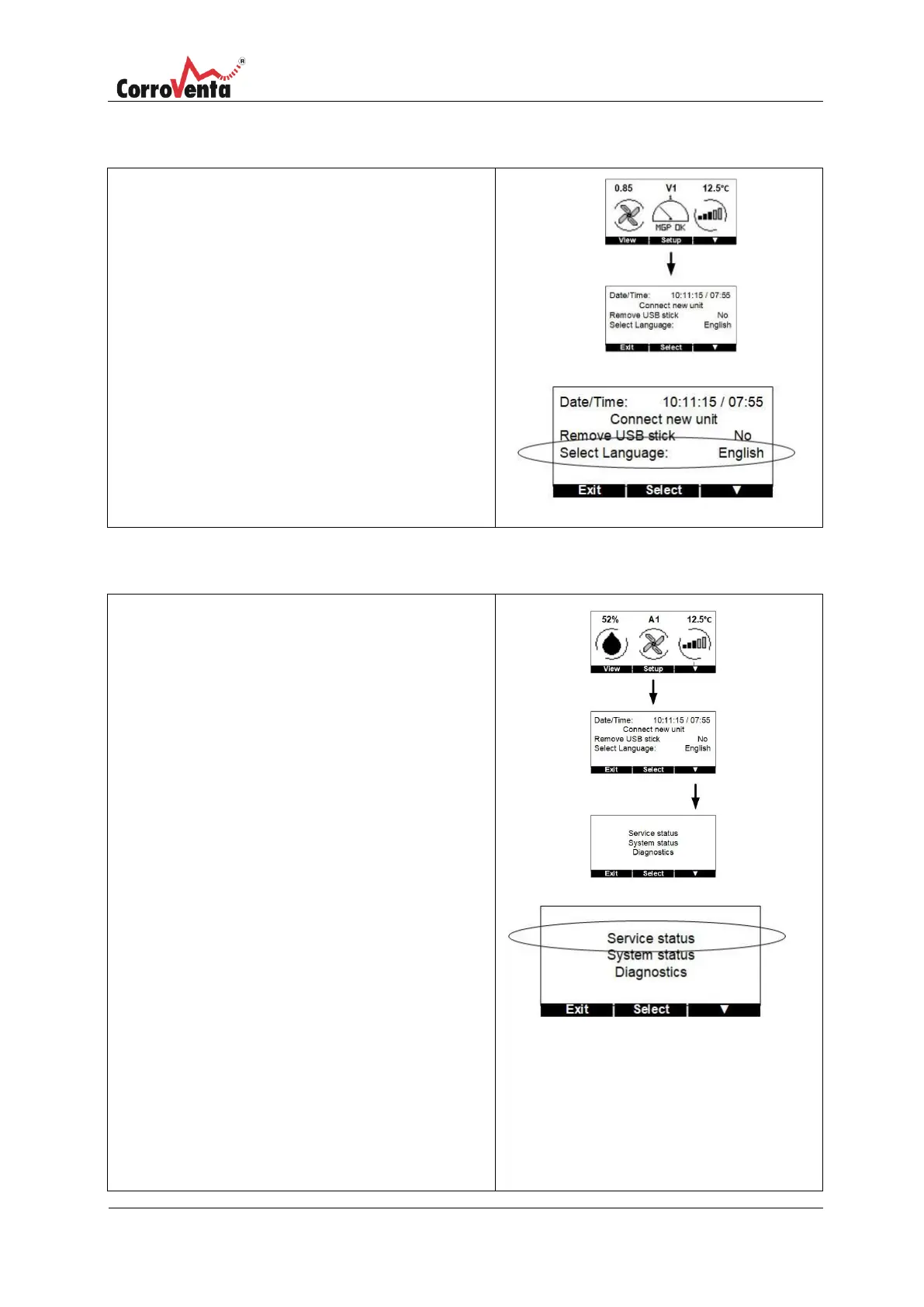
In status view, normal view, press <Setup> to get to
Administration view where "Select Language" can be
found.
Press <Select> which marks the first row,
Date/Time. Scroll down to ”Select Language”
using <▼>.
Press <OK>.
Use <▲> or <▼> to select the desired language.
Press <Save> and the language has now been reset.
In the status view, normal view, first press <Setup>
and then <▼> to get to the Service/System view.
In the Service/System view press <Select> to mark
the first row Service Status. Press <OK> to select this
function.
The system now presents a list of the paired units
and, for each of these, how many days remain until
service is required.
After a service has been carried out and the counter
should be reset, select <Modify> at the Time until
service presentation.
Then select the unit to be reset and press
<OK>.
To prevent unintentional resets, the system then
asks a confirmation question. If the intention was to
reset the counter for the selected unit, press <OK>.
Once the selection has been confirmed, a
confirmation is presented stating that saved changes
have been stored in the Control unit. If this
confirmation does not appear, the message has
not reached the unit. Repeat the procedure.


 To Next Page