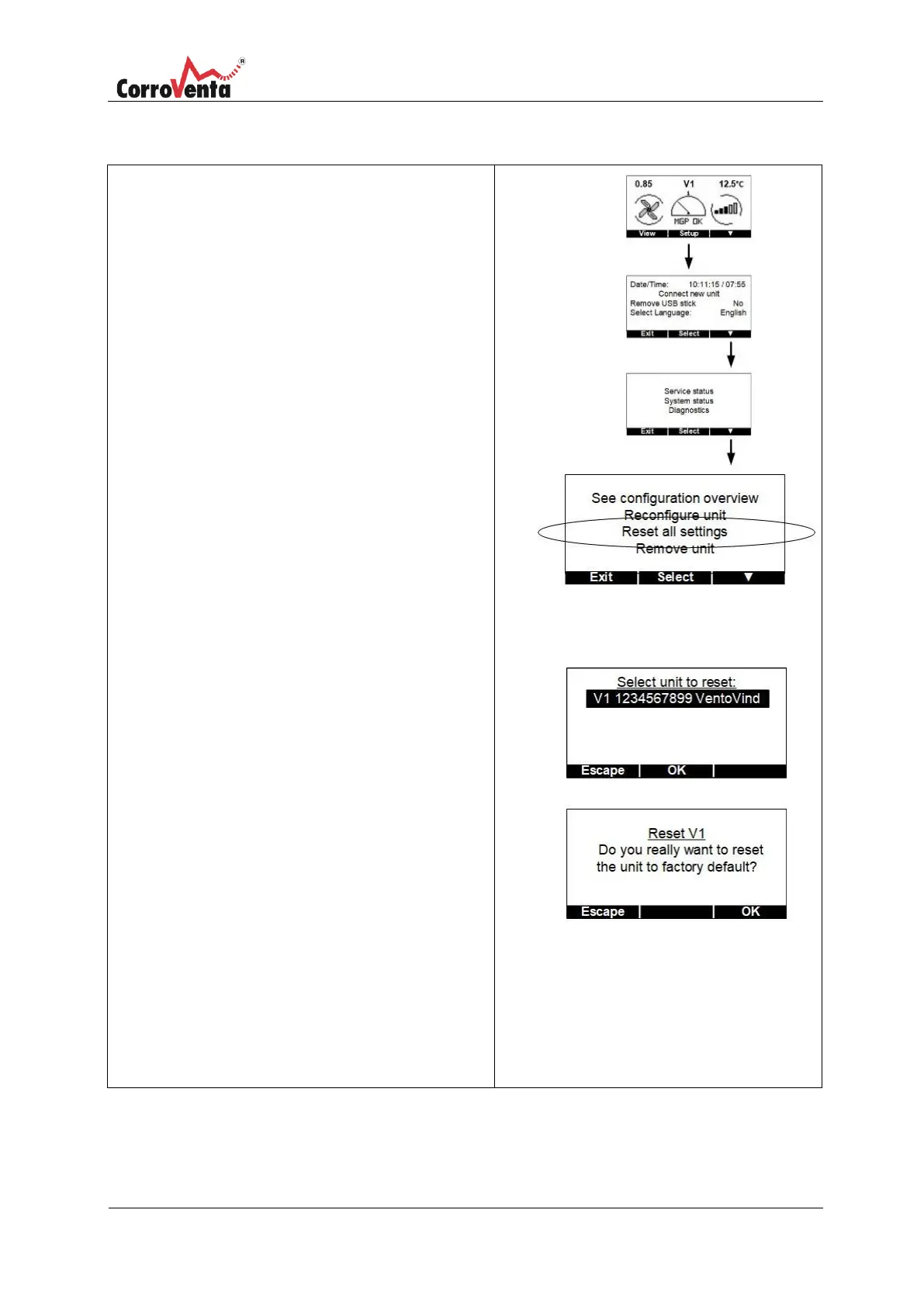
In the status view, normal view, first press <Setup>
and then <▼> twice to get to the Settings view.
In the settings view, press <Select> and then
<▼> so that the ”Reset all settings” row is marked.
Press <OK> to select this function.
The panel now asks the user to select the unit to be
reset. If required, press <▼> to scroll to the relevant
unit. If the relevant unit is already marked, press
<OK> to continue.
To prevent any unintentional changes, the user
confirms the selection and intention once more.
Press <OK> if everything is OK.
Factory configuration means:
For dehumidifiers that the unit uses fixed regulation
method with the setpoint 65% and hysteresis +/- 4%.
The alarm level is set to +10%, which means that the
alarm for high humidity is presented if the relative
humidity in the space is 79%.
For VentoVind™
Start level 1.1
If in doubt whether the change was saved or not, use
the function ”See configuration overview” to check
which settings are now applicable to the unit.


 To Next Page