COTES C35 OPERATING AND SERVICE HANDBOOK page 47/71
First setup of PLC dehumidifier
The basic programs for Cotes dehumidifiers are ALWAYS ON and RH ON/OFF. You should choose
the program best suited to your needs. The ALWAYS ON program is the simplest – it runs the
dehumidifier at full capacity all the time. You should use this if you have an external hygrostat fitted
and do not need any additional functions, but wish to keep all the safety features of the PLC unit. The
RH ON/OFF program uses the room sensor (temperature and relative humidity) included with the
dehumidifier in order to maintain the target relative humidity and/or dew point at the place where the
sensor is located. For details on the other programs, please consult the extended PLC manual.
Step-by-step instructions about how to set up your dehumidifier for the RH ON/OFF program are
provided below:
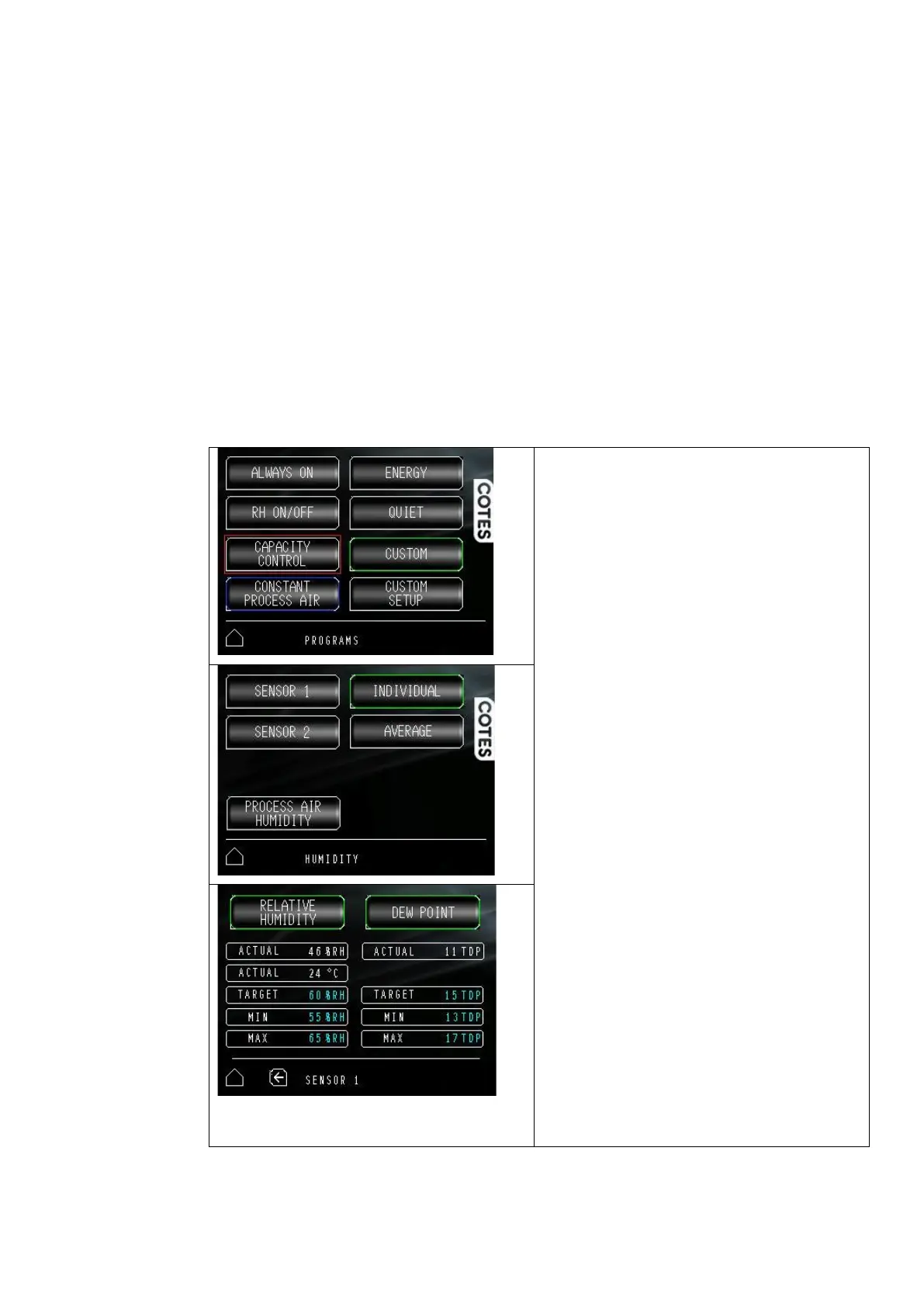
1. Go to the programs menu and choose the RH
ON/OFF program:
2. If you are not logged in, you will be asked for
the operator's code (1234). Enter this code and
press log in, then select the desired program
again.
3. Go back to Main menu
4. Select the target humidity level.
5. This shows settings for SENSOR 1
(and SENSOR2 if included)
6. Select SENSOR 1
7. Use this menu to select your control conditions
– relative humidity and/or dew point. You can
select the target value here as well as setting
the minimum and maximum values. The
dehumidifier will start working if the measured
value is above the maximum setting and will
stop when it measures a value below the
minimum setting. If you choose both control
conditions options, the dehumidifier will start
when either of the conditions are outside the
selected range, and will continue to work until
both measurements are again inside the
selected range.
8. You can go back to the main menu and start the
dehumidifier


 To Next Page