39
ver.071217-2.10
iLEARN System Manual
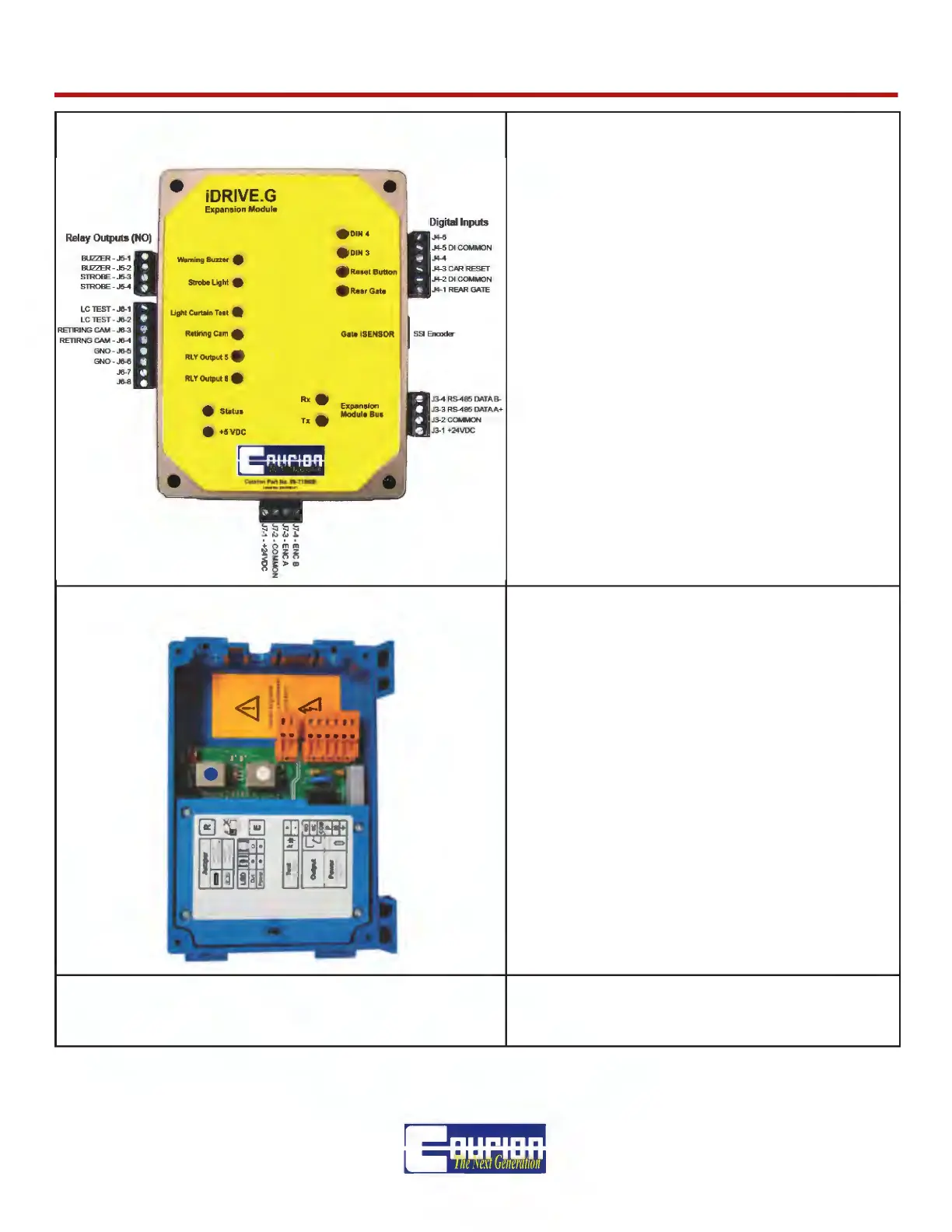
iDRIVE.G Expansion Module (CTEM) CTEM STATUS Light Codes
1 Flash - Normal Operation
2 Flash - Encoder Communication Error
3 Flash - iDRIVE.G Communication Error
REAR CAR GATE
All iDRIVE.G Car Top Controls are set up for
a FRONT Car Gate. If you have a REAR Car
Gate, remove the resistor from terminals C03
and C04 inside the iDRIVE.G VFD Control-
ler, and place a jumper between terminals
J4-1 and J4-2 entitled “Rear Gate” on the
iDRIVE.G Expansion Module.
Relay Output 5 - Gate Not Open
Relay Output 6 - Gate Open
CARE-C Light Curtain Wiring
CARE Light Curtain Power Supply
See CARE Light Curtain Wiring Schematics
and Installation Instructions for futher details.
SECOND LIGHT CURTAIN - If you have two
(2) Light Curtains per Car Gate Opening,
please remove the jumper between digital in-
putes LC1 and LC2 inside the iDRIVE.G VFD
Control.
NOT USED WITH COURION’S 2ND GENERATION
CEDES LIGHT CURTAINS WITH SYNC CABLE.
RESET BUTTON
Should an iDRIVE.G become locked due to 3
consecutive same errors, it can be unlocked
from the COP by pressing the Reset Button.



 To Next Page