28 February 2017 Operation and Maintenance
CY460_Operational_Manual_405 Page 41 of 218
2.0 Operating Basics
This section outlines the basics of operating the CY460 Sync Pulse and Test Pattern Generator. The
information is divided into the following sub-sections:
Front-Panel Controls and Indicators
Rear Panel Connectors
Operating Basics
2.1 Front Panel Buttons and Indicators
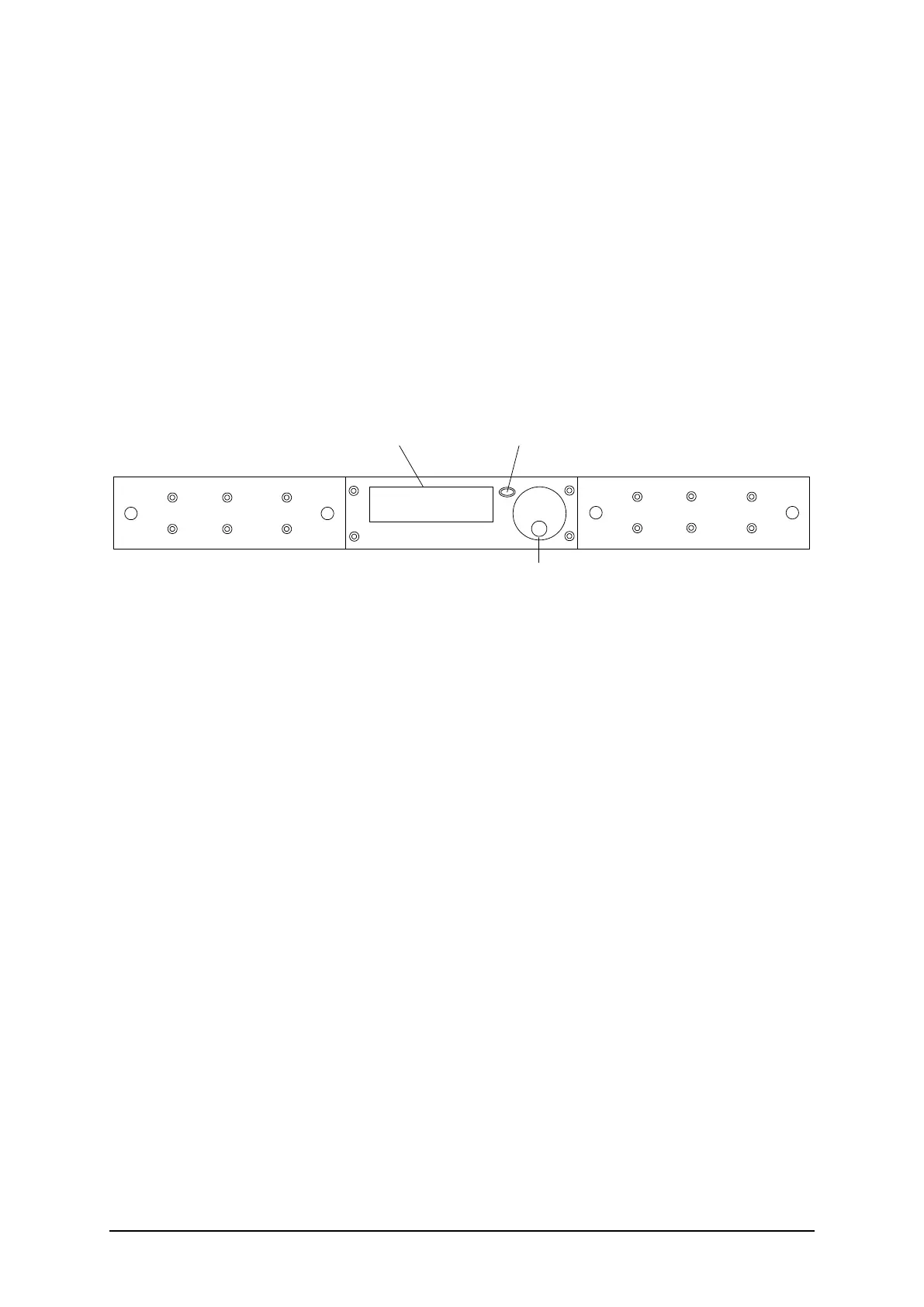
Figure 2.1 shows the CY460 Sync Pulse and Test Pattern Generator Front Panel. Descriptions of the
Front Panel controls and indicators appear below.
Courtyard
Blanking Plate
Blanking Plate
LCD Display
Rotary / Push Control
Back Button
CY460 SPG
Figure 2.1: CY460 Sync Pulse and Test Pattern Generator – Front Panel (Single Supply option)
CY460 Sync Pulse and Test Pattern Generator – Front Panel Controls and Indicators
LCD Display
The dot-matrix LCD display is used to show system status, fault indications, and
general in-use information, as well as being used to configure the Menu system items.
Rotary / Push Control
The Rotary / Push control has two functions:
the rotary function is used to navigate up or down items in a Menu, or to
cycle through a range of values relating to a Menu item,
the push function is used to confirm a Menu item selection for editing, to exit
Menu item editing, or take you “forward” to the next Menu item.
Selecting or editing Menu items requires you to turn the Rotary Control in order to
select or change the highlighted Menu item / setting, then to press the Rotary Control
to select or confirm that Menu item / setting. Pressing the Rotary Control will select
the highlighted Menu item for editing, exit Menu item editing, or take you to the next
Menu level. Note that there may be more Menu lines available than can be displayed
on the LCD screen; be sure to scroll down (or up) to find the required entry.
Ballistic Response
For some menu items, there may be many values to scroll though. In order to assist
in quickly accessing the required value(s), software monitoring the signals from the


 To Next Page