Before Using D2Before Using D2
4. Windows 98 Driver Setup
If you are using Windows 98 or 98 SE, you will need to install a separate driver when the player is
connected to the computer. Under windows XP, D2 is automatically recognized.
■
Installing Windows 98 Driver
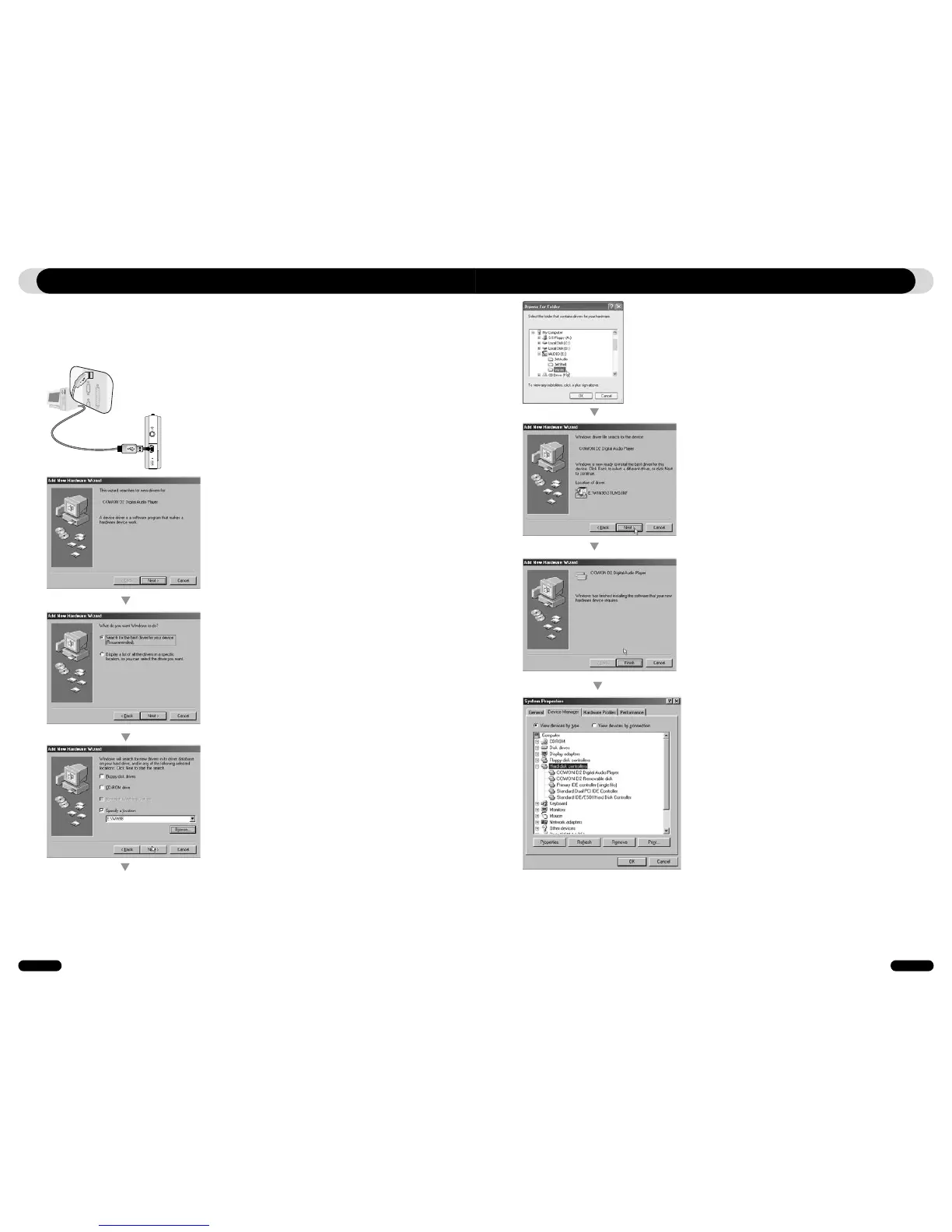
1. Connect D2 with a computer via USB cable
2. “Add New Hardware Wizard” will appear as
shown. Click “Next”.
3. Click “Search for the best driver for your device
(Recommended)”, and then click “Next”
4. Click “Specify a location” and click “Browse”
button.
5. Select “Win98” folder in the installation CD and
then click “Next” button. Drivers are also available
for download from www.COWON.com.
6. Once the drivers are recognized, click “Next”.
7. Continue to click “Next”
8. Click the “Finish” button to complete the driver
installation. The newly added drive can be seen in
Device Manager or Explorer.



 To Next Page