JetShell JetShell
Converting Audio CD Tracks to MP3 Files and
Downloading Them to COWON D2
With JetShell, you can easily convert your Audio CD into MP3 files and download them to COWON D2.
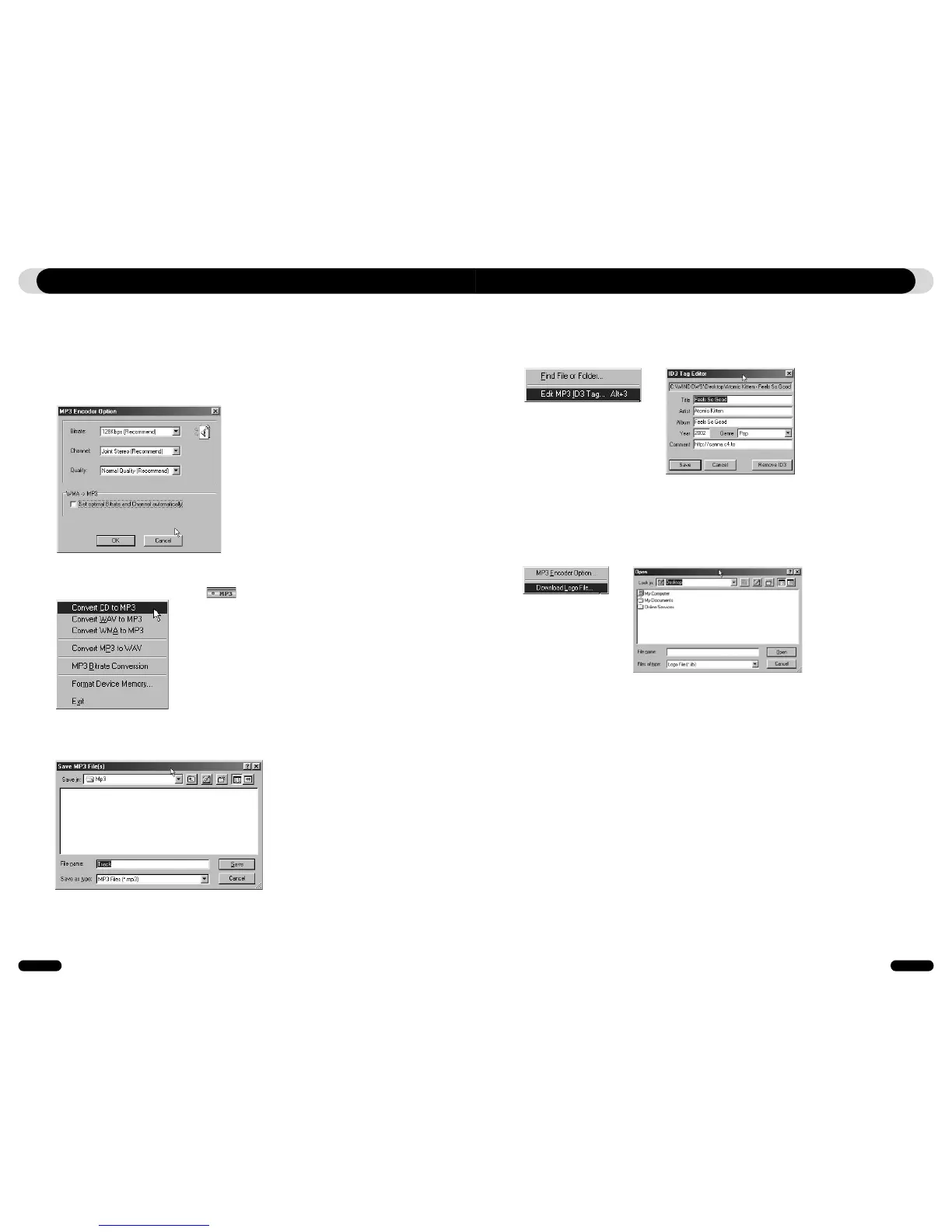
1. Before getting started, you must choose the quality of the MP3 files to create. Click [Setup] –[MP3 Encoder
Option] to set the desired bitrate of the MP3 files. (The files compressed in a high bitrate have a higher sound
quality and a bigger file size.)
2. From the File Management section, select the CD-ROM drive in which the Audio CD is inserted. Select the
audio tracks from the right window and click or [File] –[Convert CD to MP3] from the menu.
3. Specify the path to save the MP3 files in. Choose a folder in COWON D2 to directly download MP3 files onto
COWON D2.
2. Downloading Logo File
You can download a logo file to change the logo screen that appears when COWON D2 powers on.
Select [Download Logo File] from the menu. When the "Open" window appears, select the desired logo file and
click Open. Then the logo file is downloaded and applied.
1. Editing ID3 Tag
You can edit the ID3 tag of a MP3 file by selecting [Tools] – [Edit MP3 ID3 Tag] from the JetShell menu.
Other Features



 To Next Page