Basic OperationsBasic Operations
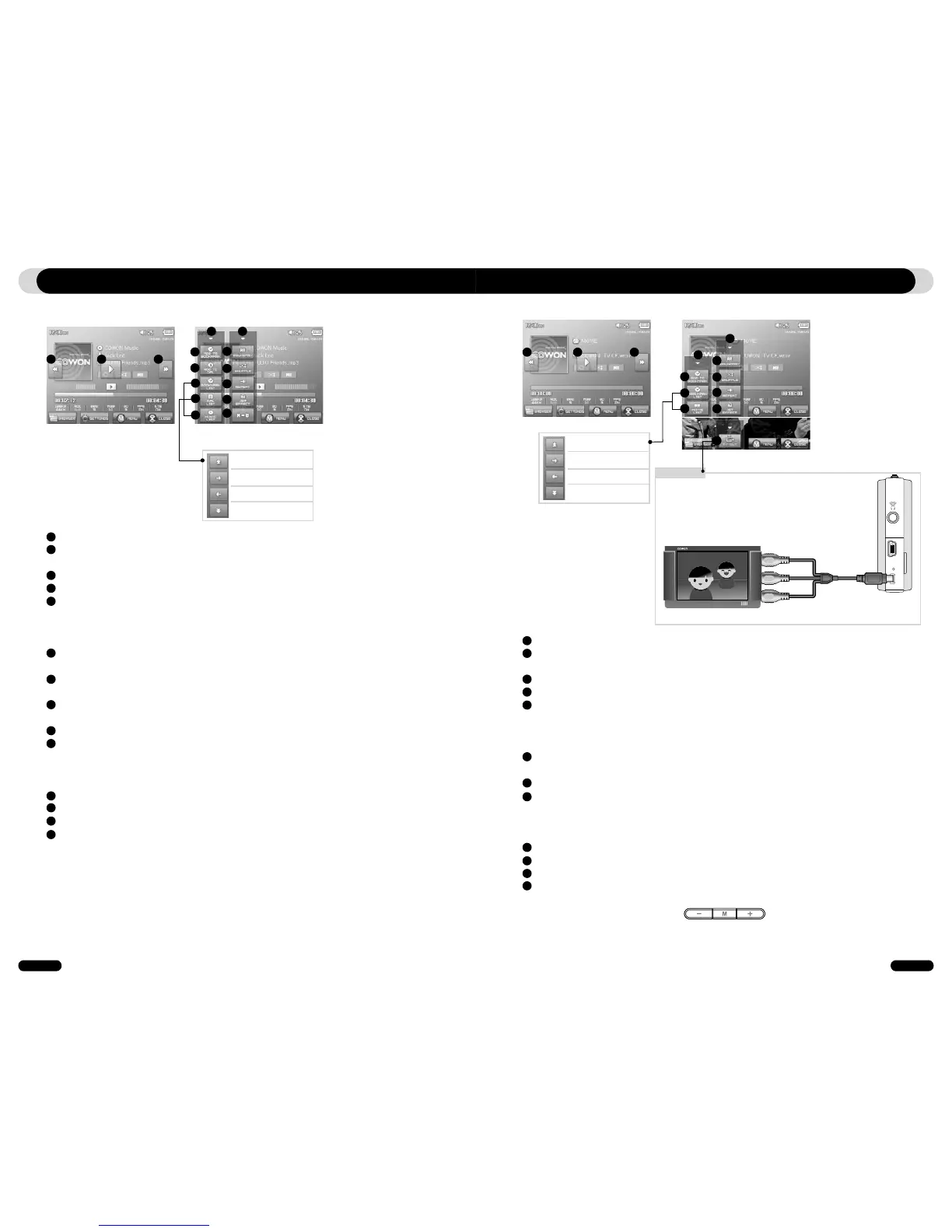
3. Music Mode
Selects the previous music track or rewinds the current track.
Plays a music file or pauses it.
If a file contains an ID3 tag with an image, it will display the image on the screen.
Selects the next music track or fast-forwards the current track.
Close the settings screen
Inserts bookmarks during the playback.
Once a bookmark is inserted at a specific point during a playback of music, it is possible to start
playback at that particular point.
Maximum of 256 files can be added to bookmark.
Adds the currently playing music file to a DPL (Dynamic Play List)
Maximum of 256 files can be added to DPL (Dynamic Play List)
Displays Bookmark list
Used to find and play back bookmarked music files
Displays Play List
Used to find and play music files in the DPL
Displays File Browser Mode
Sets the boundaries for playback
All : Plays all music files regardless of folder
1 : Plays the currently selected music track
Folder : Plays music files located within the current folder
Sets the random play mode
Sets the repeat play mode
Selects JetEffect settings
Sets the sectional repeat. It can play back in repeat mode a minimum 1 second-length section of
a track.
1
2
3
4
5
6
7
10
8
9
11
12
13
14
1 2 3
4 4
5
6
7
8
9
10
11
12
13
14
Move cursor upwards
Expand selected folder
Execute/run selected file
move to upper level folder
Move cursor downwards
Selects the previous video file or rewinds the current video file.
Plays a video file or pauses it.
A video file may not play properly if it has not been converted using jetAudio VX software.
Selects the next video file or fast-forwards the current video file.
Closes the settings screen
Inserts bookmarks during the playback.
Once a bookmark is inserted at a specific point during a playback of music, it is possible to start
playback at that particular point.
Maximum of 256 files can be added to bookmark.
Displays Bookmark list
Used to find and play back bookmarked video files
Displays File Browser Mode
Sets the boundaries for playback
All : Plays all music files regardless of folder
1 : Plays the currently selected music track
Folder : Plays music files located within the current folder
Sets the random play mode
Sets the repeat play mode
Selects JetEffect settings
Turns on the TV OUT (* This can be used only for playback purpose)
When TV OUT is selected, volume level is fixed and headphone cannot be used.
TV OUT can be cancelled by pressing
1
2
3
4
5
6
7
10
8
9
11
12
4. Video Mode
1 2 3
4
4
5
6
7
10
8
9
11
12
TV-OUT
※ TV OUT cable (Optional)
Move cursor upwards
Expand selected folder
Execute/run selected file
move to upper level folder
Move cursor downwards



 To Next Page