CRADLEPOINT COR | USER MANUAL Firmware ver. 5.0.0
© 2013 CRADLEPOINT, INC. PLEASE VISIT HTTP://KNOWLEDGEBASE.CRADLEPOINT.COM/ FOR MORE HELP AND RESOURCES PAGE 90
6.7.5 Route Maps and Filters
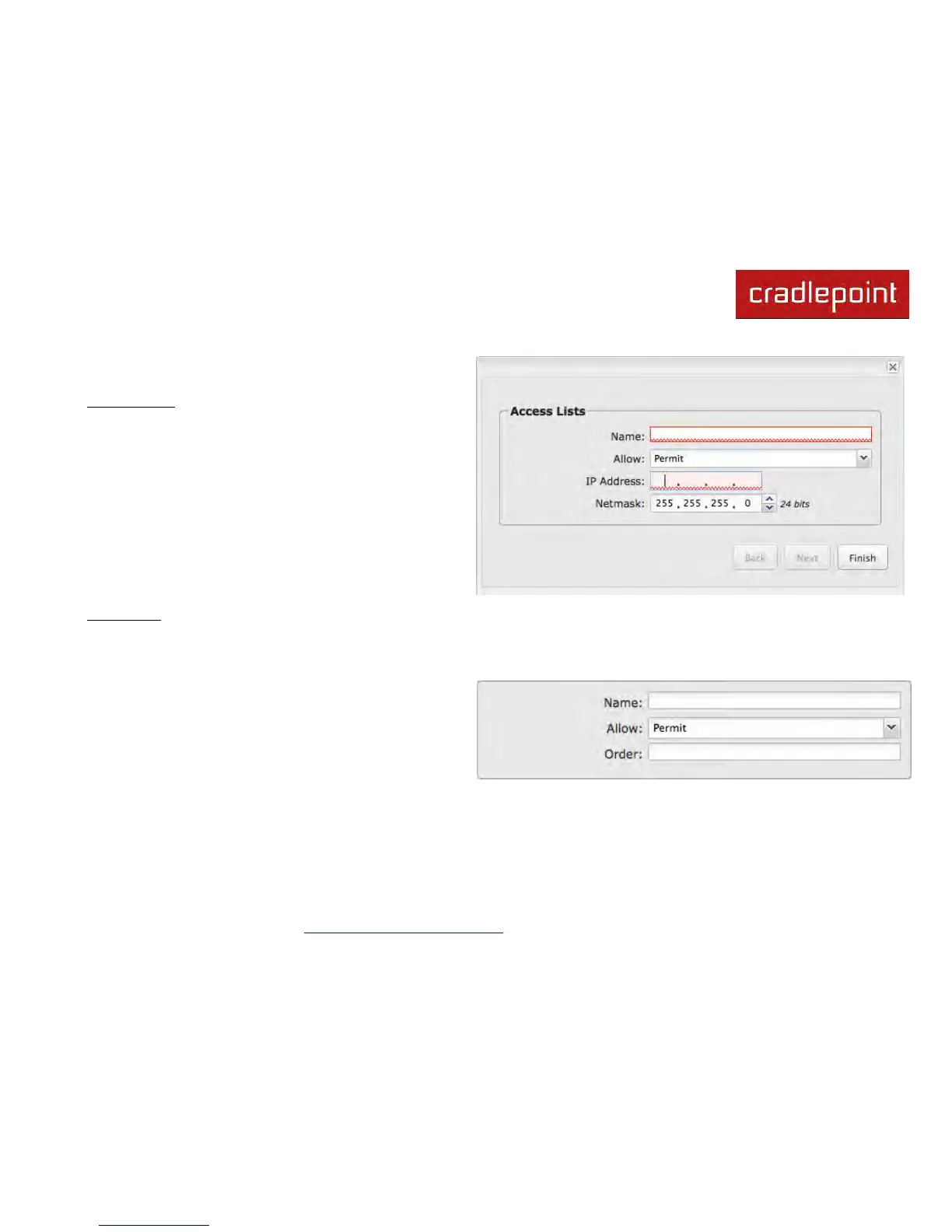
Access Lists
This option provides for basic filtering based on IP
addresses and netmasks.
Click Add to create a filtering rule.
Name: Choose a unique name.
Allow: Select “Permit” or “Deny”.
IP Address: Input the IP addresses that you want
permitted or denied.
Netmask: Use this along with “IP Address” to specify a
range of IP Addresses associated with this Access Lists
rule.
Route Map
Route maps provide a means to filter and/or apply actions to routes, allowing policies to be applied to routes. Route maps
define rules for transferring between different routing protocols. Each statement in a route map is ordered. Once there is a
match to a statement, the statement is executed and the scan terminates.
Click Add to create a new route map.
• Name: Choose a unique name.
• Allow: Select “Permit” or “Deny”.
• Order: Input a number to set the order of this policy.












 To Next Page