CRADLEPOINT MBR1400 | USER MANUAL – Firmware version 5.0
© 2013 CRADLEPOINT, INC. PLEASE VISIT HTTP://KNOWLEDGEBASE.CRADLEPOINT.COM/ FOR MORE HELP AND RESOURCES PAGE 165
7.1.10 SIM/APN/Auth Settings
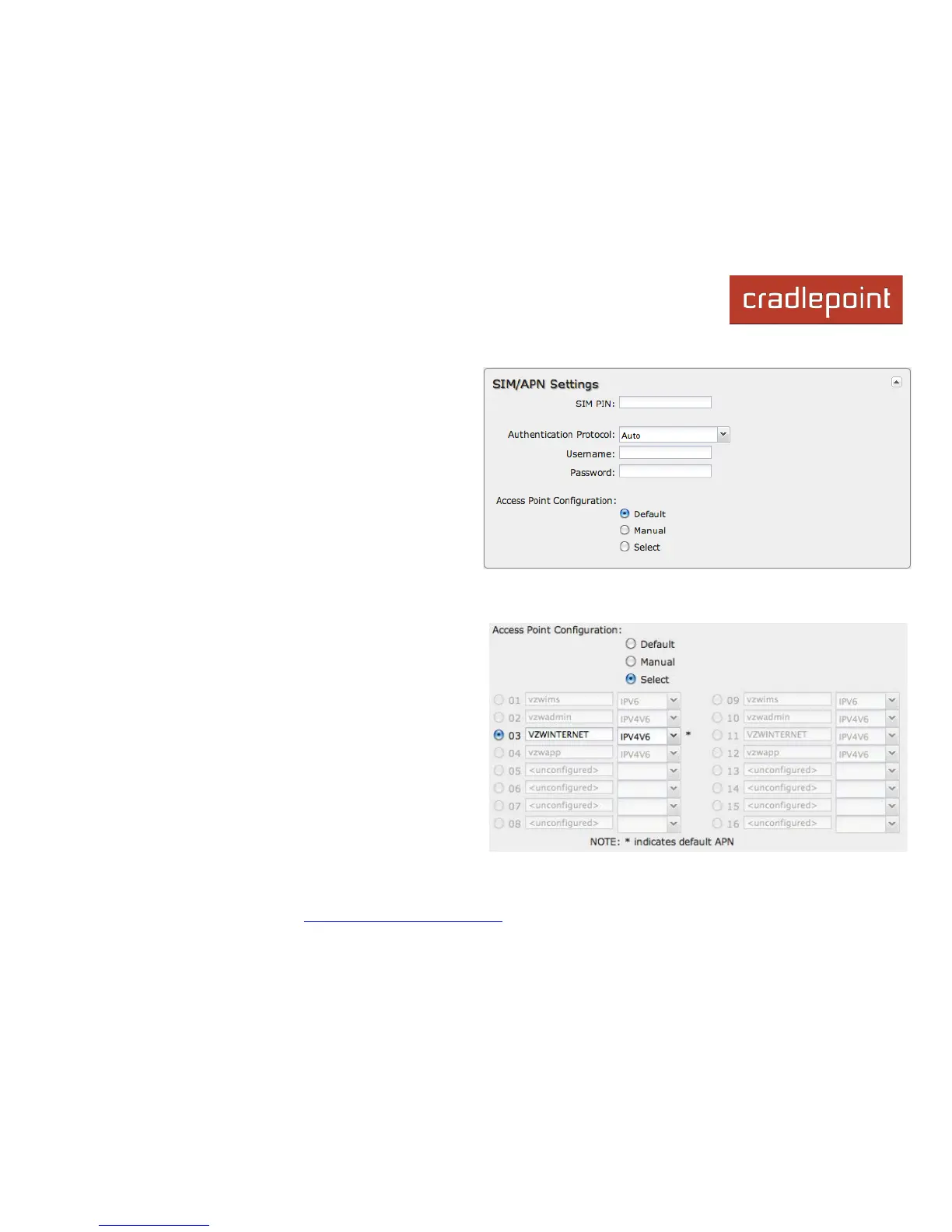
SIM PIN: PIN number for a GSM modem with a locked SIM.
Authentication Protocol: Set this only if your service
provider requires a specific protocol and the Auto option
chooses the wrong one. Choose from Auto, PAP, and
CHAP and then input your username and password.
Access Point Configuration: Some wireless carriers
provide multiple Access Point configurations that a modem
can connect to. Some APN examples are ‘isp.cingular” and “vpn.com”.
• Default: Let the router choose an APN automatically.
• Manual: Enter an APN by hand.
• Select: This opens a table with 16 slots for APNs,
each of which can be set as IP, IPV4V6, or IPV6. The
default APN is marked with an asterisk (*). You can
change the APN names, select a different APN, etc.
For Verizon modems, only the third slot is editable.
Changes made here are written to the modem, so a
factory reset of the router will not impact these
settings.







 To Next Page